


Spotify Music
Downloader Online

Please wait . . .


Spotify Music Converter
Rating:

Recommended by:

More than music lovers join TuneFab!
Why TuneFab Is the Smarter Way to Download Spotify Music
With dozens of Spotify downloaders available online, how do you know which one is truly reliable, safe, and worth your time? Here’s a clear breakdown of what makes TuneFab stand out.
| Feature | TuneFab Spotify Music Converter | Free Tools | Online Tools | Typical Competitors |
|---|---|---|---|---|
| Max Audio Quality |
Up to 320kbps for MP3s
Lossless for FLAC/WAV |
Usually 128kbps | 128kbps | 256–320kbps |
| Playlist Batch Download |
 Yes
Yes
|
 Limited
|
No
|
Yes
|
| ID3 Tag Preservation |
Full
|
Often missing
|
Partial
|
Usually
|
| Output Formats | MP3, M4A, WAV, FLAC, AIFF | MP3 only | MP3 only | MP3 + limited formats |
| Speed | High-speed local conversion | Slow | Server-dependent | Medium |
| Stability | Very stable | Often unstable | Link failures common | Moderate |
| Security | Clean & safe installer | Risk of bundled ads | Unknown server risk | Generally safe |
| Customer Support | Professional support team | None | None | Varies |
Looking for Alternatives?
If you’re still comparing options, we’ve prepared in-depth guides to help you decide:
Whether you’re looking for the most affordable option, the fastest conversion speed, or the highest audio quality, these comparison guides will help you find the best fit.

What Can Our Spotify Music Converter Do for You?
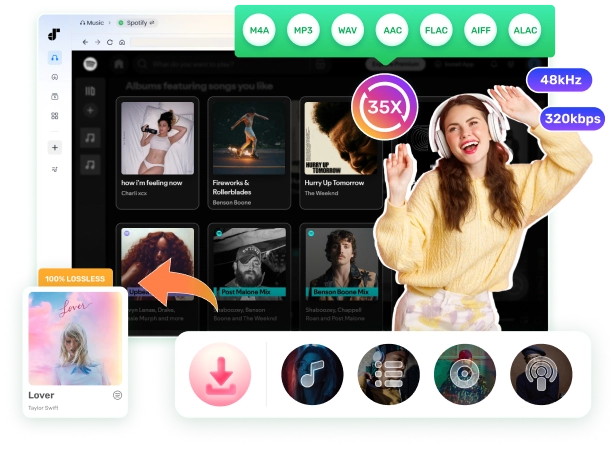
TuneFab Spotify Music converter lets you quickly convert and download 100M+ songs, millions of playlists and albums, 5M+ podcasts, and 350,000+ audiobooks from Spotify for permanent offline access.
- Songs & Playlists
- Albums
- Podcasts & Shows
- Audiobooks
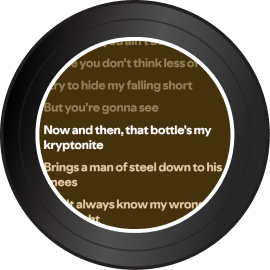
- Lyrics Download

How Does Spotify Converter Work?
TuneFab Spotify Music Converter works by connecting directly to Spotify’s web player and processing the audio stream through its built-in conversion engine. Instead of recording songs in real time like many browser-based tools, which often results in quality loss, the software converts Spotify tracks efficiently while preserving the original audio quality and metadata.
Once you log in to your Spotify account within the program, you can browse songs, playlists, albums, podcasts, or audiobooks just as you would normally.
Simply add the content you want to convert, choose your preferred output format (such as MP3, M4A, WAV, or FLAC), adjust the bit rate or sample rate if needed, and start the conversion. The process runs locally on your computer, ensuring stable performance, faster speed, and higher security.
All converted files are saved as standard audio formats that can be played on any compatible device, transferred freely, and stored permanently without Spotify’s playback restrictions.
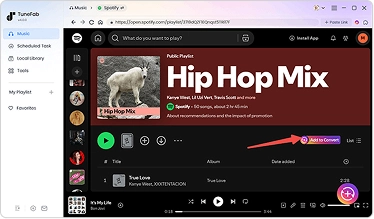
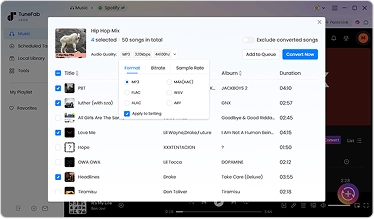
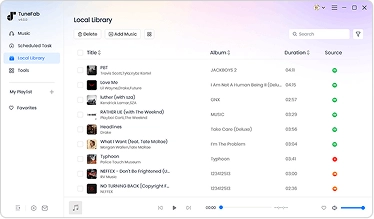
Want a step-by-step walkthrough?
You can follow this guide to convert Spotify to MP3 →
Learn more about how to Download Music from Spotify →
When Do You Need A Spotify Music Converter?
Spotify works well for everyday streaming, but there are moments when streaming alone isn’t enough. That’s when converting Spotify to standard audio files becomes practical.

In short, whenever streaming restrictions limit how or where you listen, converting Spotify music gives you back full control.
Explore More Spotify Download Tips & Guides
 Download Guides
 Tool Reviews
 Troubleshooting

Frequently Asked Questions
1. Is TuneFab Spotify Music Converter safe?
2. What are the limitations of a free trial version?
3. How to activate TuneFab Spotify Music Converter?
4. Can I transfer my license to a different computer?
5. What conversion speed does TuneFab Music Converter support?
6. Can I use this Spotify downloader without an account login?
7. Can I download Spotify songs to MP3 with Spotify free accounts?
8. Can I convert Spotify to MP3 online free?
9. Will songs or podcasts downloaded with a free account contain ads?
10. Where are the downloaded Spotify songs saved?
11. How to download Spotify music in lossless sound quality?
Spotify now supports lossless audio quality . To save your Spotify downloads in lossless quality, you can choose the output format as FLAC or M4A(ALAC). FLAC is compatible with most devices and players with a larger file size, and M4A file with ALAC codec is more commonly used on Apple devices or APPs.
If you want to save Spotify music in MP3, but preserve nearly lossless quality, it is advisable to set the parameters to match the original Spotify bitrate up to 320kbps and the sample rate to 44100Hz.
What TuneFab Have Achieved
Trusted by 100+ Industry Experts
Try TuneFab Spotify Music Converter Today
Freely install TuneFab Music Converter to batch convert Spotify playlist to MP3 with great sound quality, 35X faster speed, and secure performance to bring free to your Spotify music journey!


