


To avoid issues like lag or playback cuts due to no internet, downloading SoundCloud songs to your local devices offers a wise solution. If the uploader enables downloads, you can simply click the download button on the track page. However, this only works for certain songs and gives you the original uploaded format. Or you'll need SoundCloud Go/Go+ to download songs on the app.
For more flexibility, professional software, online tools, or browser extensions can help. Among them, TuneFab SoundCloud Music Converter stands out—it lets you batch download entire playlists and export in high-quality formats like WAV, FLAC, or 320kbps MP3.
Now, let's walk through the 5 best ways to download SoundCloud music in 2025. Whether you want to download on your phone, computer, or directly from the web, you'll find simple and efficient solutions right here. Let's get started!
- 1. Download SoundCloud Music/Playlist to MP3/WAV/FLAC (PC/Mac)
- 2. Download Music from SoundCloud App Directly (iPhone/Android)
- 3. Rip Tracks from SoundCloud with a Downloader App (Android)
- 4. Download Songs from SoundCloud for Free with Web-Based Tool (Online)
- 5. Download Music from SoundCloud Free with Chrome Extension (Browser)
- Side-by-Side Comparison of the 5 Methods
- FAQs About Downloading Music from SoundCloud
- Conclusion
1. Download SoundCloud Music/Playlist to MP3/WAV/FLAC (PC/Mac)
If you are finding a reliable way to download music from SoundCloud while maintaining high audio quality, TuneFab SoundCloud Music Converter is one of the best SoundCloud downloaders in the market. With this powerful downloader, you can losslessly rip any tracks from SoundCloud, including singles, albums, playlists, podcasts, and audiobooks.
If you want to download a playlist or album, just add it with one click and start downloading, quickly and hassle-free. TuneFab supports multiple output formats, such as 320kbps MP3, FLAC, WAV, AIFF, and M4A, allowing you to save the files to your storage device and enjoy them offline anytime, with premium sound quality. Here are some key features of this versatile downloader.
Key Features of TuneFab SoundCloud Music Converter
- Offer User-Friendly Interface: The interface is easy to use, even for beginners.
- Ensure Best Quality Downloads and Inclusive Outputs: It can convert SoundCloud music to 320kbps MP3, WAV, or FLAC and customize them.
- Enjoy Lightning-fast Conversion Speed: You can download SoundCloud audio with a drag-and-drop move and at least 35X faster speed.
- Retain Original Music Metadata and ID3 Tags: It can smartly identify the original ID3 tags of your added online music and help you arrange metadata of SoundCloud audio files.
Here are 4 easy steps to download SoundCloud music:
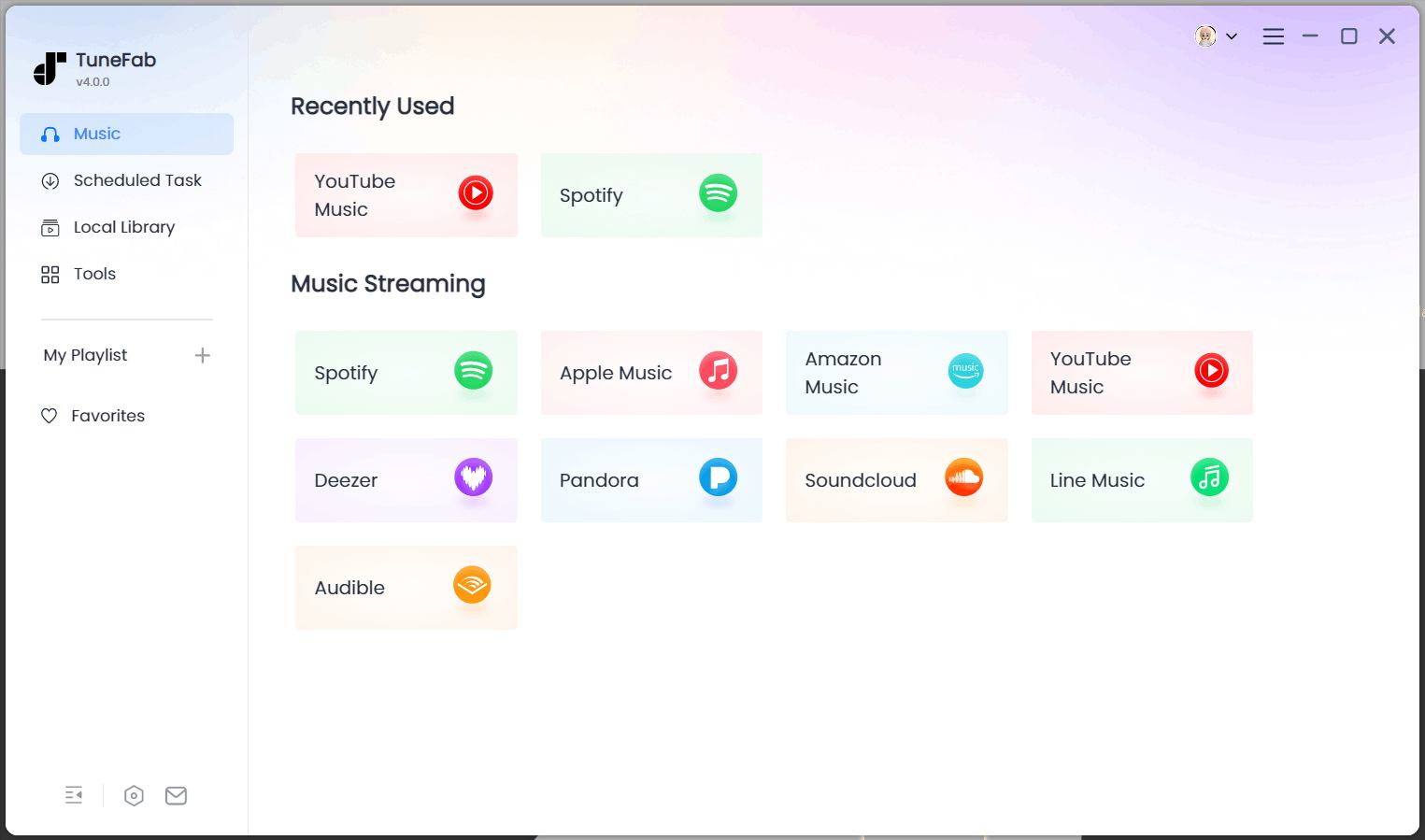
Step 1. Launch TuneFab SoundCloud Music Converter and enter the SoundCloud service in the converter interface.
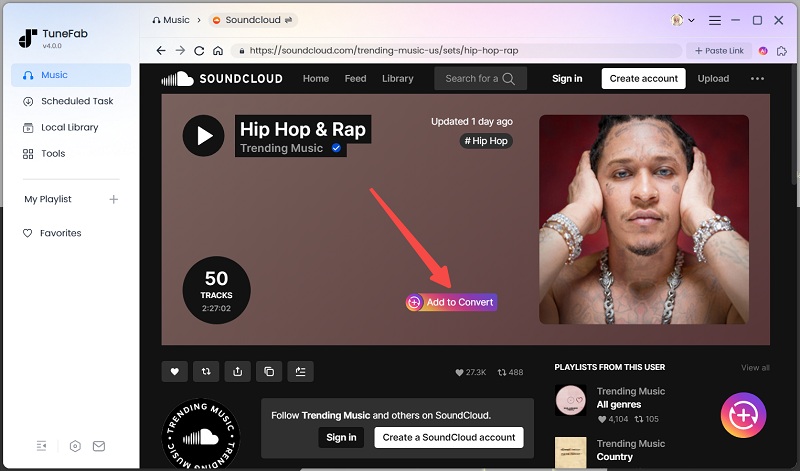
Step 2. Log in to the web player and open your SoundCloud music library. After browsing, drag your favourite songs to the conversion list on the right side.
Note: You can still use the tool without logging in.
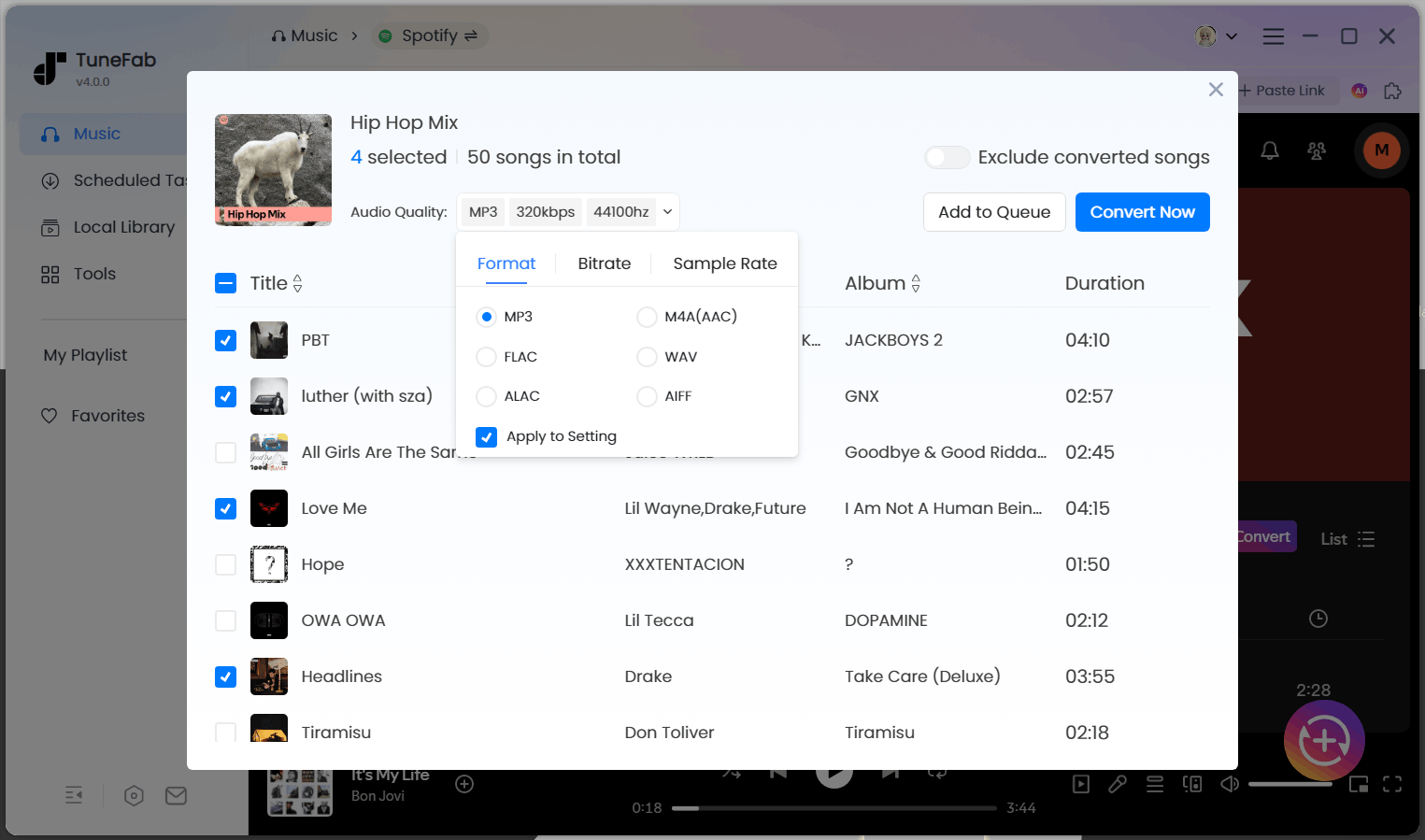
Step 3. Customize parameters such as output format, sample rate and bitrate on the list. Then, click "Convert All" to start downloading SoundCloud files.
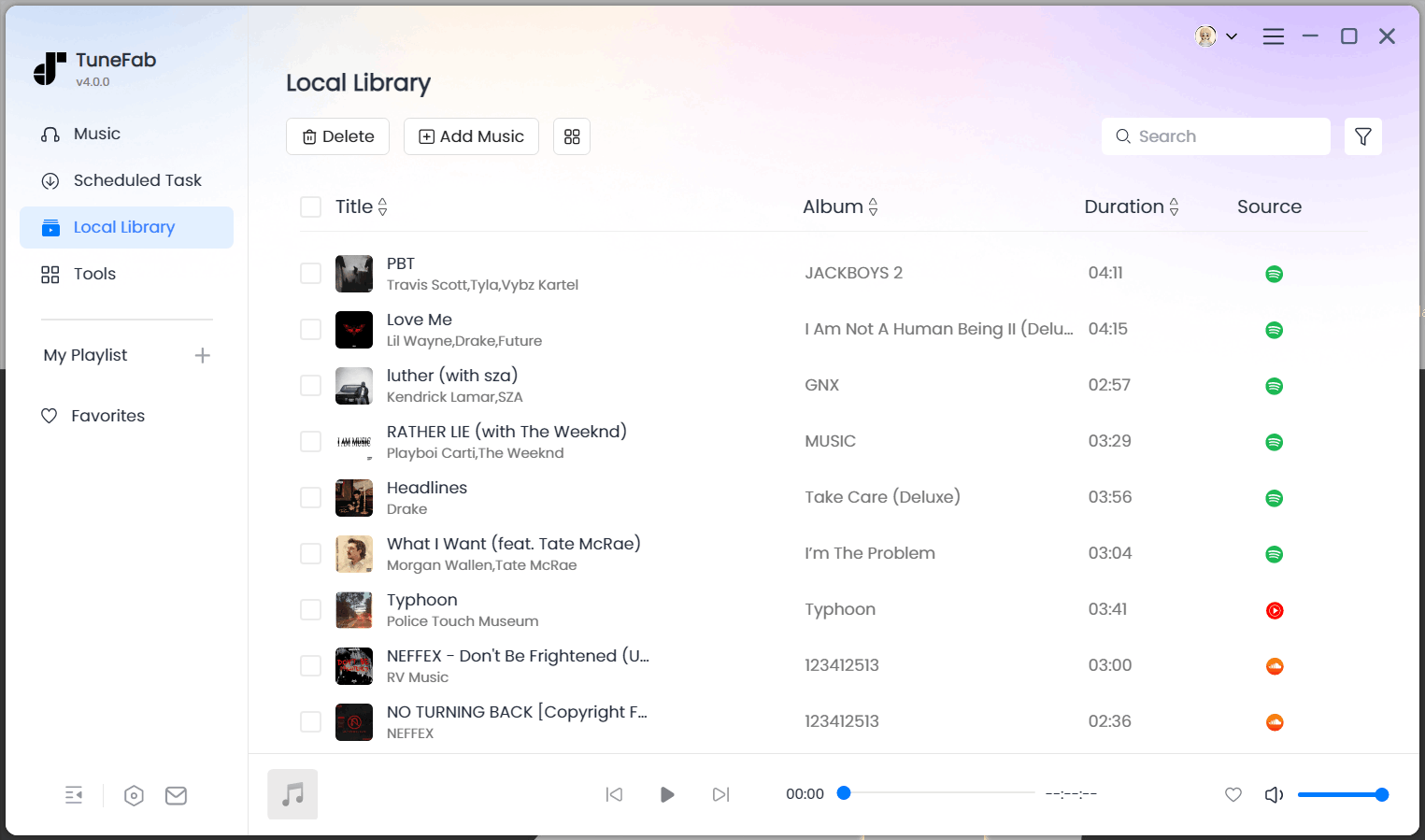
Step 4. After downloading, tap "Finished" and locate your converted songs through the file button.
2. Download Music from SoundCloud App Directly (iPhone/Android)
While downloading on a computer works well, many users actually stream and enjoy music more often on their phones. Thus, downloading songs from SoundCloud to iPhone or Android is also a common need. On mobile devices, downloads are only available for SoundCloud Go or Go+ subscribers, who can save tracks for smooth SoundCloud listening offline.
However, not all tracks are downloadable - this depends on the uploader's settings in the track's Permissions tab. Only individual tracks can be downloaded; entire playlists are not supported.
Related Article: How to Download SoundCloud Songs to Android (Ultimate Guide)
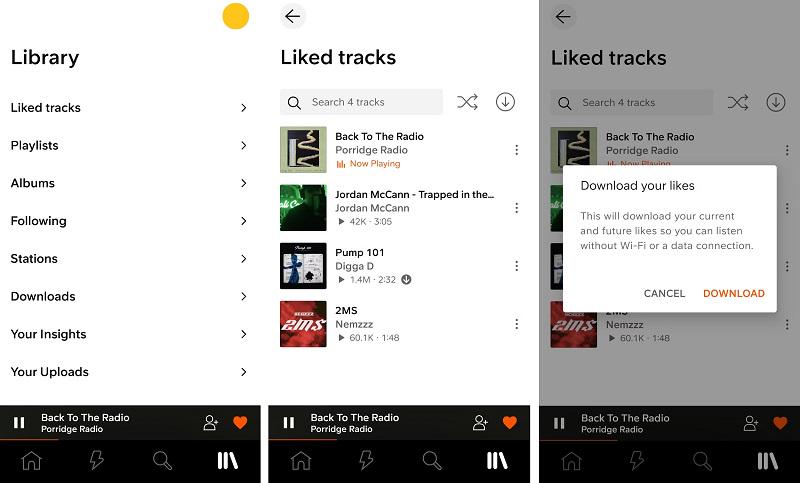
Here are the steps to download music from SoundCloud with SoundCloud Go:
Step1. Subscribe to SoundCloud Go or SoundCloud Go+.
Step2. Open the SoundCloud app on your mobile device and go to the library. Find the playlist or the liked song you want to download.
Step3. Tap the download button next to the shuffle button to save it for offline use.
3. Rip Tracks from SoundCloud with a Downloader App (Android)
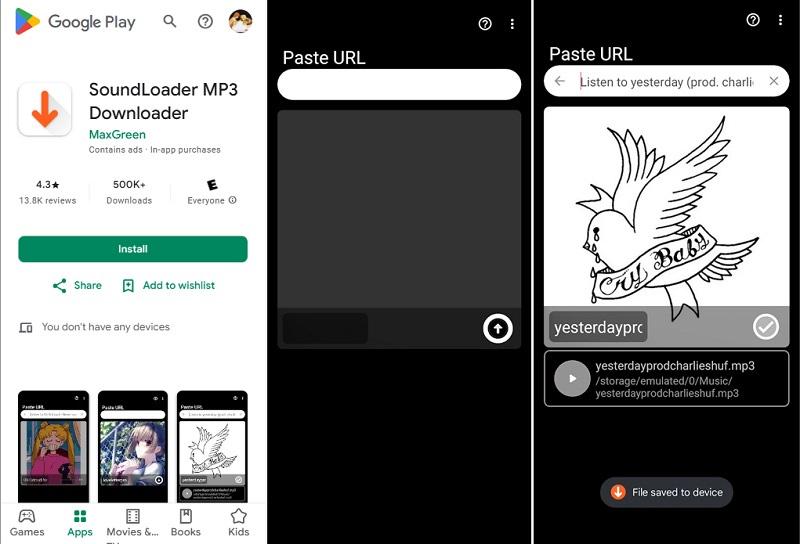
If you're an Android user, you can also take advantage of apps like SoundLoader MP3 Downloader, available on the Google Play Store. This app makes it easy to download SoundCloud tracks directly to your Android device without much hassle. With it, you can download almost any SoundCloud track, excluding premium content for offline playback.
That said, the experience isn't always perfect. After each download, you're required to watch a 30-second ad, which can quickly become frustrating if you're trying to save a full playlist. The app may also occasionally struggle to recognize certain track links or unexpectedly delete them after the ads. In some cases, it even downloads incorrect "sample files" instead of the actual songs you wanted. Still, despite these quirks, it remains a handy tool for quick downloads on Android.
Here are the steps to download music from SoundCloud for free with Android Downloader
Step1. Install the app from the Google Play Store.
Step2. Open the app and copy-paste the URL of SoundCloud music that you want to download.
Step3. Tap the download button to save the music to your device.
4. Download Songs from SoundCloud for Free with Web-Based Tool (Online)
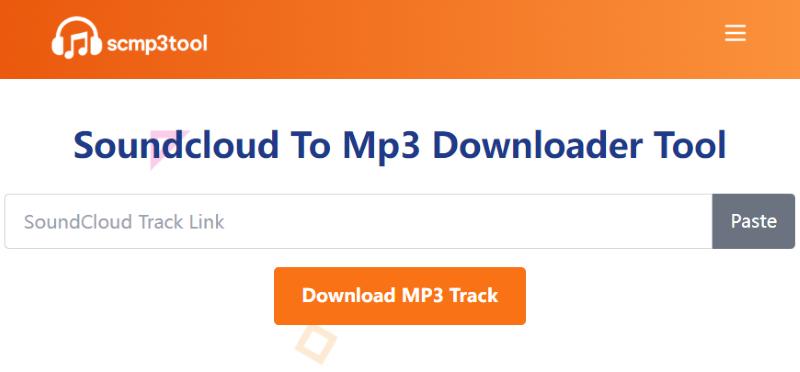
If you don't want to download any extra software, resorting to some online extractors like Soundcloud To Mp3 Downloader Tool can also be a quick solution. This method allows you to run a URL and download music from SoundCloud to your computer and any other devices directly as MP3 files, with no registration or usage limits.
The tool is completely free to use, whether you're downloading a single track or a playlist. Even better, it preserves excellent audio quality, closely matching the original source on SoundCloud. However, as an online tool, it may not be as stable or feature-rich as professional desktop software like TuneFab SoundCloud Music Converter. Occasional mismatches or failed downloads may occur, and it doesn't support one-click batch downloads for entire playlists.
Here are the steps to download music from SoundCloud for free with this online tool:
Step 1. Copy the URL of the SoundCloud track or playlist you want to download.
Step 2. Navigate to scmp3tool.com.
Step 3. Paste the URL into the input box on the website.
Step 4. Click "Download MP3 Track" to save the MP3 file to your device.
5. Download Music from SoundCloud Free with Chrome Extension (Browser)
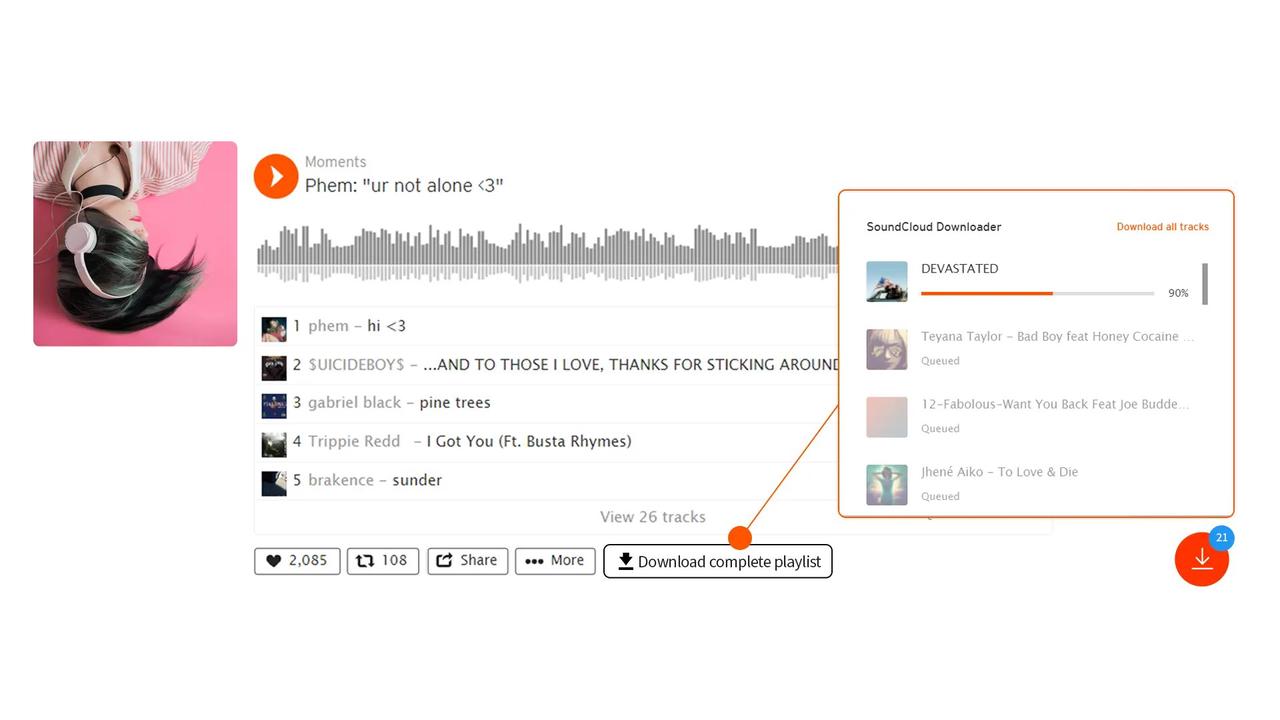
While online tools are convenient, they require you to copy and paste links and constantly switch between platforms. If you find that process a bit tedious, the SoundCloud Music Downloader Chrome extension might be exactly what you need. Developed by Addoncrop, this browser plugin integrates seamlessly with SoundCloud's web interface, making the operation much more streamlined.
This lightweight plugin can automatically detect audio on the page, whether it's a single track or a playlist. With just a few clicks, you can download SoundCloud music in 320 kbps quality. It's completely free to use and doesn't require you to log in or create an account.
Here are the steps to download music from SoundCloud with Chrome Extension:
Step 1. Open your Chrome browser and go to the SoundCloud Music Downloader page. Click the "Add to Chrome" button and confirm by selecting "Add Extension" in the popup window. Once installed, the plugin icon will appear in your browser toolbar.
Step 2. Visit the official SoundCloud website, browse or search for the track you want to download, and open the song's individual page. You'll now see a "Download" button appear below each track.
Step 3. Click the "Download" button, and the song will automatically be saved as an MP3 file to your computer's local folder.
Side-by-Side Comparison of the 5 Methods
We've just walked you through five detailed methods to download music from SoundCloud. If you're still unsure which one to choose, review the comparison table below that summarises the key features of each tool. It'll help you quickly spot the differences and pick the solution that best fits your needs.
| Supported Devices | Download Quality | Download Speed | Batch Download | URL Needed | Overall Rating | |
| TuneFab SoundCloud Music Converter | Windows, macOS | Original Audio Quality | 35X Faster | √ | × | 4.8/5 |
| SoundCloud Go/Go+ | Android, iOS | Original Audio Quality | Normal Speed | √ | × | 4.75 |
| SoundLoader MP3 Downloader | Android | high quality | Normal Speed | × | √ | 4.5/5 |
| Soundcloud To Mp3 Downloader Tool | Windows, macOS, Android, iOS | high quality | Normal Speed | × | √ | 4.6/5 |
| Soundcloud Music Downloader | Windows, macOS | 320 kbps | Normal Speed | √ | × | 4.7/5 |
FAQs About Downloading Music from SoundCloud
Can I download SoundCloud songs for free without using third-party software?
Yes, you can. But only for some tracks. If the uploader has enabled downloads, you'll see a "Download" button right below the track. Then, you can simply click it to save the file directly to your device. However, not all creators allow this. For songs without the download option, you'll need to turn to third-party tools like the Soundcloud To Mp3 Downloader Tool mentioned above to rip SoundCloud audio for free, though the quality may be limited.
Why do some songs on the SoundCloud website have a download button while others don't?
Whether a download button appears depends entirely on the uploader. SoundCloud gives artists the choice to enable or disable downloads for their tracks under the Permissions tab. If they allow it, listeners can download the track directly. If not, the button won't show up. This helps creators control how their content is distributed.
How to download songs from SoundCloud that are not downloadable?
For tracks that aren't downloadable on SoundCloud, third-party tools like TuneFab SoundCloud Music Converter or online downloaders can come to the rescue. If you prioritize top-notch audio quality, TuneFab stands out as the top choice, offering formats like 320kbps MP3, WAV, and FLAC for a premium listening experience.
Conclusion
In this guide, we have combed through 5 methods about how to download music from SoundCloud on all devices, from high-quality converters like TuneFab SoundCloud Music Converter to quick online tools and Android apps.
Whether you need high-quality formats like MP3, WAV, or FLAC, or prefer quick solutions, there's an option for everyone. For superior audio quality and a seamless downloading experience, TuneFab SoundCloud Music Converter is the ultimate choice. Start saving your favorite SoundCloud tracks today and enjoy them offline anytime!

