


Key Takeaway
This article reviews the best Spotify music converters, including TuneFab, NoteBurner, and Sidify, comparing their main features to help you find the right one. Among them, TuneFab Spotify Music Converter stands out for its lossless audio quality, 35X faster batch conversions, and support for Spotify Free users, making it the top recommended choice.
Spotify uses a proprietary, encrypted format (Ogg Vorbis) to control offline playback and cross-device use, which is why Spotify music converters have become increasingly popular. With the right tool, you can:
- Convert Spotify songs to MP3, FLAC, WAV, and other formats;
- Backup or transfer your playlists to USB, phone, or car for flexible offline listening.
But which can offer the best experience? To help you out, we tested and compared over 20 popular tools and selected the top 10 Spotify music converters for Windows, Mac, and online. Now, scroll down to find the one that fits you best.
Quick Comparison of the Top Spotify Music Converters
If you are searching for the best Spotify music converter but don't want to go through each full review, this quick comparison table will help you choose the right tool in seconds.
| Recommendation | Output Format | Conversion Quality | Conversion Speed | Platforms | Intuitive to Use | Batch Conversion | ID3 Tag Preservation | Ad-free |
| TuneFab Spotify Music Converter ⭐⭐⭐⭐⭐ (Editor's Choice) |
MP3, M4A, FLAC, WAV, AIFF, ALAC | Original 320kpbs / Lossless | 35X | Windows & Mac | ✅ | ✅ | ✅ | ✅ |
| NoteBurner Spotify Music Converter ⭐⭐⭐⭐ |
MP3, AAC, FLAC, AIFF, WAV, ALAC | 320kpbs | 10X | Windows & Mac | ✅ | ✅ | ✅ | ✅ |
| Sidify Music Converter ⭐⭐⭐⭐ |
MP3, AAC, WAV, FLAC, AIFF, ALAC | 320kpbs | 10X | Windows & Mac | ✅ | ✅ | ✅ | ✅ |
| AudFree Spotify Music Converter ⭐⭐⭐ |
MP3, FLAC, WAV, M4A, M4B, AIFF | 320kpbs | 13X | Windows & Mac | ❌ | ✅ | ✅ | ✅ |
| ViWizard Spotify Music Converter ⭐⭐⭐ |
MP3, M4A, WAV, FLAC, AIFF, M4B | 320kpbs | 15X | Windows & Mac | ❌ | ✅ | ✅ | ✅ |
| UkeySoft Spotify Music Converter ⭐⭐⭐ |
MP3, M4A, WAV, AAC, FLAC, AIFF | 320kpbs | 10X | Windows & Mac | ✅ | ✅ | ✅ | ✅ |
| Audacity ⭐⭐ |
MP3, AIFF, WAV, FLAC, M4A, Opus | 256kpbs | 1X | Windows, Mac & Linux | ❌ | ❌ | ✅ | ✅ |
| TuneFab Online Spotify Downloader ⭐⭐⭐⭐ |
MP3, M4A, FLAC, WAV, AIFF, ALAC | 320kpbs | 1X | Android, iOS, Windows & Mac | ✅ | ✅ | ✅ | ✅ |
| SpotiDown ⭐⭐⭐ |
MP3 | 320kpbs | 1X | Android, iOS, Windows & Mac | ✅ | ZIP | ✅ | ❌ |
| SpotiMate ⭐⭐⭐ |
MP3 | 320kpbs | 1X | Android, iOS, Windows & Mac | ✅ | ZIP | ✅ | ❌ |
How We Tested the Best Spotify Music Converters
To provide honest, trustworthy Spotify music converter reviews, our testing ensures that our recommendations are based on real performance, not just marketing claims. All tools have been tested under the same real-world conditions.
- Device: Windows 11 PC and macOS 15 Tahoe
- Spotify Version: The latest official desktop app or web player
- Network: Stable 500 Mbps internet connection
- Test Content: 1 single track, 1 album (10 songs), and 1 playlist (50 songs)
- Our Rating Methodology: We evaluated tools based on ease of use, batch conversion performance, success rate, audio quality, ID3 tag preservation, and overall security.
Best Spotify Music Converters for Mac and Windows (Desktop)
Desktop options generally offer more stable performance, faster speeds, and advanced features like batch conversion, suitable for long-term users. In this section, we first explore the best Spotify converters for Mac and PC.
1. TuneFab Spotify Music Converter (Overall Winner: 35X Speed & 320kbps MP3)
Verdict: Designed for users who need the fastest batch Spotify conversion and consistent 320kbps quality for permanent offline playback on any device.
| Pros | Cons |
| ✔️ Keep the original quality, supporting 320kbps MP3 and lossless FLAC/WAV. ✔️ Save audio as MP3, WAV, M4A, FLAC, AIFF, and ALAC. ✔️ Batch convert entire playlists, albums, or podcasts at 35X speed. ✔️ Include a built-in Spotify web player with no login required. ✔️ Provide advanced features like a local file format converter, ID3 editor, LRC lyrics file, proxy support, etc. ✔️ Offer a flexible way for archiving Spotify converted files. Also work with Spotify, Apple Music, Amazon, and more in one stop. |
❌ The full feature is available with a subscription. |
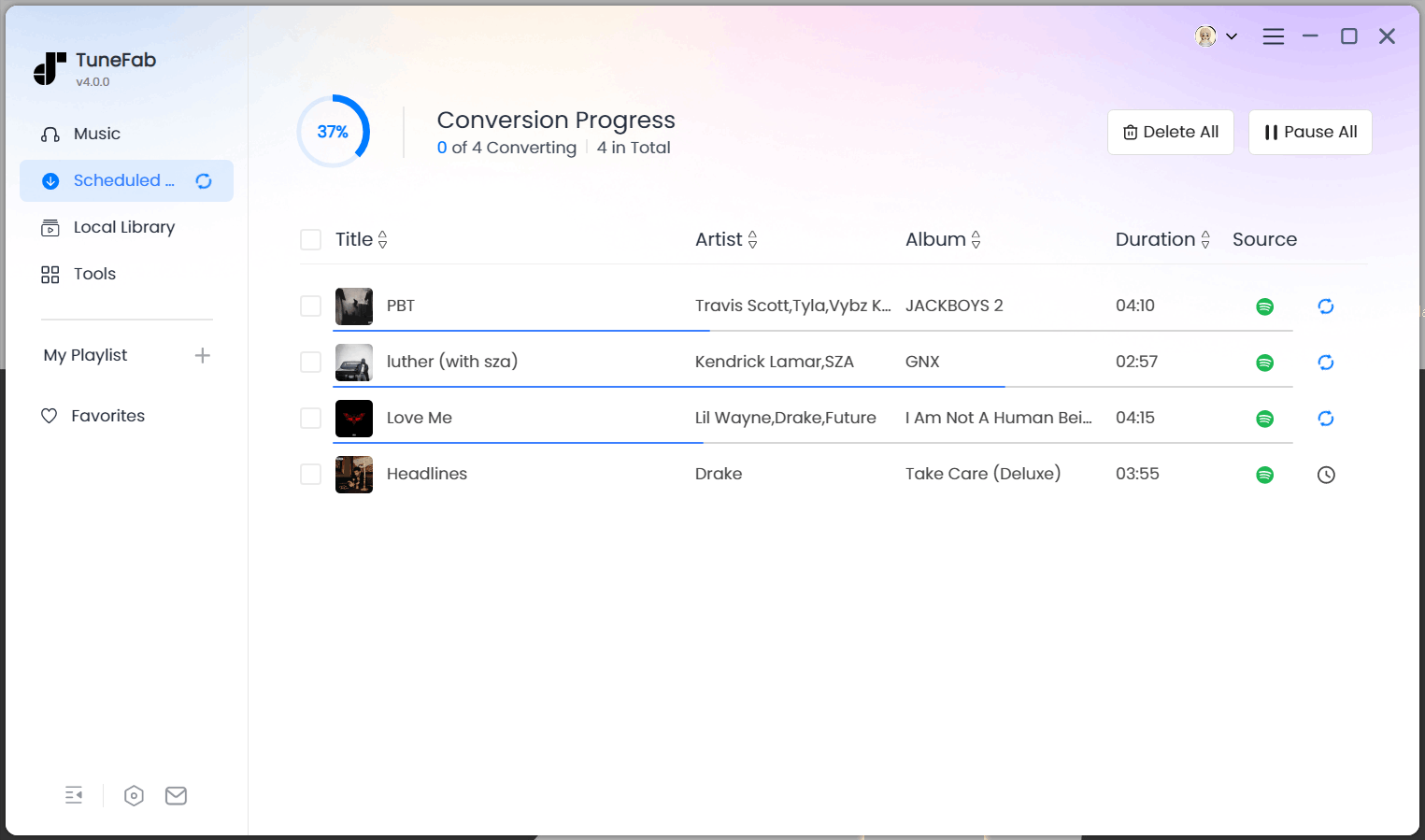
TuneFab Spotify Music Converter is our top pick for Windows and Mac that works with any Spotify account. Thanks to its built-in Spotify web player, it lets you directly access and save songs from Spotify without Premium, giving you a seamless and effortless process.
Even better, TuneFab is able to convert songs, playlists, albums, and podcasts from Spotify to MP3, M4A, WAV, and FLAC with full ID3 tags and original audio quality up to 320kbps. The best part is that this converter delivers a 35X faster speed, so even an entire Spotify playlist can be processed in seconds.
Plus, this tool also organizes output files automatically by artist, album, or playlist, making it ideal for users who want to back up their Spotify library locally. Beyond that, TuneFab also comes with rich additional tools like format converter and ID3 editor, further extending its functionality. So, if you are looking for the best Spotify music converter for Windows and Mac, TuneFab is definitely your go-to option.
Test Results
- Performance: In our test, a 4-minute song was converted in just 5 seconds, while a 50-song playlist spent less than 5 minutes. The success rate is near 100%.
- Output: Spotify music can be converted into multiple common formats with 128 ✔️ 320kbps quality, ID3 tags, album art, and lyrics successfully preserved
- Safety: No malware, adware, or bundled software during the installation. Also, there are no ads or intrusive pop-ups on the screen.
- Support: Basically, customer support is responsive within 24 hours. Also, regular version updates are supported.
To learn more about this tool, check: Full Review of TuneFab Spotify Music Converter
2. NoteBurner Spotify Music Converter
Verdict: This versatile converter is ideal for those looking for a one-stop solution for burning Spotify music to CD.
| Pros | Cons |
| ✔️ One-click to burn converted Spotify music to CD effortlessly. ✔️ Provide diverse output formats for conversion. ✔️ 10X download speed to batch convert Spotify tracks. ✔️ ID3 tag information is retained with converted songs. ✔️ Support Google Drive and other cloud platforms for music storage. |
❌ The Spotify desktop app is required to bundle with. ❌ It can not work without a subscription. |
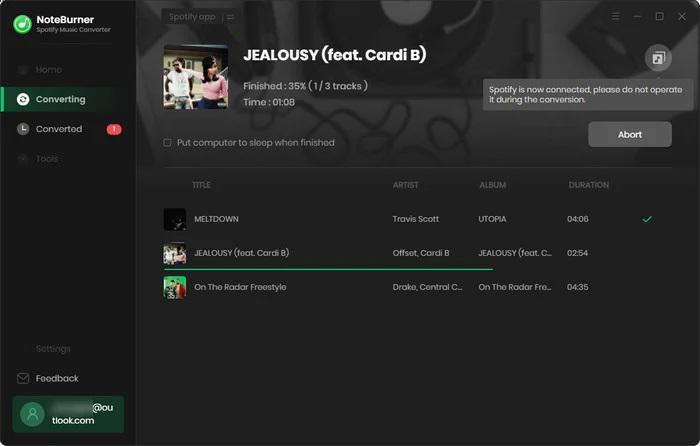
The second recommendation in this Spotify Music converter review comes with NoteBurner. Also working on Windows and Mac, NoteBurner Spotify Music Converter can extract and convert music from Spotify to MP3, AAC, FLAC, and more common formats with lossless sound quality.
And a 10X download speed is conducive to Spotify music quick saving in less time. Beyond this, what sets this program apart is that it can burn Spotify music to CD. With this feature, you can seamlessly burn converted Spotify tracks to CDs without an extra CD burner.
Test Results
- Performance: This Spotify music converter offers a stable conversion process, but our tests showed noticeable lag when handling large playlists. Also, the installation is somewhat cumbersome as it bundles additional tools, taking over 10 minutes to complete in our tests, which is far from user-friendly.
- Output: Like the TuneFab Spotify music converter, it supports common audio formats such as MP3, AAC, FLAC, AIFF, and ALAC, with up to 320kbps. However, its free trial version only supports downloads up to 128kbps.
- Safety: No viruses or malware were detected during our tests. However, it is important to note that some Trustpilot users have reported their Spotify accounts being banned after using this tool.
- Support: Our test emails took over 24 hours for a response. Additionally, many users noted that subscriptions automatically renew by default and lack clear receipts. This can cause some users to overlook the renewal. Most importantly, the refund policy is quite strict.
For more information, read the article: NoteBurner Spotify Music Converter Review & Best Alternative
3. Sidify Music Converter
Verdict: Famous for delivering Spotify conversions with ID3 tags retained, along with useful extras such as a CD burner and tag editor.
| Pros | Cons |
| ✔️ Support for both Spotify Free and Premium accounts. ✔️ Convert Spotify music to MP3, AAC, FLAC, WAV, or ALAC. ✔️ 10X faster speed to handle Spotify playlists in batches. ✔️ Retains ID3 tags and lyrics for easy navigation. ✔️ Built-in CD burner and tag editor. |
❌ Requires the Spotify desktop app to work; ❌ Conversion speed may vary depending on system performance. |
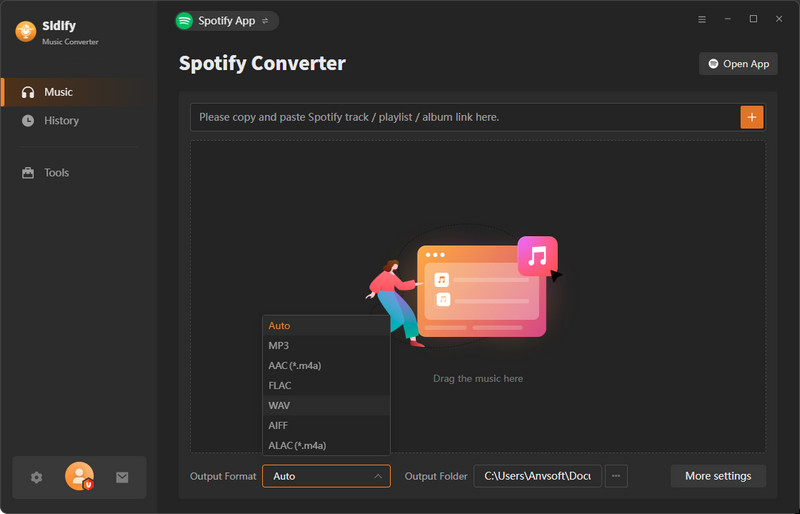
Sidify Music Converter is widely recognized as one of the best Spotify music converters, claiming to offer you a reliable way to download and convert Spotify tracks, albums, and playlists to MP3, AAC, FLAC, WAV, or ALAC with 100% lossless quality. Compatible with both Spotify Free and Premium accounts, it preserves important metadata like ID3 tags and lyrics, making music management seamless. If you want to play Spotify on an MP3 player and see the correct album art and synced lyrics, Sidify will be a reliable option.
With up to 10X faster conversion speed, Sidify ensures efficiency while retaining audio fidelity. In addition, the software offers handy built-in tools, including a CD burner and tag editor, providing more flexibility in organizing and enjoying your music library. Whether you want to transfer songs to different devices or create your own CDs, Sidify delivers a professional and easy-to-use way.
Test Results
- Performance: Its UI looks almost identical to Noteburner. If you've used Noteburner before, there is no learning curve. However, when we tested batch downloading 50 Spotify songs, its recording-based method required high CPU usage but was inefficient.
- Output: This Spotify music converter can output crisp 320kbps audio.
- Safety: We didn't encounter any security issues during our testing, but recently, many Reddit users have reported their accounts being quickly banned after use.
- Support: Despite frequent software updates, our test emails went unanswered. If you run into urgent conversion issues, you may not receive timely help.
Related Reading: Sidify Spotify Music Converter Review: Is It Worth It?
4. AudFree Spotify Music Converter
Verdict: A reliable pick with strong decoding features and flexible bitrate/sample rate options for tailored Spotify playback.
| Pros | Cons |
| ✔️ Compatible with Windows and Mac platforms; ✔️ Losslessly convert Spotify to MP3, FLAC, AAC, etc.; ✔️ 13X speed can boost Spotify music downloads in bulk; ✔️ Various bitrates and sample rates for your preferences. |
❌ Poor customer support. ❌ It is a paid Spotify downloader. |
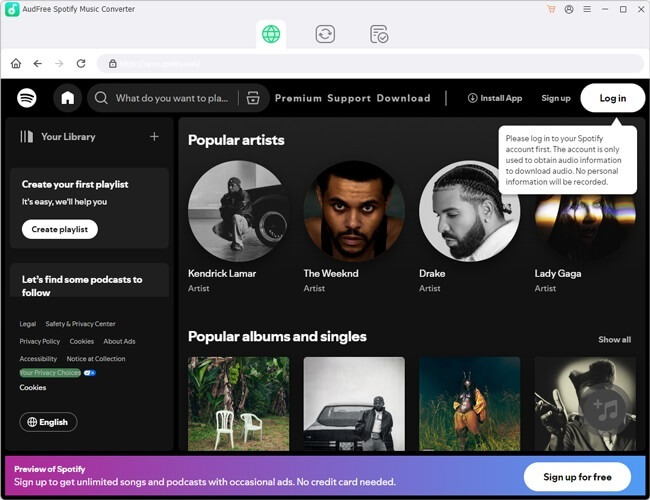
Just like other Spotify music converters for Mac and Windows, AudFree also offers an effective solution to convert and download Spotify music to an MP3 player, car stereo, or USB for offline listening. With AudFree Spotify Music Converter, you can save your favorite tracks, albums, playlists, or podcasts across any device with ease.
Also, no worries about sound quality and metadata information, as they are both preserved in their original form. Notably, AudFree Spotify Music Converter supports parameter customization with 14 bitrates and 6 sample rates for you to choose from. This allows you to have complete control over the listening effect of your Spotify music.
Test Results
- Performance: In our batch conversion test, 6 out of 50 songs failed to download. Even with its claimed 13X speed, the whole process actually took over 20 minutes, not as fast as advertised.
- Output: It supports multiple commonly used audio formats while preserving the original sound quality, delivering a high-quality offline listening experience.
- Safety: We scanned the software with antivirus tools and detected no malware, viruses, or suspicious Trojans. Additionally, no ads or pop-ups appeared during use.
- Support: This is perhaps the main weakness of this Spotify music converter. Most negative user feedback is related to slow responses or the lack of effective customer assistance.
For more information, learn here: Audfree Spotify Music Converter Review: Useful but Not Best
5. ViWizard Spotify Music Converter
Verdict: Offer a seamless solution for converting Spotify songs and listening to them offline in one stop.
| Pros | Cons |
| ✔️ Simple interface to get it to work with ease; ✔️ Offer a variety of output formats to choose from; ✔️ Enable Spotify music enjoyment with up to 320kpbs quality; ✔️ Organize output music library by artist or album; ✔️ Support output parameter customization to suit your taste. |
❌ It is not free. ❌ Occassionally crashes and freezes. |
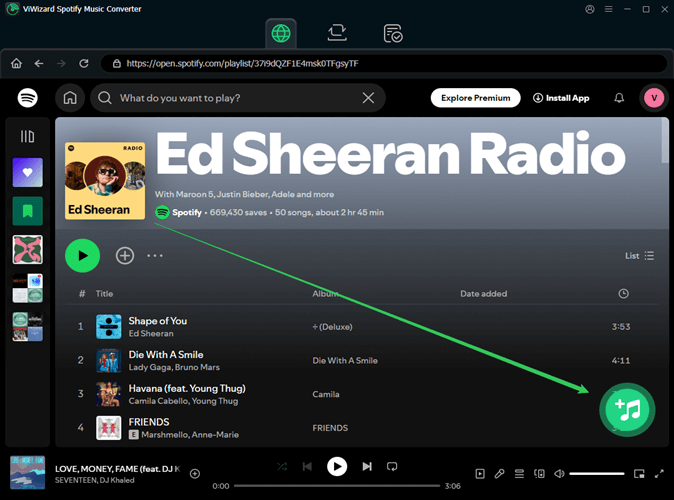
ViWizard Spotify Music Converter is also a frequently mentioned solution in the community. It claims to deliver 15X conversion speeds and convert Spotify songs, albums, playlists, and podcasts to various popular output formats on Windows and Mac, including MP3, FLAC, WAV, AIFF, M4A, and M4B, to suit different needs.
During our testing, our favorite feature was its built-in player with adjustable playback speeds. This is especially useful for offline listening to long-form podcast content. Notably, this is a unique function that is not commonly found in many other top Spotify music converters.
Test Results
- Performance: When we launched ViWizard Spotify Music Converter, its interface immediately reminded us of AudFree, as the two share a very similar UI. Likewise, the conversion efficiency is not impressive. Converting a 30-minute album took about 28 minutes in our test.
- Output: ViWizard retains the original audio quality, ID3 tags, and lyrics, ensuring you enjoy the same listening experience as the official Spotify playback.
- Safety: We did not encounter any viruses, bundled software, or ads during use, so it is safe to use.
- Support: Customer support responses are fairly sluggish. Additionally, many users have reported that this converter's refund policy is quite strict, so it is advisable to try the free trial before making a purchase.
To explore more, read this post: ViWizard Spotify Music Converter Review: Not Best but Decent
6. UkeySoft Spotify Music Converter
Verdict: An all-in-one Spotify converter that includes a built-in web player, similar to TuneFab.
| Pros | Cons |
| ✔️ Work with both Spotify Free and Premium users; ✔️ Support MP3, M4A, WAV, FLAC, and AAC to output Spotify music; ✔️ Download multiple songs at the same time at a fast speed; ✔️ Save Spotify music in up to 320 Kbps files with customizable parameters; ✔️ ID3 tag info of title, artist name, cover images, and others will be preserved. |
❌ Limited download of Spotify tracks under the free trial. ❌ Require Spotify Premium to unlock 320kbps output. ❌ The actual results fell short of the advertised performance. |
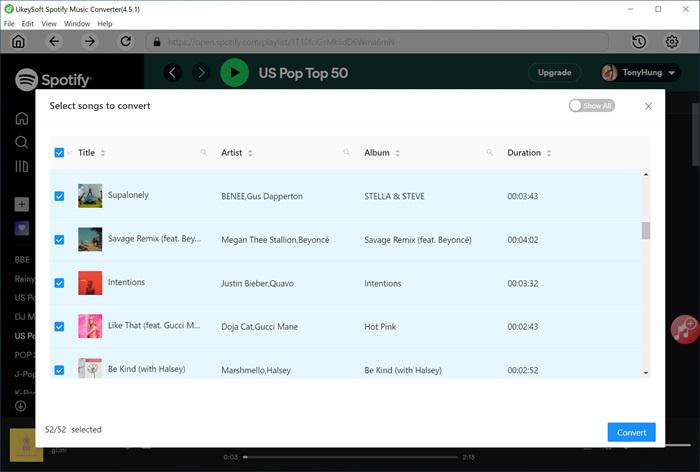
The previous version of UkeySoft Spotify Music Converter also required the installation of the Spotify desktop app to obtain music links for downloading. However, the latest version has now been a one-stop solution because of the integrated Spotify web player. In this case, you can directly find and add your favorite songs to the download queue only within the software.
Better still, UkeySoft Spotify Music Converter not only ensures the original audio quality is saved on both Windows and Mac computers, but also flawlessly retains the ID3 tag metadata of Spotify music. This delivers great benefits to immerse yourself in and organize your offline music library.
Test Results
- Performance: The overall conversion process was stable, with no freezes or crashes. A 3-minute song took 15+ seconds to convert, while a 50-song playlist required more than 20 minutes to complete, which is slower compared to tools like TuneFab.
- Output: Although this tool advertises 320kbps and even 512kbps, in our actual tests, the output audio quality was noticeably compressed. Compared to other best Spotify music converters for Mac/PC, this may be a significant drawback.
- Safety: The installation package downloaded from the official website was free from viruses or malware. However, note that this converter requires you to log in to your Spotify account. While it claims not to collect personal data, this could be a potential concern for security-conscious users.
- Support: Many users have reported that even after following the instructions provided by UkeySoft's email support, their conversion issues remained unresolved, suggesting that troubleshooting assistance may not always be effective.
Related Reading: Ukeysoft Spotify Music Converter Review: Features & Alternative
7. Audacity
Verdict: An open-source audio editing tool, free to use on Windows, macOS, and Linux, capable of recording Spotify tracks for conversion.
| Pros | Cons |
| ✔️ Completely free and open-source; ✔️ Available on Windows, macOS, and Linux; ✔️ Records Spotify audio in MP3, AIFF, WAV, FLAC, M4A, and Opus; ✔️ Equipped with advanced audio editing features. |
❌ Cannot retain ID3 tags; ❌ Recording is in real time, which takes longer; ❌ The interface may feel complex for beginners. |
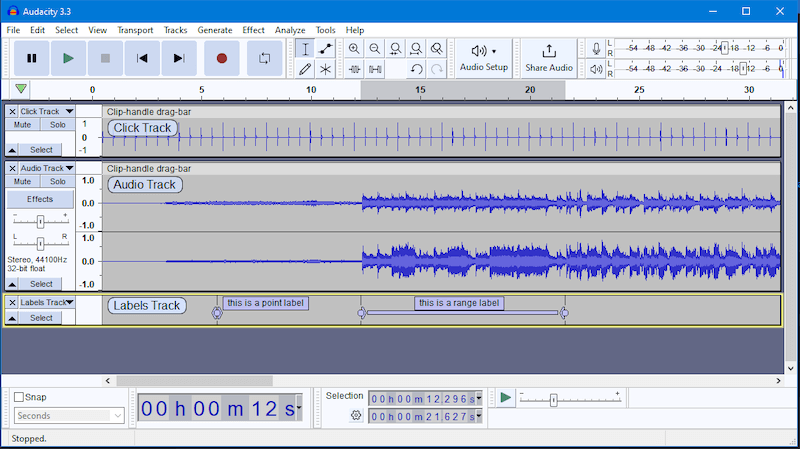
If you are budget-conscious users, students, or those needing basic audio editing, then Audacity can be a handy alternative when looking for the best Spotify music converter on Windows, macOS, and Linux. It is a free, open-source, and cross-platform audio editor that allows you to record Spotify songs in real time and save them as MP3, WAV, or other supported formats.
Beyond Spotify recording, Audacity also comes with powerful editing tools, such as noise reduction, audio effects, and multi-track editing, making it suitable for both beginners and advanced users who want more control over their audio.
Tip. If you need to back up the entire Spotify library locally in a quick way, TuneFab Spotify Music Converter for 35X faster batch conversion speed, will be a more ideal option for efficiency.
Test Results
- Performance: As a recorder, it works in real time, meaning conversions are done at a 1:1 speed with no acceleration available. Additionally, it is a lightweight program that runs smoothly without affecting other software. However, to ensure high-fidelity audio, you must disable system notifications from other software to prevent unwanted sounds.
- Output: It supports the most common audio formats to fit different devices and players. You will need to manually trim the silent segments at the beginning and end of each recording.
- Safety: When downloaded from the official source, it contains no ads, spyware, or hidden plugins. Moreover, it does not directly interact with Spotify servers, so there is no risk of account banning.
- Support: Audacity is backed by an active community forum and responsive customer support, where you can get timely answers and troubleshooting assistance.
Best Free Online Spotify Converters (No Installation Required)
Online Spotify music converters are ideal for users who don't want to install any software, especially when using public computers, mobile devices, or low-storage systems.
Keep in mind, though, if you prefer batch conversion, lossless formats, or faster speed, consider the best Spotify music converter desktop solutions like TuneFab.
8. TuneFab Online Spotify Downloader
Verdict: The most reliable cloud-based solution for users who prioritize safety and need to save Spotify songs permanently in organized ZIP files.
| Pros | Cons |
| ✔️ Convert Spotify tracks, playlists, and albums in MP3 format; ✔️ Works on computers and phones via any browser; ✔️ No ads, safe, and easy to use; ✔️ Playlists/albums packed into a ZIP for convenience. ✔️ Include a free Spotify music converter online. |
❌ Online converter limited to MP3 format only; ❌ Fewer advanced features compared to the desktop version. |
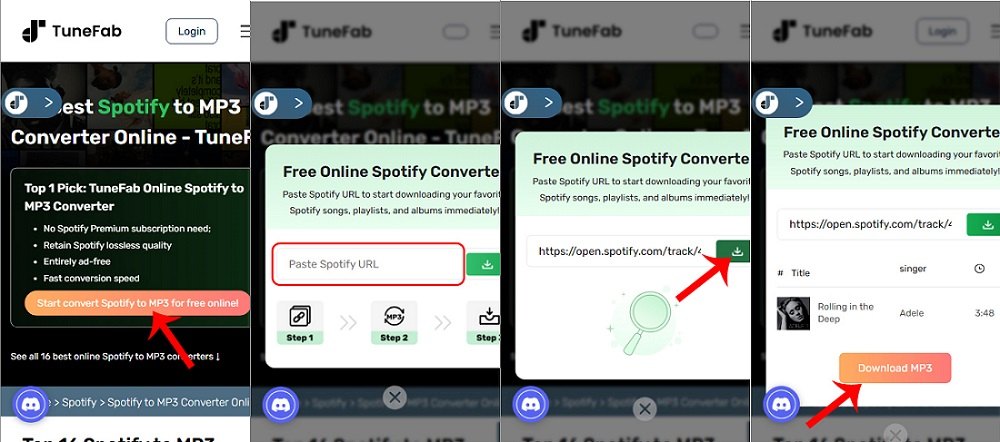
TuneFab stands out among the best Spotify music converters by offering not only desktop software for Windows and Mac, but also a convenient online Spotify downloader. With this tool, you can directly download and convert Spotify songs, playlists, and albums in high-quality MP3 format right from your browser, with no installation required.
For easier organization, playlists and albums are automatically packed into a single ZIP file. Since it's web-based, TuneFab works seamlessly across computers and mobile devices, making it a flexible way for music lovers on the go. Backed by the TuneFab team, the online converter is 100% safe, ad-free, and reliable, giving you peace of mind while enjoying your music offline.
Test Results
- Performance: A single track took 8 - 12 seconds to parse and prepare, depending on network speed. Our testing found that this online Spotify converter can batch process up to 10 Spotify songs at a time. For a 50-song playlist, the total processing time is roughly 20 minutes.
- Output: It can save Spotify songs as MP3 files with original ID3 tags (title, artist, album), 128kbps (free)/320kbps (paid).
- Safety: There are no ads, redirects, or phishing pop-ups during our testing.
- Support: Share responsive email support by the TuneFab team.
Top 9. SpotiDown
Verdict: A quick solution for mobile users who need to convert Spotify to MP3 on the go without logging into any account.
| Pros | Cons |
| ✔️ Work on both smartphones and computers; ✔️ Download and convert Spotify music to MP3 online for free; ✔️ Achieve zero compression in sound quality. |
❌ Only the MP3 format can be converted. ❌ Batch convert only 2 Spotify songs for free. |
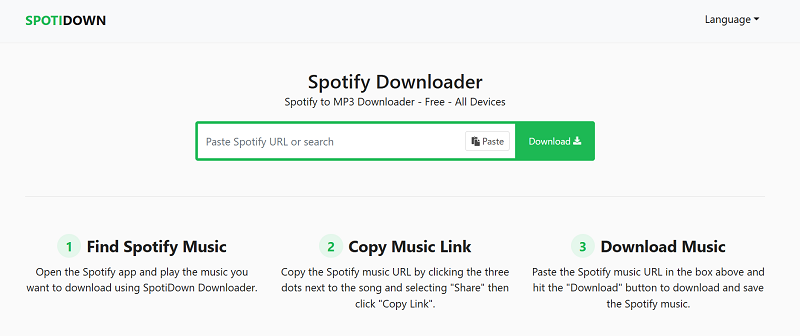
SpotiDown is a widely used online Spotify music converter for free. That said, it can work on both mobile devices and computers. With it, you can convert Spotify songs to MP3 by just pasting a track link without a Spotify Premium account or any login credentials.
Better yet, SpotiDown boasts an impressive output bitrate of up to 320kbps, allowing you to experience optimal audio quality. If you are looking for the best free Spotify music converter, this will be a viable option.
Test Results
- Performance: The processing and conversion speeds are unremarkable. Occasional failures when processing multiple links in a row.
- Output: It supports batch conversion but only processes 2 tracks at a time. For the full albums or playlists in a ZIP file, this online Spotify converter requires a premium subscription.
- Safety: We encountered no intrusive ads or deceptive "download" buttons during the conversion process. Additionally, the final output was completely clean with no bundled software, plugins, or viruses installed alongside your files.
- Support: As a web-based tool, it only offers a basic on-page guide. Don't expect any dedicated or advanced customer support if you encounter technical difficulties.
10. Spowload
Verdict: A handy online free Spotify converter that is ideal for casual listeners who need a quick backup.
| Pros | Cons |
| ✔️ Keep album covers and artist info intact. ✔️ Work on any browser on any device. ✔️ Free to handle Spotify music conversion. ✔️ No login required. |
❌ No support for batch conversion. ❌ Deliver relatively lower audio quality. ❌ Only supports MP3 output format. |
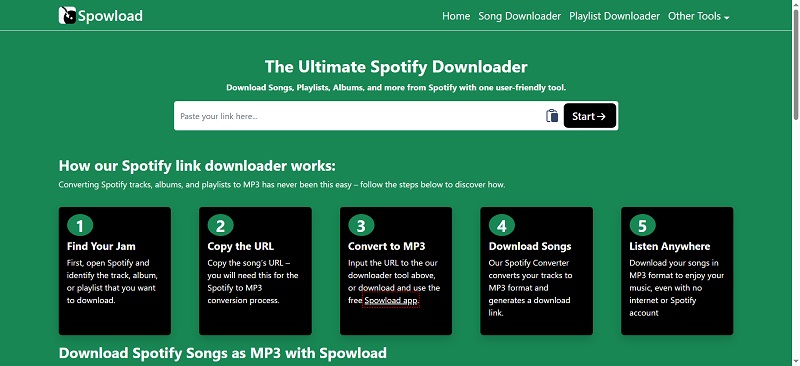
The last option in our best Spotify music converter review is Spowload, which also works by analyzing music links. By pasting a Spotify track or playlist link, you can quickly export music to MP3 on computers or mobile devices without software installation. Also, this online Spotify converter keeps the basic ID3 tags, so you don't need to worry about a messy music library. Even better, it is completely free. This makes it a free choice for quick, individual track saves.
Test Results
- Performance: Parsing is fast, but the conversion starts after 10 seconds of clicking. Also, you have to process one by one with no button for batch conversion. When handling a 50-song playlist, it took a very long time.
- Output: Support 128kbps MP3 audio only. Enough for daily listening, but music lovers will immediately notice the obvious compression.
- Safety: Safe during testing but may trigger pop-ups.
- Support: This online Spotify converter website offers FAQ section with very limited assistance.
FAQs About Spotify Music Converters
Is it legal to use Spotify music converters?
Technically, it is legal to use a Spotify music converter for personal use, like creating a backup for your own MP3 player or car stereo. As long as you do not distribute or sell the converted files for commercial purposes, the risk is minimal.
Can I convert Spotify to MP3 with these tools?
Yes. All the best Spotify music converters discussed above support the MP3 format. This allows for offline Spotify playback without app restrictions across any devices.
To explore more Spotify to MP3 converters for your needs, check the full list: Top Spotify to MP3 Converters Free (Pros & Cons & Reviews)
Can I use Spotify music converter without Premium?
Yes. Many of the best Spotify music converters are fully compatible with Spotify Free accounts, so you don't need a Premium subscription to convert songs or playlists. However, some might limit output quality if you don't have Spotify Premium.
What is the best Spotify converter app for Android and iPhone?
Picking a reliable option is tricky. Although tools like SpotiFlyer or iOS Shortcuts are available, they are often unstable and may stop working or be removed without notice.
For this reason, we recommend using a free online Spotify music converter on mobile devices. Alternatively, you can use a desktop converter first and then transfer the downloaded files to your phone for offline listening.
Conclusion: What is the Best Spotify Music Downloader to Use?
That concludes our best Spotify music converter review. Based on the detailed descriptions and comparison above, you can choose the tool that best fits your needs.
For cost-effectiveness, free online options like TuneFab Online Spotify Downloader and SpotiDown are suitable for occasional use. However, when choosing the best Spotify Music converter, it is also important to consider output audio quality and software performance. While the desktop tools require a subscription, they provide better performance, higher success rates, and a more secure experience than online free Spotify converters.
In particular, TuneFab Spotify Music Converter not only provides multiple output formats but also delivers ultra-fast conversion speeds of up to 35X, making it the best Spotify music converter for those who need an efficient solution for handling Spotify playlists. Give it a try and enjoy your music offline anywhere!

