×
   TuneFab Discord
Join 10,000+ TuneFab Fans on Discord

Spotify Music
Downloader Online

down-loading

Please wait . . .

pop-close down-pop

Feel too slow?

Speed up the conversion right away!

Speed Up Now

More than music lovers join TuneFab!

Why TuneFab Is the Smarter Way to Download Spotify Music

With dozens of Spotify downloaders available online, how do you know which one is truly reliable, safe, and worth your time? Here’s a clear breakdown of what makes TuneFab stand out.

Feature TuneFab Spotify Music Converter Free Tools Online Tools Typical Competitors
Max Audio Quality Up to 320kbps for MP3s
Lossless for FLAC/WAV
Usually 128kbps 128kbps 256–320kbps
Playlist Batch Download yes Yes no Limited no No yes Yes
ID3 Tag Preservation yes Full no Often missing no Partial yes Usually
Output Formats MP3, M4A, WAV, FLAC, AIFF MP3 only MP3 only MP3 + limited formats
Speed High-speed local conversion Slow Server-dependent Medium
Stability Very stable Often unstable Link failures common Moderate
Security Clean & safe installer Risk of bundled ads Unknown server risk Generally safe
Customer Support Professional support team None None Varies

Looking for Alternatives?

If you’re still comparing options, we’ve prepared in-depth guides to help you decide:

Whether you’re looking for the most affordable option, the fastest conversion speed, or the highest audio quality, these comparison guides will help you find the best fit.

looking

What Can Our Spotify Music Converter Do for You?

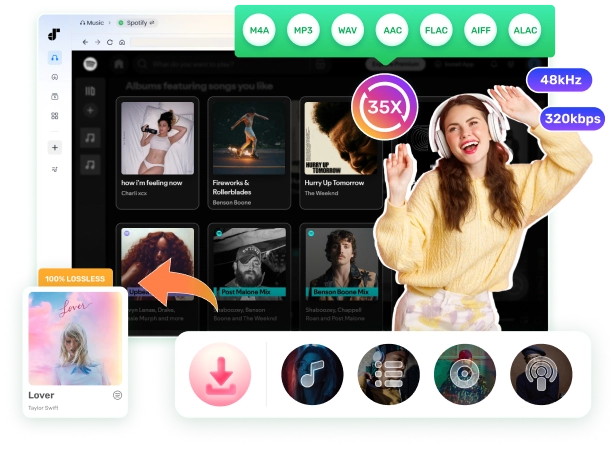
TuneFab Spotify Music converter lets you quickly convert and download 100M+ songs, millions of playlists and albums, 5M+ podcasts, and 350,000+ audiobooks from Spotify for permanent offline access.

  • Songs & Playlists
  • Albums
  • Podcasts & Shows
  • Audiobooks
  • Lyrics Download
Songs & Playlists

Songs & Playlists

Search for songs or playlists from all genres, from Hip Hop songs and jazz music, to rock songs and classical music, and then download them to MP3 directly. With batch download support at up to 35X speed, even large playlists can be processed efficiently within seconds.

Albums

Albums

Simply navigate to an artist's page to view all albums and download them in bulk with original audio quality preserved.

TuneFab supports multiple output formats, including MP3 for everyday listening or WAV and FLAC for lossless sound.

Podcasts & Shows

Podcasts & Shows

This Spotify podcast downloader lets you download every episode from any podcast and show to audio files at once.

Because the conversion is processed locally instead of being recorded in real time like many online tools, the original sound quality is maintained more reliably.

Audiobooks

Audiobooks

TuneFab Spotify Music Converter also allows you to download all chapters from an audiobook that is in the Spotify library.

All downloaded files preserve full ID3 metadata, and you can even preset file names and folder structures based on the tags to keep your collection perfectly organized.

Lyrics Download

Lyrics Download

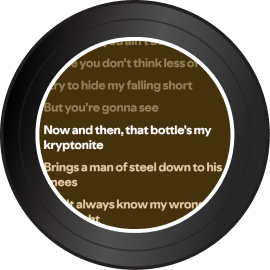
This music converter lets you download synced lyrics as LRC files, so you can follow along with the music on any compatible player.

The exported lyrics work smoothly with supported desktop players and car systems, creating a more immersive listening experience.

How Does Spotify Converter Work?

TuneFab Spotify Music Converter works by connecting directly to Spotify’s web player and processing the audio stream through its built-in conversion engine. Instead of recording songs in real time like many browser-based tools, which often results in quality loss, the software converts Spotify tracks efficiently while preserving the original audio quality and metadata.

Once you log in to your Spotify account within the program, you can browse songs, playlists, albums, podcasts, or audiobooks just as you would normally.

Simply add the content you want to convert, choose your preferred output format (such as MP3, M4A, WAV, or FLAC), adjust the bit rate or sample rate if needed, and start the conversion. The process runs locally on your computer, ensuring stable performance, faster speed, and higher security.

All converted files are saved as standard audio formats that can be played on any compatible device, transferred freely, and stored permanently without Spotify’s playback restrictions.
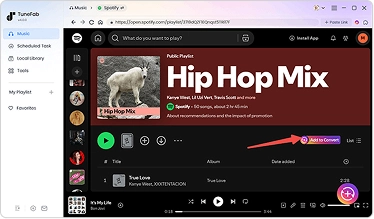
Select Spotify songs and click the 'Add to Convert' button.

Step 1.

Select Spotify songs and click the "Add to Convert" button.

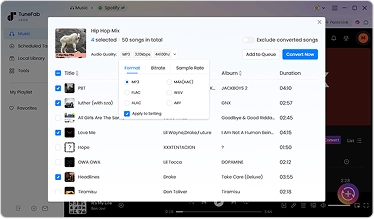
Set your preferred parameters and start downloading.

Step 2.

Set your preferred parameters and start downloading.

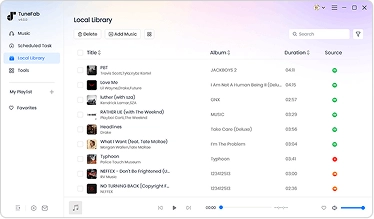
Once finished, you can view the songs in the Local Library.

Step 3.

Once finished, you can view the songs in the "Local Library".

Want a step-by-step walkthrough?

When Do You Need A Spotify Music Converter?

Spotify works well for everyday streaming, but there are moments when streaming alone isn’t enough. That’s when converting Spotify to standard audio files becomes practical.
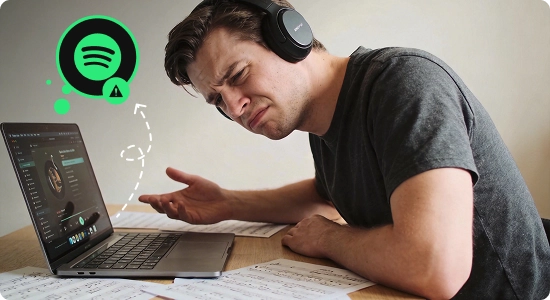
Access Music During Spotify Issues

Access Music During Spotify Issues

If the Spotify app is not working or crashes during playback, having local backups ensures your music is still accessible even when the platform experiences outages or technical issues.

Fix common Spotify problems here →
Convert Spotify Songs for Editing

Convert Spotify Songs for Editing

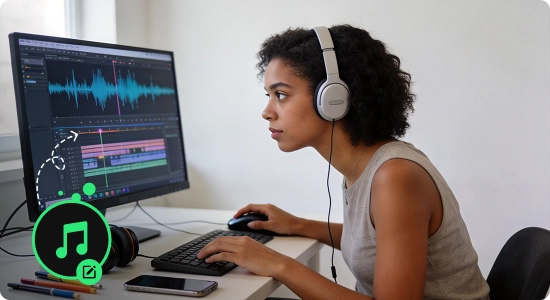
If you want to add Spotify music to a video, presentation, DJ mix, ringtone, or creative project, converting songs to WAV or MP3 makes editing and embedding possible without compatibility limitations.

See how to convert Spotify to WAV →
Offline Listening without Premium Offline Listening without Premium

Offline Listening without Premium

If Spotify offline doesn’t meet your needs, download Spotify music without Premium gives you full control over your library.

Learn how to download Spotify without Premium →
Keep Spotify Downloads Forever Keep Spotify Downloads Forever

Keep Spotify Downloads Forever

You may also need it when you want to store Spotify downloads permanently instead of keeping them locked inside the app. Official Spotify downloads are encrypted and tied to your account, meaning they can’t be moved to a USB drive, saved to an SD card, backed up to an external hard drive, or accessed outside the Spotify app. If your subscription ends or a song is removed from Spotify’s catalog, those downloads may disappear as well.

Learn how to keep downloaded Spotify songs forever →

In short, whenever streaming restrictions limit how or where you listen, converting Spotify music gives you back full control.

Frequently Asked Questions

1. Is TuneFab Spotify Music Converter safe?

Definitely! This Spotify music converter was developed by a professional team in 2016 and has been operational since then. It is a 100% clean and trusted music conversion tool that will not harm your computer or system.

2. What are the limitations of a free trial version?

The free trial lets you fully convert 3 songs at no cost, with no limits on format or audio quality.

3. How to activate TuneFab Spotify Music Converter?

Launch the software, and a status window will pop up. Log in to the account center with your email address and license key in the appropriate boxes. Hit "Update account status" after logging in.

4. Can I transfer my license to a different computer?

Yes, you can transfer your license to a new computer and it's 100% free. To do that, just install and log in to the software on a new computer, enter the TuneFab account center, hit "Manage devices" and rest the old computer.

5. What conversion speed does TuneFab Music Converter support?

It supports the lowest conversion speed at 35X faster, which highly boosts the conversion to be completed within just a moment.

6. Can I use this Spotify downloader without an account login?

Yes. Whether or not you log into your Spotify account via the built-in TuneFab player, you can still search for and access the songs, playlists, or albums you want to download and convert songs from Spotify easily. But if you find it fails to download songs, you should log in to Spotify and retry.

7. Can I download Spotify songs to MP3 with Spotify free accounts?

Yes. TuneFab Spotify Music Converter works for both Spotify free accounts and Premium accounts.

8. Can I convert Spotify to MP3 online free?

Yes! While TuneFab Spotify Music Converter requires installation, TuneFab also offers an online tool that lets you batch-download Spotify playlists, albums, and tracks as MP3. You can access it via the TuneFab Account Center or the top of this page if you are using a mobile device.

9. Will songs or podcasts downloaded with a free account contain ads?

No. When you download songs using TuneFab, it removes any ads, so the downloaded files are clean and ad-free.

10. Where are the downloaded Spotify songs saved?

It depends on whether you are using the default setting or a customized location for the downloads. Either way, you can easily find the downloaded songs by clicking on the folder icon at the bottom of the conversion window.

11. How to download Spotify music in lossless sound quality?

Spotify now supports lossless audio quality . To save your Spotify downloads in lossless quality, you can choose the output format as FLAC or M4A(ALAC). FLAC is compatible with most devices and players with a larger file size, and M4A file with ALAC codec is more commonly used on Apple devices or APPs.

If you want to save Spotify music in MP3, but preserve nearly lossless quality, it is advisable to set the parameters to match the original Spotify bitrate up to 320kbps and the sample rate to 44100Hz.

What TuneFab Have Achieved

+

Years of Industry Expertise

+

Years of Industry Expertise

+

Regions Covered Worldwide

%

Positive Customer Feedback

What Our Users Say

Abby Reddy

"The download process is quick and smooth. It is not the type cluttered with unnecessary features. Definitely on a par with bigger brands out there."

Sophia Jones

"This Spotify Music converter developed by TuneFab is a marvelous tool for converting my Spotify tracks to MP3 format. I need MP3 files so I can save them on my USB and play them offline in my car."

Dan Weaver

"It's been a great experience overall when using the TuneFab music converter. All functions are user-friendly. But it doesn't provide options to edit the converted tracks. This should be the only improvement I will ask for."

Olivia Harris

"I've tried a lot of Spotify downloaders. So far, TuneFab is the best. It performs much more stably than online Spotify downloaders, especially with its fast download speed and high success rate. Lossless sound quality can also be preserved after conversion! Cheers to TuneFab for making downloading Spotify music easier!"

David Preston

"I've subscribed to this music converter for a few days. All seems pretty good at present. The drag and drop feature is extremely useful as I used it to download playlists of songs. And the sound quality of the converted tracks is what I expected. I give a good score."

-Nicolas Martinez

"Great tool for Spotify music conversion! I tried the free version before I purchased the software. It works well and no ads pop up. It's easy to use and the download speed is pretty fast. Till now, I've successfully ripped all my Spotify playlists and saved them on my computer."

Trusted by 100+ Industry Experts

"TuneFab Music Converter provides you with flexible options when it comes to setting output audio parameters. You can set the sample rate, bitrate and output format as you preferred. For those who want to keep the original music quality, you can set the sample rate as 44,100 Hz and bitrate as 320 Kbps."

"TuneFab Music Converter is also known as a playlist downloader, allowing you to download tens of tracks in one go, while also converting them from OGG Vorbis to offline multimedia formats like MP3, M4A, WAV, and FLAC. "

"The interface of TuneFab Music Converter is designed to be simple and easy to operate. You just need to simply drag-and-drop the Spotify songs and with few clicks, then you can finish the conversion. "

"The conversion rate of this application is very fast and gives you more reliability. The intuitive user interface makes it easier for its users. This application is available for Windows and Mac operating systems. Our hands-on experience proved it to be very useful for music lovers."

"This program will download the songs at 5x the speed and you will not have to worry about ever losing any audio quality either. What we love is that the quality you get remains throughout the entire process, from the download to the conversion process."

Try TuneFab Spotify Music Converter Today

Freely install TuneFab Music Converter to batch convert Spotify playlist to MP3 with great sound quality, 35X faster speed, and secure performance to bring free to your Spotify music journey!


System Requirement:
Windows 7 or later on 64-bit
Mac OS X 10.15 or higher
Ratings:
4.8/5
ratings
Pricing:
1-Month: starting at $25.95
1-Year: starting at $79.95 ($6.66/mon)
Single Lifetime: starting at $99.95
Supported Formats:
MP3, M4A, FLAC,WAV,AAC,AIFF,ALAC
streamer
Back to top