


Important Considerations:
- Source Quality: YouTube provides lossy audio. FLAC conversion won't restore lossless quality, but a reliable converter like TuneFab ensures the audio is preserved in its original quality without further degradation, preventing quality loss during the conversion process.
- Metadata Protection: Unlike TuneFab, many online tools strip or partially support metadata, affecting library organization.
- Legal Use: Downloading copyrighted content is subject to YouTube's Terms of Service. TuneFab is intended for personal use only.
For audiophiles who care about sound quality, there is one favorite format FLAC (Free Lossless Audio Codec). Well-known for its ability to compress audio without compromising any data, FLAC ensures a higher quality sound, hence the best bet for music lovers. If you stream YouTube Music and wish to maintain that high-quality sound, you can convert it to FLAC. This ensures that you get to hear your favorite tracks in full audio quality, as intended by the artist.
In this article, we will walk you through three effective methods to download and convert YouTube Music to FLAC format, and you can choose the most appropriate method for your needs.
- Why Do You Convert YouTube Music to FLAC, not MP3?
- Method 1. Convert YouTube Music to FLAC 24-Bit with TuneFab Converter
- Method 2. Download YouTube to FLAC Online with 4KDownload.to
- Method 3. Convert YouTube to FLAC with UKC YouTube Video Downloader
- Comparison: Which YouTube to FLAC Converter is Best?
- FAQs About YouTube Music to FLAC
Why Do You Convert YouTube Music to FLAC, not MP3?
MP3 is popular because it makes files very small. But to do this, it removes some of the original audio data. For those who love high-quality sound, FLAC is a much better choice. It keeps every detail of the music perfect, just like the original. Let's look at what FLAC is and how it beats MP3.
What's FLAC?
FLAC stands for Free Lossless Audio Codec. It's a special way to save audio files. Its main features are:
- Perfect Quality: It makes files smaller without losing any sound quality. When you play it back, it's exactly the same as the original.
- Saves Space: A FLAC file is about half the size of a completely uncompressed file, so it's still efficient.
- Great for Archiving: It's the best format for saving your music collection forever without losing quality.
- Good Support: Many music players, phones, and home stereo systems can play FLAC files.
- Metadata Support: Information like the album cover, artist name, album title, track number, and genre is perfectly preserved within the file, keeping your music library well-organized.
FLAC vs MP3
| Feature | FLAC | MP3 |
| Compression | Lossless | Lossy |
| Sound Quality | Perfect. Keeps every detail. | Good, but reduced. Some details are lost forever. |
| File Size | Larger | Much Smaller |
| Editing | Great for editing and mixing | Loses more quality if edited |
| Playback Device | Hi-Fi players, DJ software, pro tools | Phones, car players, most devices |
| Best For | Music lovers, DJs, collectors | Everyday listeners |
Method 1. Convert YouTube Music to FLAC 24-Bit with TuneFab Converter
If you're looking for a straightforward way to experience these audio quality benefits, a dedicated YouTube Music converter can be very useful. Tools like TuneFab YouTube Music Converter support output in FLAC 24-bit format, helping preserve the original depth and clarity of the music during conversion.
Beyond audio quality, TuneFab often includes practical features like batch downloading of playlists and albums, which saves considerable time when managing a large music collection. It also typically retains ID3 tags, including artist, album, cover art, and track information, making it easier to organize and navigate your audio library afterward.
Overall, a capable converter like this can provide a complete way for anyone looking to enjoy YouTube Music in higher-quality, well-organized local formats.
Key Features of TuneFab YouTube Music Converter
- Multiple Formats Support: Besides FLAC, it also downloads YouTube Music to MP3, WAV, AIFF, and M4A (AAC/ALAC).
- Lossless Audio Output: Preserve the original quality of sound without compression.
- Batch Download: Save time by batch downloading multiple tracks at once.
- 35X Faster Conversion Speed: Enjoy speed and efficiency in music downloads.
- Keep Full ID3 Tags: Keep artist names, album covers, and metadata for instant sorting.
- Personalizable Audio Settings: Alter bit rate and sample rate for your sound.
Now, let's start with this simple guide to using TuneFab YouTube Music Converter to convert YouTube music to FLAC:
Step 1: Download and Install TuneFab YouTube Music Converter
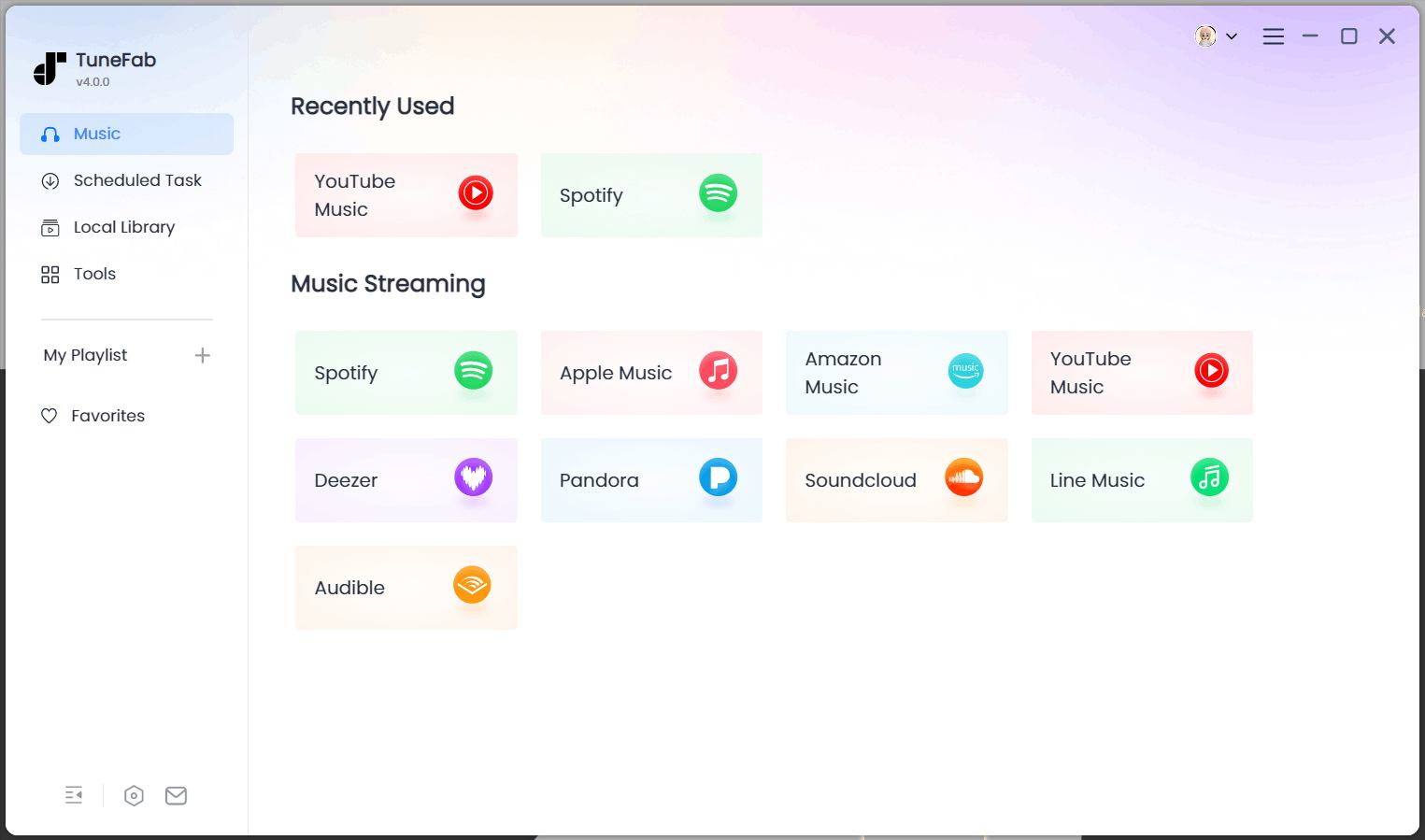
The software is compatible with both MacOS and Windows. Choose the proper version for your computer. After installing, launch the software, from the software interface, select YouTube Music
Step 2: Log in to Your YouTube Music Account
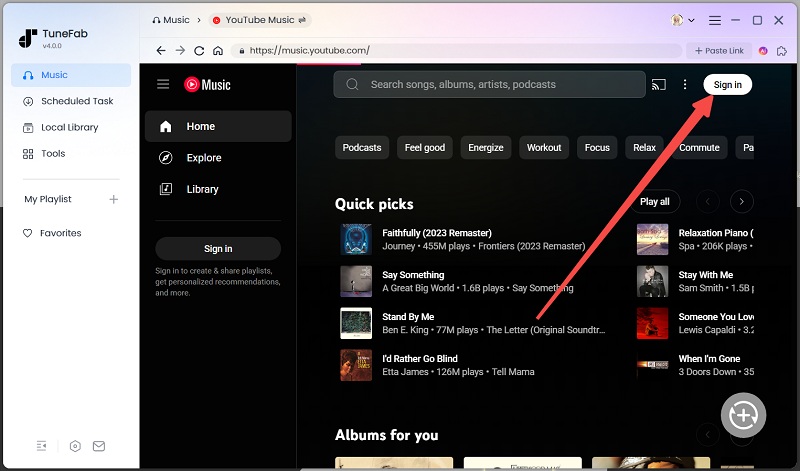
After that, it will enter the built-in YouTube Music web player. Click on the Sign in button and log in to your account.
Step 3: Add Desired Songs to Download
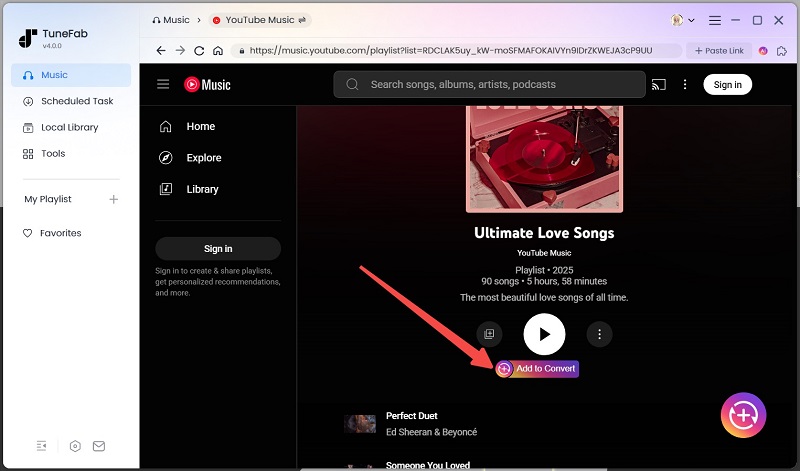
In the built-in YouTube Music web player of the software, you can search for the songs you want. Drag and drop the songs that you want to download to the “+” section, which means you add them to the downloading and conversion list.
Step 4: Change the Output Format and Download
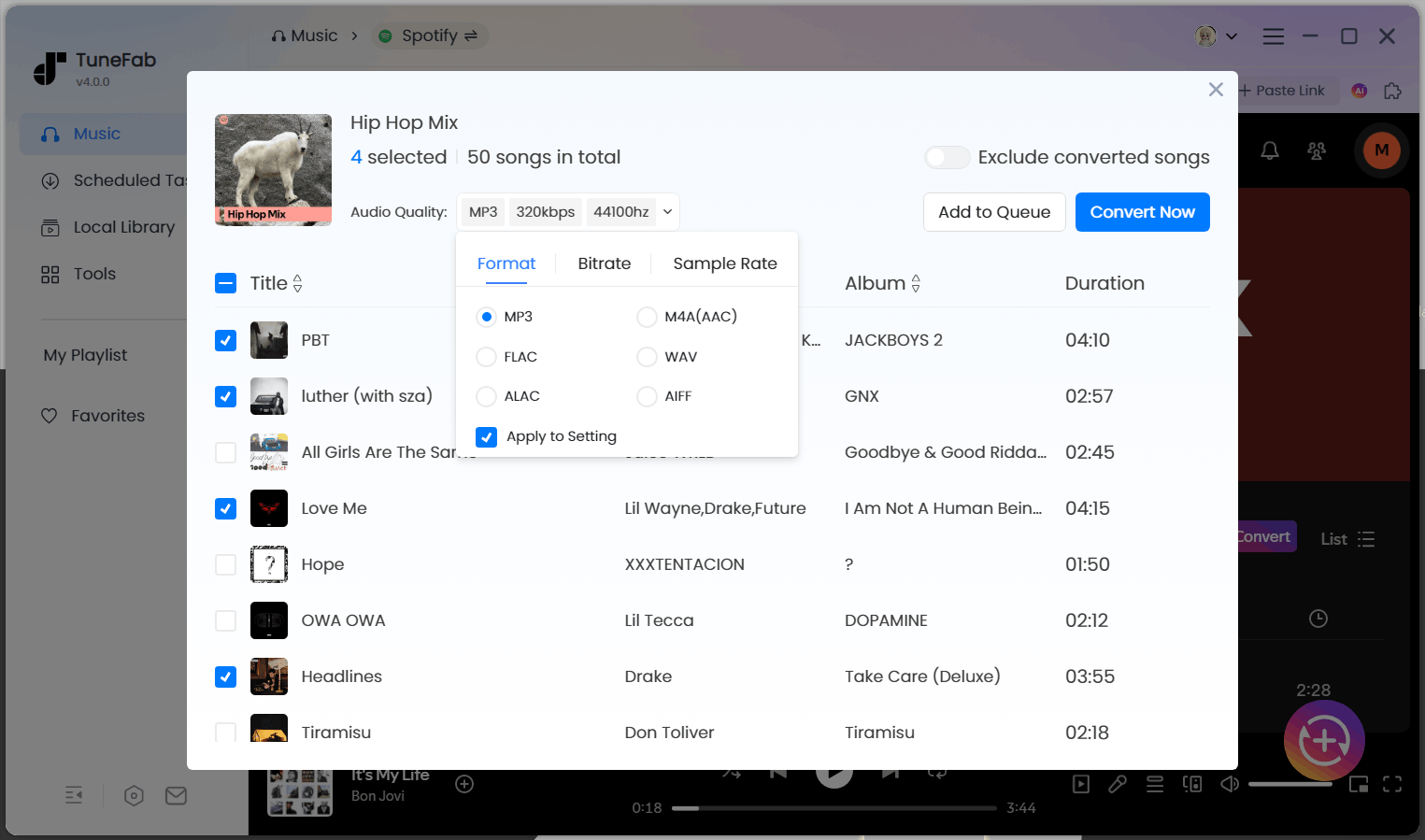
From the conversion window, choose the output format as FLAC and click on the Convert All button to start the conversion process.
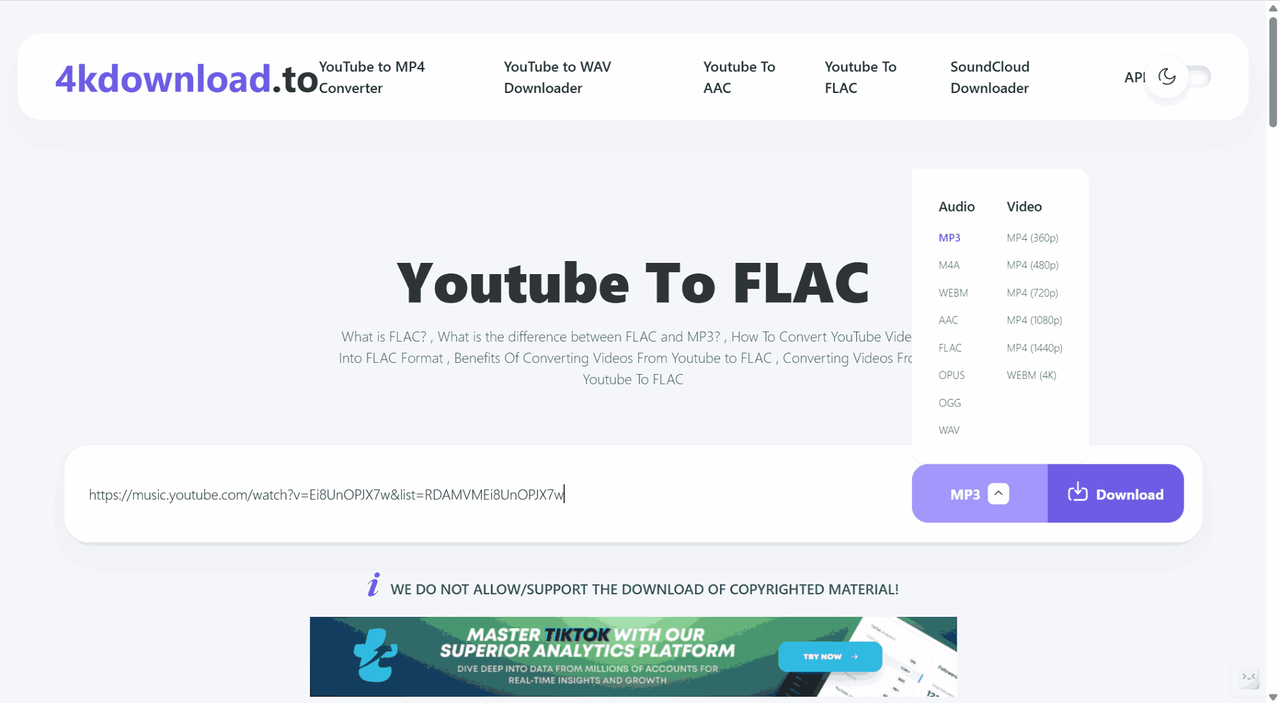
Method 2. Download YouTube to FLAC Online with 4KDownload.to
4KDownload.to is a free online tool that allows you to convert YouTube videos to FLAC and other formats such as MP3, WAV, AAC, and OPUS directly in your browser. Its key features are as follows:
| Feature | Description |
| Sound Quality | Up to 24-bit/96kHz FLAC |
| Download Speed | Low |
| Batch Download | Supported |
| ID3 Tags | Includes title and artist, but does not preserve cover art |
| Ads | Contains redirect ads and occasional pop-ups |
Here are the step-by-step instructions to follow:
Step 1: Copy the wanted YouTube Music song URL.
Step 2: Paste the URL into the address bar of 4KDownload.to.
Step 3: Choose the output format as FLAC and click on the Download button to start.
Step 4: The song will be saved in the browser download folder by default.
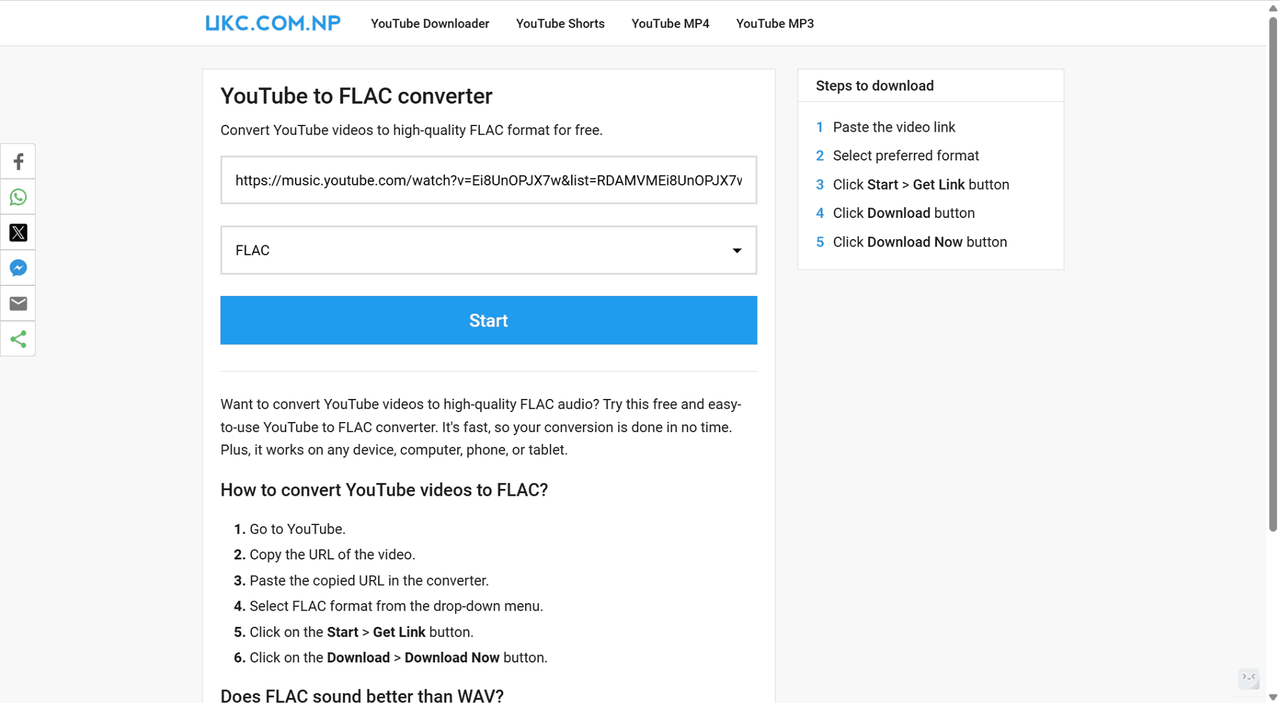
Method 3. Convert YouTube to FLAC with UKC YouTube Video Downloader
As another online YouTube to FLAC converter, UKC YouTube to FLAC Converter offers the same experience as 4KDownload.to. Simple to operate and convenient on any device.
| Feature | Description |
| Sound Quality | Depend on the source |
| Download Speed | Low |
| Batch Download | Not supported |
| ID3 Tags | Basic metadata support |
| Ads | Contains intrusive ads and pop-ups |
| Interface | Functional but less polished visually |
Here is the step-by-step guide to start using:
Step 1: Copy the URL of the YouTube Music.
Step 2: Paste the URL to the UKC YouTube to FLAC Converter.
Step 3: Select FLAC format from the drop-down menu.
Step 4: Click on the Start > Get Link button.
Step 5: Click on the Download > Download Now button and it starts downloading.
Comparison: Which YouTube to FLAC Converter is Best?
To help you better decide which method is suited to your needs, we have summarized the key aspects of the three tools. You can easily get a clear picture of what they offer and make a choice.
| YouTube to FLAC Using | Supported OS | Download Mode | Download Speed | Download Playlist/Album | Stability | Ad-Free |
| TuneFab YouTube Music Converter | Windows & Mac | Built-in web player, drag & drop download | High | √ | High | √ |
| 4KDownload.to | Web browser | Copy-paste URL to download | Low | × | Medium | × |
| UKC YouTube to FLAC Converter | Web browser | Copy-paste URL to download | Low | × | Medium | × |
For users looking for a simple and quick method to download YouTube Music to FLAC without installing software, 4KDownload.to and UKC YouTube to FLAC Converter are good options. They are ideal for casual users who don't need to download full playlists or albums and don't mind ads.
If you prefer higher sound quality, faster downloads, and more features like downloading full albums or playlists, TuneFab YouTube Music Converter is the way to go. It offers everything you need. Ad-free and provides a better overall user experience.
FAQs About YouTube Music to FLAC
Does YouTube Music play FLAC?
No, YouTube Music does not natively stream or support playback of FLAC files. The platform uses its own compression formats, typically AAC or Opus, for streaming, which are lower in quality than lossless FLAC. To enjoy FLAC audio from YouTube Music, you’ll need to use a third-party converter to download and save tracks in FLAC format locally.
Does YouTube Music offer FLAC audio quality?
YouTube Music does not provide FLAC or any lossless audio tier. Its highest streaming quality is “High Quality” (256kbps AAC), which remains a compressed, lossy format. While it offers good sound for casual listening, it does not match the full fidelity and detail preservation of lossless formats like FLAC. For true lossless audio, conversion tools are required.
Besides FLAC, can TuneFab convert YouTube Music to other formats?
Yes. In addition to FLAC, TuneFab YouTube Music Converter supports output in multiple popular formats, including MP3, ALAC, WAV, M4A, and AIFF. This flexibility allows you to choose the format that best fits your needs, whether for high-quality archiving (FLAC/WAV) or everyday portable use (MP3/AAC).

