×
   TuneFab Discord
Join 10,000+ TuneFab Fans on Discord
TuneFab Playlist Transfer: Move Lists Between Music Services

Effortless Playlist Moving, Done Right.

wrap1-icon1 wrap1-icon2 wrap1-icon3 wrap1-icon4 wrap1-icon5 wrap1-icon6

Support Major Music Platforms

Transfer between Spotify, Apple Music, Deezer, Amazon Music, YouTube Music, Pandora - all in one place.

TuneFab Playlist Transfer Supporting Platform

Transfer Playlists, Albums, or Single Tracks

Move entire playlists or specific songs between music platforms with full control over what you transfer.
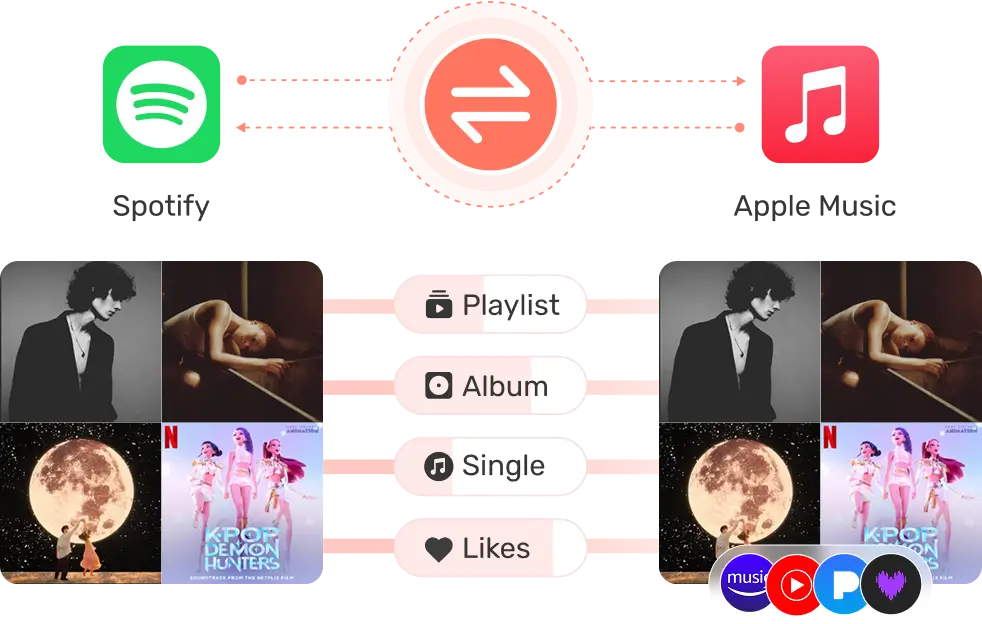
Transfer Playlists, Albums, or Single Tracks

Fast & Reliable Playlist Transfer

Transfer thousands of songs in minutes with our high-speed engine. No delays, no crashes - just smooth and efficient performance every time.
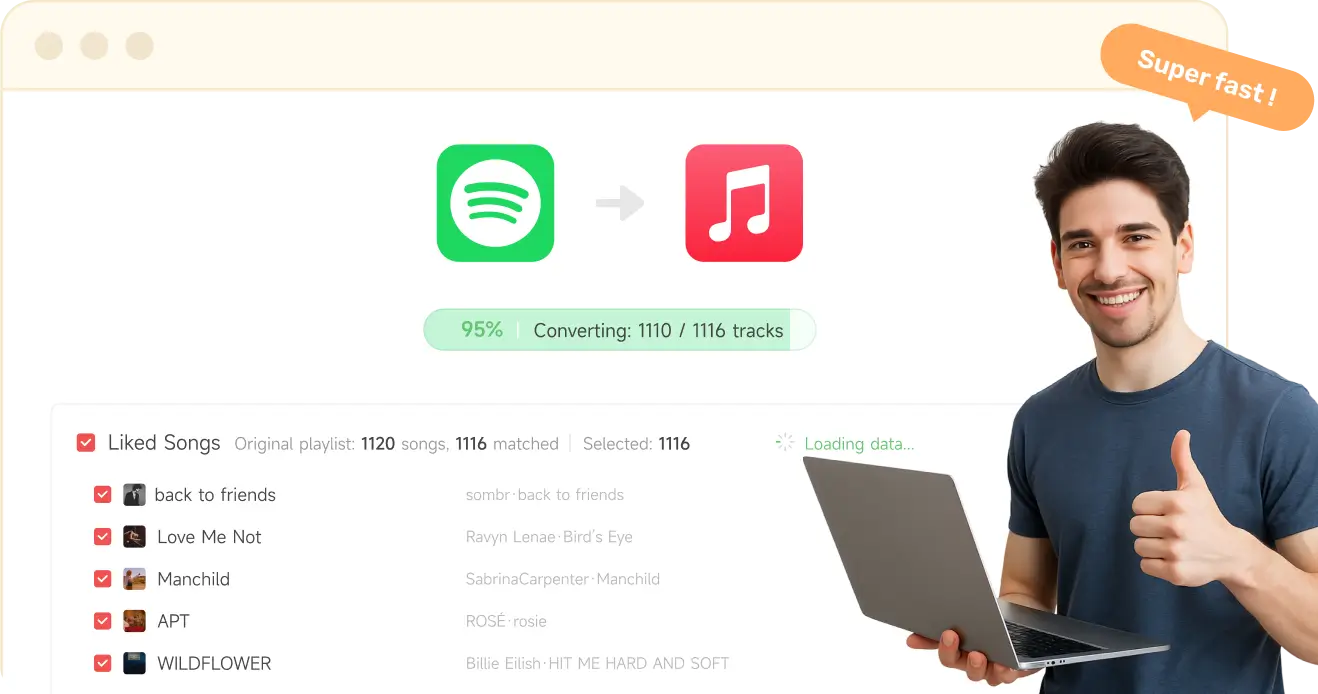
Fast Smooth Reliable
Transfer Playlists Fast

Why Choose TuneFab?

Trusted by over 1 million music lovers worldwide, TuneFab isn’t just another playlist transfer tool. It’s your reliable companion for seamless music migration. Here’s what sets us apart:

No Learning Curve No Learning Curve

User-friendly interface with a simple 4-step process. No technical skills needed.

Safe & Secure Transfers Safe & Secure Transfers

OAuth login ensures your account credentials are never stored. We prioritize your privacy and data safety.

Stable and Reliable Stable and Reliable

The playlist transfer tool runs smoothly, so your playlists move without a hitch.

Dedicated Support Dedicated Support

Our friendly support team is always here to help if you hit a bump. Real humans, real responses.

Money-back Guarantee Money-back Guarantee

TuneFab launches the Refund Policy on all programs to ensure your money-back rights.

Free Lifetime Upgrading Free Lifetime Upgrading

Enjoy lifetime access to every new feature, performance enhancement, and platform update for free.

No Learning Curve No Learning Curve

User-friendly interface with a simple 4-step process. No technical skills needed.

Safe & Secure Transfers Safe & Secure Transfers

OAuth login ensures your account credentials are never stored. We prioritize your privacy and data safety.

Stable and Reliable Stable and Reliable

The playlist transfer tool runs smoothly, so your playlists move without a hitch.

Dedicated Support Dedicated Support

Our friendly support team is always here to help if you hit a bump. Real humans, real responses.

Money-back Guarantee Money-back Guarantee

TuneFab launches the Refund Policy on all programs to ensure your money-back rights.

Free Lifetime Upgrading Free Lifetime Upgrading

Enjoy free lifetime access to every new feature, performance enhancement, and platform update for free.
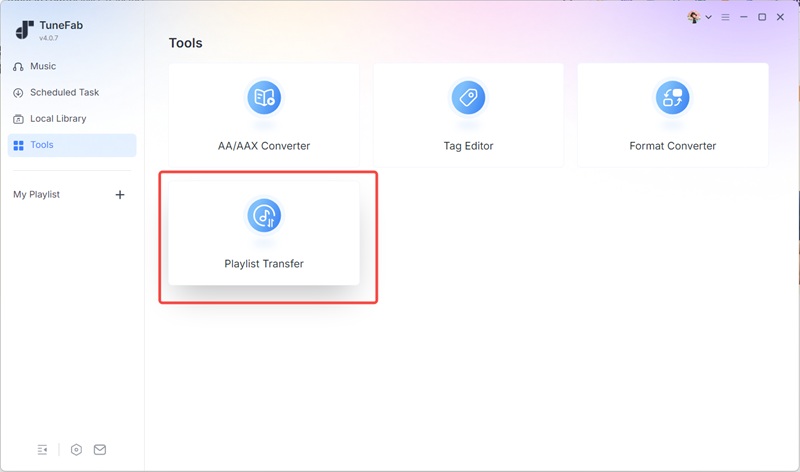
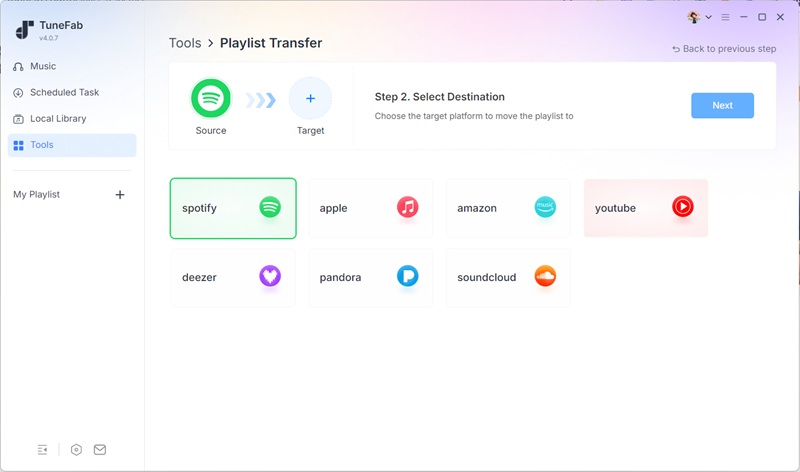
How to Convert Playlists with TuneFab Playlist Transfer

Step 1. Go to Tools and open Playlist Transfer.

Enter TuneFab Playlist Transfer

Step 2. Choose the music services you want to transfer between: select the source service first, then the destination service.

Select Music Services

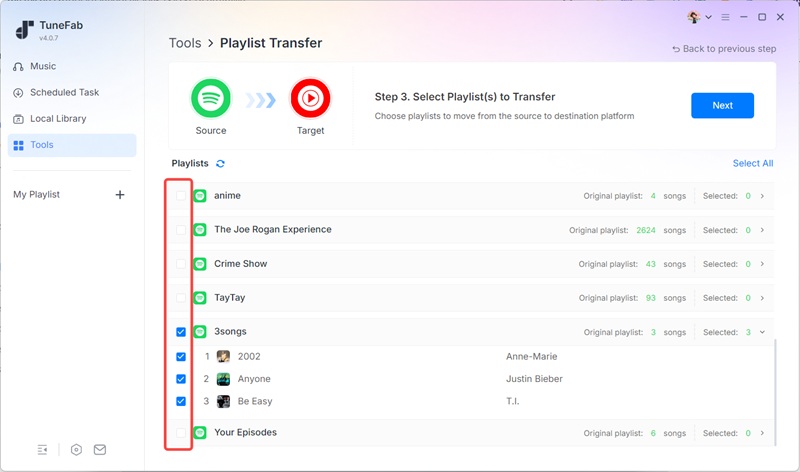
Step 3. Select the playlists and tracks you want to transfer.

Select Playlist to Transfer

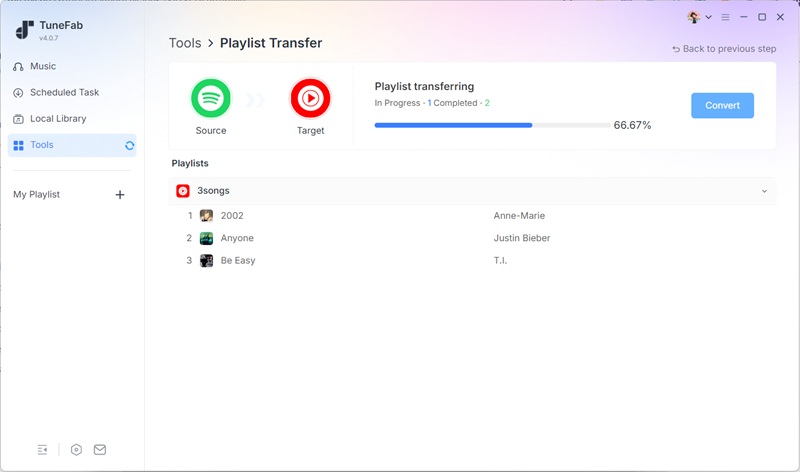
Step 4. Click Convert in the top-right corner to start the transfer.

Transfering Playlists from Music Services

Popular Transfers

icon-spotify icon-apple

Transfer Spotify playlist to Apple Music

Learn More
icon-spotify icon-youtube

Transfer Spotify playlist to YouTube Music

Learn More
icon-spotify icon-amazon

Spotify playlist to Amazon Music

Learn More
icon-spotify icon-deezer

Transfer Spotify playlist to Deezer

Learn More
icon-apple icon-spotify

Transfer Apple Music to Spotify

Learn More
icon-apple icon-youtube

Transfer Apple Music to YouTube Music

Learn More
icon-youtube icon-apple

Transfer YouTube Music to Apple Music

Learn More
icon-youtube icon-spotify

Transfer YouTube Music to Spotify

Learn More
icon-amazon icon-spotify

Transfer Amazon Music to Spotify

Learn More

Go Premium - Transfer Without Limits

Already a TuneFab All-in-One Music Converter subscriber? Playlist Transfer is included for free. Not a member yet? Get the All-in-One License below now.

wrap-tag
HOT SALE
1-Month Plan

Auto renew, cancel at any time

icon-spotify icon-apple icon-deezer conversion icon-amazon icon-youtube icon-pandora

What Our Users Are Saying

I’ve spent years building playlists on Spotify and dreaded starting over on a new app. But with TuneFab, I was able to transfer my Spotify playlist to Apple Music in minutes, including the song order and all my favorites. Totally stress-free!

Jessica Morgan Jessica Morgan

I’ve tried other tools to transfer playlists between music services, but none were as fast or accurate as TuneFab. I moved my entire YouTube Music library to Spotify in minutes. Highly recommend!

Daniel Taylor Daniel Taylor

Tried TuneFab to move a 300-song playlist from Deezer to Spotify. Everything transferred perfectly, no glitches at all. Super impressed with how fast and accurate it is.

Lena Klein Lena Klein
faq

Frequently Asked Questions

Can I use TuneFab Playlist Transfer for free?
Yes. If you’ve already subscribed to any TuneFab's music converter, which is still active, you can use this program for free with no limits. If you don’t have a subscription, you can still try it for free, but some features will be limited.
What are the limitations of the trial version?
With the trial of this playlist converter, you can transfer only once, with a limit of 100 songs per playlist. To remove these limits, you can either purchase TuneFab Playlist Transfer or subscribe to any other TuneFab's music converter, such as the TuneFab All-in-One Music Converter.
How to activate TuneFab Playlist Transfer?
Launch the software and a free-trial window will pop up. Log in to the account center with your license code and email address. And then update the account status on the pop-up window.
What music platforms does TuneFab support?
TuneFab supports all major streaming services, including Spotify, Apple Music, Deezer, Amazon Music, YouTube Music, and Pandora.
Does it work with free Spotify accounts?
Yes! You can transfer playlists from free or premium Spotify accounts.
Can I transfer Spotify playlist to YouTube Music?
Yes! TuneFab supports direct transfers between Spotify and Apple Music, including full playlists, albums, and even liked songs — all with original song order preserved.
Is my account information safe?
Yes. We use industry-standard OAuth login, so your credentials are never stored or shared. Your data privacy is always our top priority.
Why did some songs fail to transfer when converting Spotify playlists to YouTube Music?
Some songs may not be available on the destination music platform due to licensing differences, regional restrictions, or catalog limitations. If a track doesn’t exist on Spotify, it will be skipped automatically during the transfer.
No worries! The tool will provide you with a detailed transfer report so you can easily see which songs need your attention. If YouTube doesn’t have the song you want, you can use our TuneFab Spotify Music Converter to download the track as an MP3. Then, simply add the local file to your Spotify library and add it to your playlist manually.
Will TuneFab Playlist Transfer delete my playlists on the source platform?
No, TuneFab will never delete or modify your original playlists on the source platform. The tool only reads your playlists to copy the content and recreate it on the destination platform.

Start Moving Your Music Today

Don’t rebuild your playlists from scratch. Let TuneFab Playlist Transfer do the work for you.

System Requirements
  • Windows 7 or later on 64bit is required.
  • Mac OS X 10.15 or higher
Ratings

4.8/5

star
Pricing

Free for TuneFab All-in-One Subscribers

Supported Platforms

Spotify, Apple Music, Deezer, Amazon Music, YouTube Music, Pandora

streamer
Back to top