







×
   TuneFab Discord
Join 10,000+ TuneFab Fans on Discord
TuneFab Audible Converter - Best AA/AAX to MP3 Converter Designed for Audible Users

What Makes TuneFab Audible Converter Stand Out

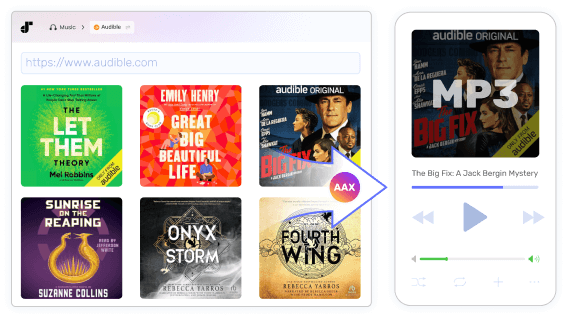
Convert Audible AA/AAX to MP3

Convert Audible Books to MP3 with Simple Clicks

Once you have installed TuneFab Audible Converter, you can easily log in to your Amazon account and download audiobooks directly from the embedded Audible website to MP3, M4A, FLAC, or WAV.

At the same time, it also includes a built-in local AAX/AA to MP3 converter, allowing you to quickly convert any of your existing Audible files without extra software. Whether you’ve purchased an audiobook or subscribed to an Audible plan, this tool makes accessing and enjoying your audiobooks straightforward and convenient.

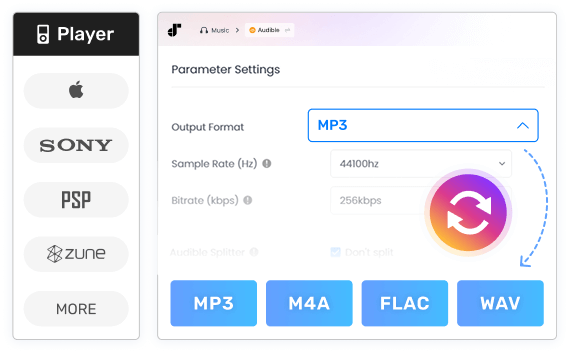
Multiple Output Formats Available

Your media devices cannot be compatible with the Audible app or AA/AAX formats? Convert AAX audiobooks to MP3, M4A, FLAC, and WAV audio files with TuneFab Audible Converter, so your Audible purchases are no longer locked in the Audible app. And you can enjoy Audible books on media devices such as MP3 players, iPod, Sony Walkman, PSP, and Zune much more conveniently.

In addition, TuneFab provides a built-in Format Converter, allowing you to convert any of your local audio files to different formats whenever needed.

Multiple Output Formats Available
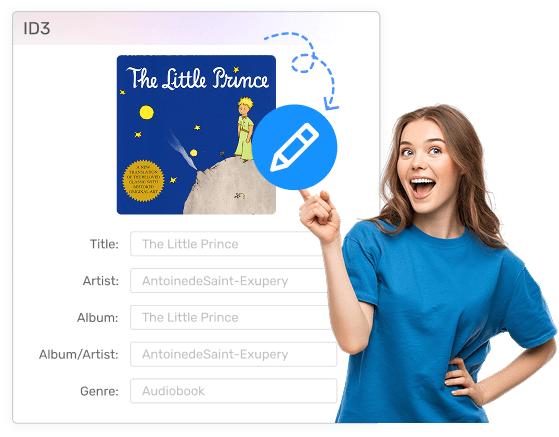
Keep Chapter Info and ID3 Tags

Keep Chapter Info and ID3 Tags

Worry about the embedded chapters of your audiobooks will lose after conversion? This could happen, but fortunately, TuneFab Audible Converter solves the problem. This out-performing Audible Converter helps preserve chapter information completely. With it, you can quickly track your progress as long as your audiobook player supports reading the chapter data.

Want to change a new book cover or a new title? Take advantage of its useful ID3 tag editor to change the metadata information.

Note: To maintain chapter info, it is suggested to convert AAX/AA books to M4A format.

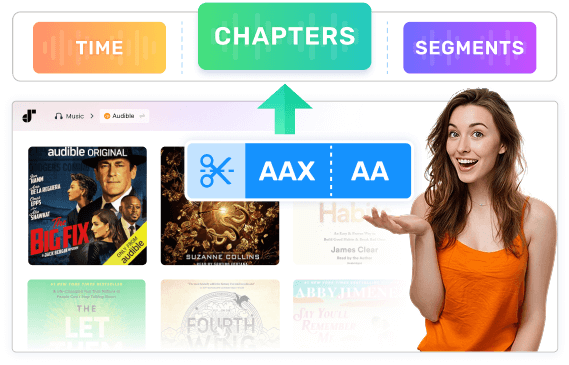
Easily Split Audiobooks by Chapters/Time/Segments

Getting annoyed when receiving a large audiobook file after conversion? No worry! TuneFab Audible Converter has an inbuilt audiobook splitter that helps divide your Audible AAX/AA books into multiple parts and get smaller files. You may use it to:

  • Split audiobooks by time
  • Split Audible books by chapter
  • Splits Audible books by time or chapters
  • Split books into multiple segments averagely
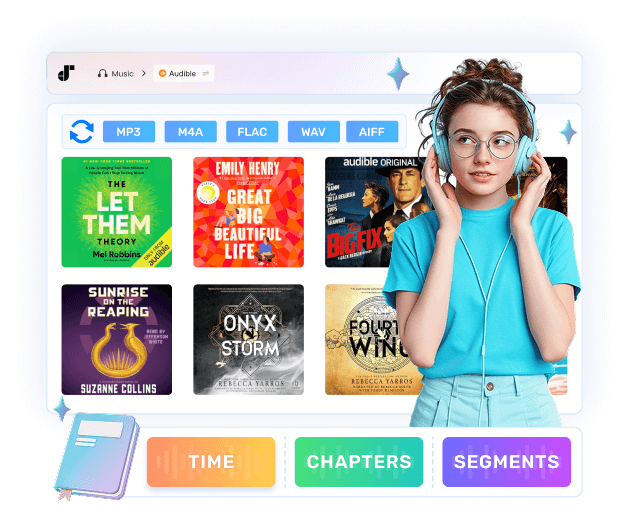
Split Audiobooks by Chapter/Time/Segment
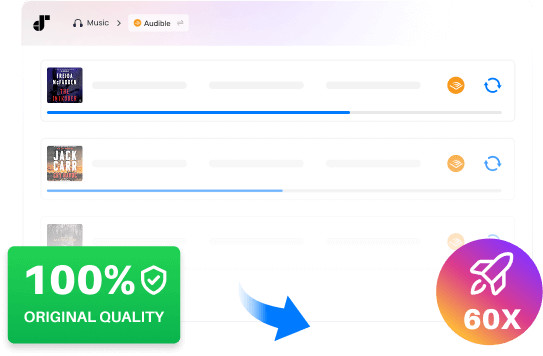
60X Faster Speed to Convert Audible Books

Support 60X Faster Speed & Preserve 100% Original Quality

TuneFab Audible Converter employs an industry-leading decrypting technique that helps you efficiently convert Audible audiobooks at a 60X super fast speed. If sound quality is your top concern, this converter offers a "Lossless" mode which delivers you really high-quality audio the same as your original audiobook file.

In addition, the powerful customization settings enable you to retain or alter different parameters including bitrate, sample rate, output folder, etc.

More Highlights Are Worthy to Explore

You can also click here to learn more about TuneFab Audible Converter

Batch Conversion

Batch Conversion

Want to convert multiple audiobooks at a time? TuneFab Audible Converter supports batch conversion. Converting Audible books doesn't have to be tricky and time-consuming.

One Click to Easily Add Files

One Click to Easily Add Files

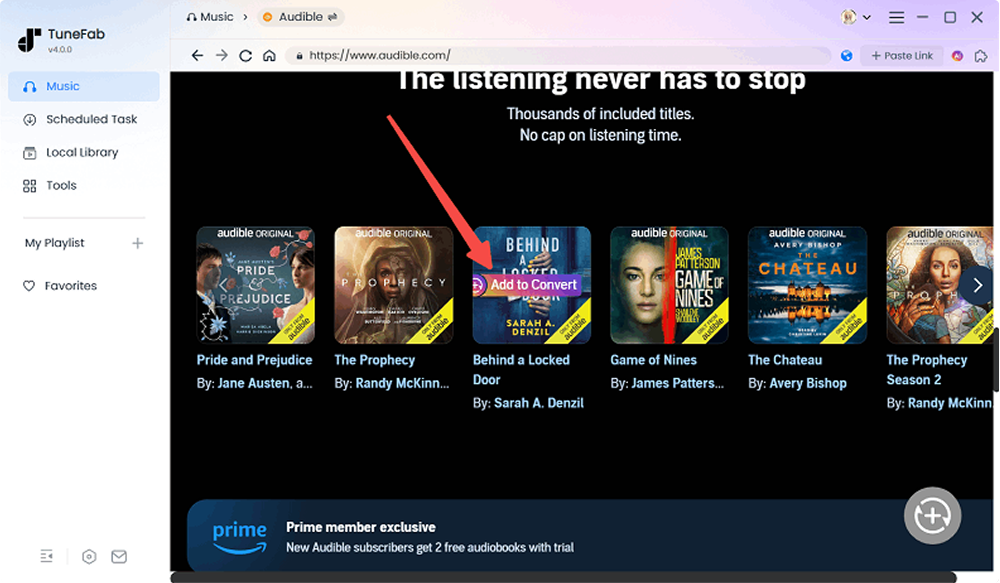
Simply click on "Add to Convert", and then TuneFab will add the audiobook to the conversion queue. ID3 tags will also be automatically detected and presented on the interface.

100% Safe Guaranteed

100% Safe Guaranteed

This program is 100% clean and safe to use without any malware or bundled software.

Proxy Setup

Proxy Setup

Configure a proxy server to bypass regional restrictions and ensure uninterrupted downloads from any location.

Multi-Language Support

Multi-Language Support

TuneFab tries to understand users in different languages. This audible converter supports English, Japanese, German, French, and Traditional Chinese.

Free Lifetime Upgrading

Free Lifetime Upgrading

Free to get every major release and every latest version.

See How TuneFab Audible Converter Works

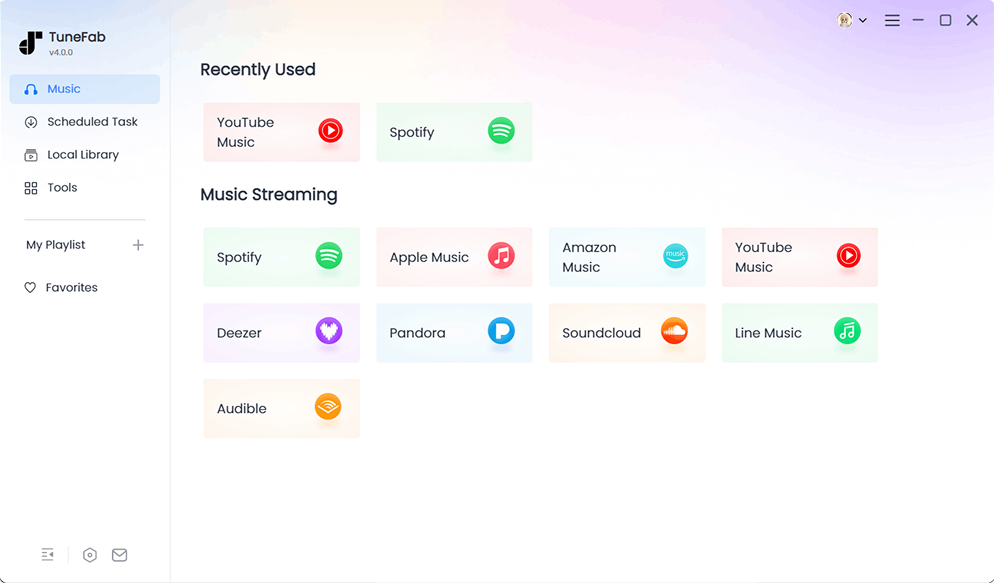
Enter Audible Service
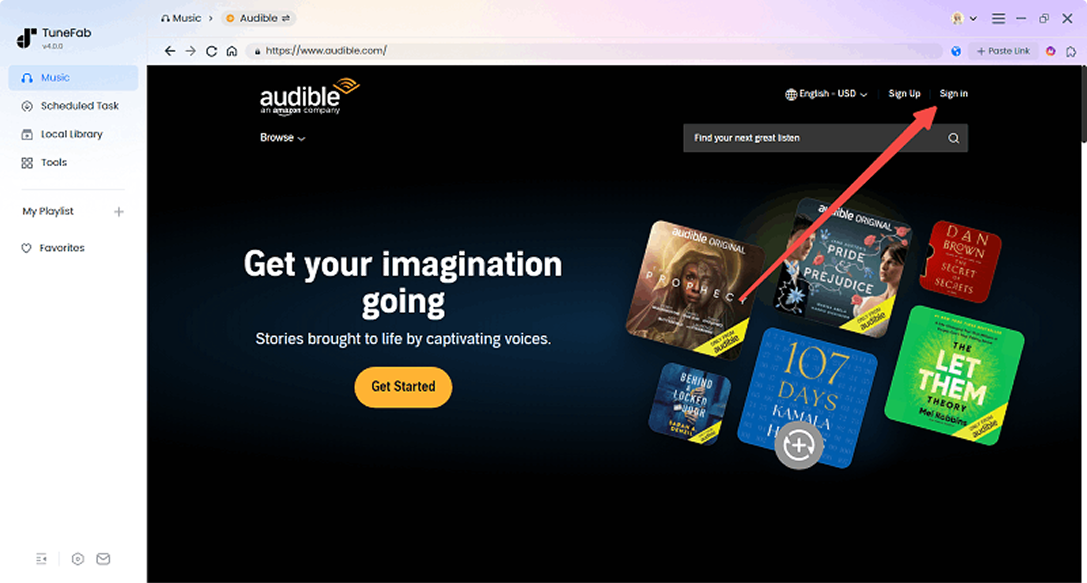
Step 1. Open TuneFab software and enter the Audible service.
Log in to Amazon
Step 2. Log in to your Amazon account that has purchased the audiobook or subscribed to Audible.
Add Audiobook to Download
Step 3. Navigate to the audiobook you want to download to MP3 and hit the "Add to Convert" button or the plus button.
Adjust Output Settings
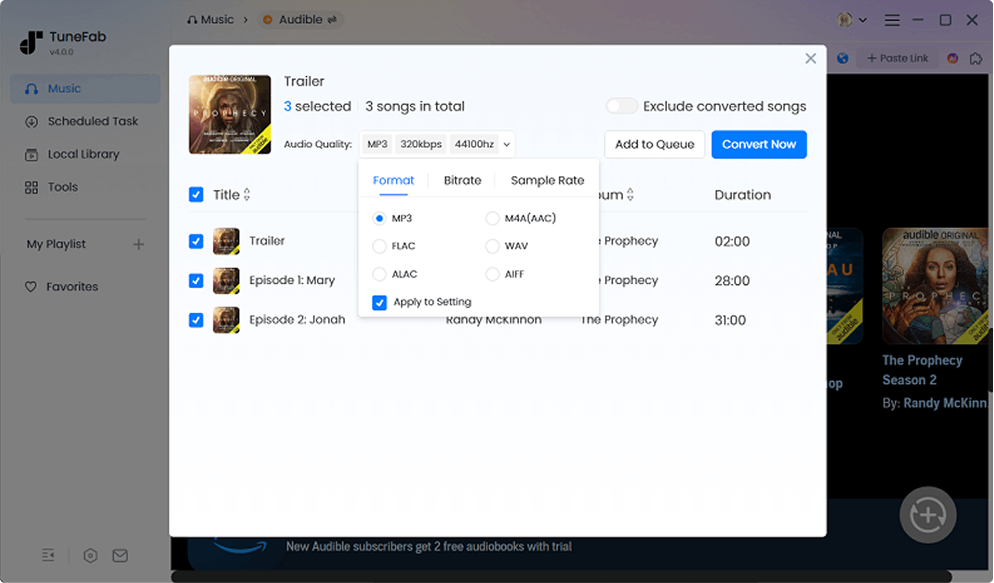
Step 4. Adjust the output format and quality.
Convert All Audiobooks to MP3
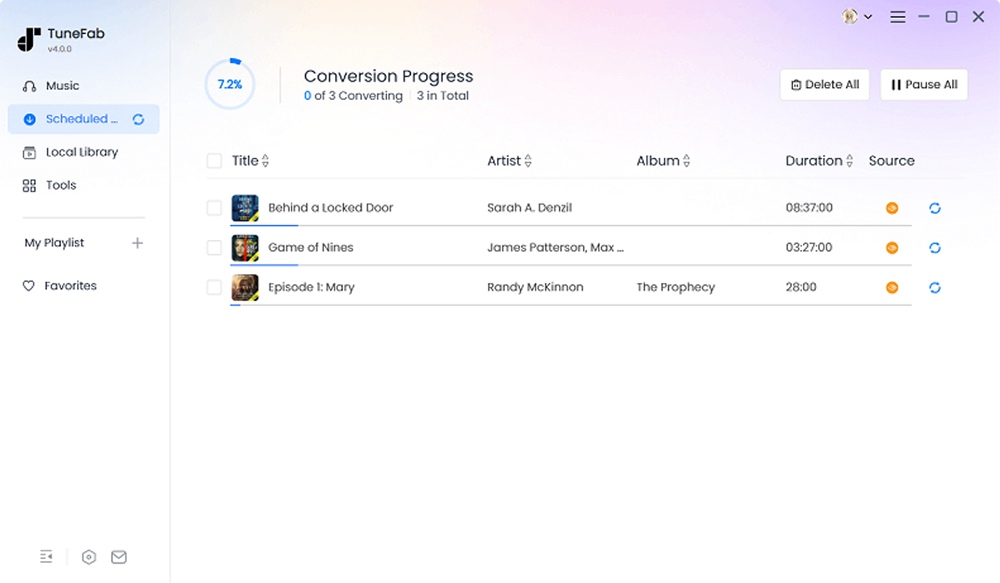
Step 5. After all settings, hit the Convert Now button at the top right. And books will be converted in the Scheduled Task section.

How TuneFab Users Feel

Wilson
Wilson

"A very intuitive desktop app. Works just as advertised removing protection from my audible books. Now I can listen to the audiobook on a lot more platforms."

Anderson
Anderson

"Been looking for software to convert my purchased Audible books to MP3 files. And this one works flawlessly! The whole process is super fast. Sound quality also seems perfect. Awesome TuneFab!"

Alise
Alise

"Very prompt and reliable customer service. The app is totally hassle-free. Even chapter data can be kept after conversion. Everything is just fine. Love this app."

Trust from 100+ Industry Experts

"TuneFab Audible Converter is the best alternative to Epubor Audible Converter. Unlike Epubor Audible Converter, which can only help you convert AAX files to MP3 and M4B, TuneFab's Audible Converter allows you to directly download Audible audiobooks not only to MP3 but also to M4A, WAV, and even FLAC. With this tool, you can enjoy your Audible books on more compatible devices you like."

SOFTPEDIA

"Leading the way in online audio decryption for Audible books, TuneFab Audible Converter is a top tool that enables you to convert the downloaded audiobooks from the Audible website to common audio formats. With it, you can get Audible files in various formats such as MP3 and FLAC, so that you can play the Audible offline on any unauthorized devices."

"With this Audible Converter, you can process the AA/AAX file conversion at up to 60X faster speed. What's more, if you have multiple audiobooks to be converted, it also offers you a batch conversion option so that you can download all Audible books with only one click, which really boosts great efficiency. "

"TuneFab Audible Converter is an all-featured audiobooks converter on the market. It is equipped with a built-in audiobook splitter that you can divide your AAX/AA Audible books into several parts by time/segments/chapters."

"This is a reliable and safe guaranteed program that is always ad-free. So, you don't need to worry about being required to install bundled software or causing potential security dangers. Moreover, the intuitive user interface makes it easier for you to handle the conversion process. It's really flawless every time!"

"TuneFab Audio Converter perfectly downloads Audible books to MP3. The highlight of this software is its splitting feature, which means you can divide a source AAX file into chapters and further segment each chapter into shorter tracks of roughly identical length. "

"TuneFab Audible Converter is the best alternative to Epubor Audible Converter. Unlike Epubor Audible Converter, which can only help you convert AAX to MP3 and M4B, TuneFab's Audible Converter allows you to download Audible audiobooks not only to MP3 but also to M4A, WAV, and even FLAC. With this tool, you can enjoy your Audible books on more compatible devices you like."

"Leading the way in online audio decryption for Audible books, TuneFab Audible Converter is a top tool that enables you to convert the downloaded audiobooks from the Audible website to common audio formats. With it, you can get Audible files in various formats such as MP3 and FLAC, so that you can play the Audible offline on any unauthorized devices."

"With this Audible Converter, you can process the AA/AAX file conversion at up to 60X faster speed. What's more, if you have multiple audiobooks to be converted, it also offers you a batch conversion option so that you can download all Audible books with only one click, which really boosts great efficiency. "

"TuneFab Audible Converter is an all-featured audiobooks converter on the market. It is equipped with a built-in audiobook splitter that you can divide your AAX/AA Audible books into several parts by time/segments/chapters."

"This is a reliable and safe guaranteed program that is always ad-free. So, you don't need to worry about being required to install bundled software or causing potential security dangers. Moreover, the intuitive user interface makes it easier for you to handle the conversion process. It's really flawless every time!"

"TuneFab Audio Converter perfectly downloads Audible books to MP3. The highlight of this software is its splitting feature, which means you can divide a source AAX file into chapters and further segment each chapter into shorter tracks of roughly identical length. "

FAQS about TuneFab Audible Converter

1. What're the limitations of a free trial version?

In the free trial version, you can download two full audiobooks at no cost. Once the free quota is used up, you will need to subscribe to a plan to continue converting.

2. Can I convert my Audible books without the Audible app?

Yes. TuneFab Audible Converter is embedded with the Audible site. You can easily log in to it, find and download your Audible books like you do on the official site on your computer.

3. Does the conversion process affect sound quality?

Audible’s highest quality uses the Advanced Audio Coding (AAC) codec with a variable bitrate of up to 128 kbps and a 44.1 kHz sample rate. Therefore, when downloading with TuneFab, if you choose M4A or MP3 with a bitrate higher than 128 kbps and a sample rate of 44.1 kHz, or select FLAC or WAV, you can preserve the original audio quality without any loss.

4. How do I keep chapter information?

To download Audible books with chapter information kept, you should select the output format as M4A before downloading.

5. Does my computer support TuneFab Audible Converter?

For Windows: Windows 7 or later on 64-bit.
For Mac: Mac OS X 10.15 or higher.

Give TuneFab Audible Converter A Try!

Download and convert Audible books for easy playback. Split your audiobooks. Organize your Audible purchases... And much more! Try it out today!

System Requirements:

Windows 7 or later on 64-bit.
Mac OS 10.15 or higher

Ratings:

4.8/5

try_star

1-Month: starting at $25.95
1-Year: starting at $55.95 ($4.66/mon)
Single Lifetime: starting at $69.95

Supported Formats:

MP3, WAV, FLAC, AIFF, M4A (AAC and ALAC codecs)

Click here to check full software updated history >>
streamer
Back to top
