


Listening to music has never been easier. Just turn on your device and log in to Spotify; thousands of songs are waiting for you to explore. But don't overlook one important issue: all these music resources are online. The Spotify app consumes significant data when loading and playing songs.
This guide will help you estimate how much data does Spotify use and share tips for controlling your data usage. That way, you can enjoy uninterrupted music playback while keeping your costs under control.
Spotify Data Usage: Estimates by Audio Quality
Spotify data usage is mainly affected by music playback duration and audio playback quality.
The first factor is easy to understand. You may need to focus on how the second factor affects data consumption.
Spotify currently offers four audio quality options. They are Low, Normal, High, and Very High. Each audio quality option consumes progressively more data. The following table lists the average data consumption for each quality level:
| Bitrate | Data Usage /4min | Data Usage /2h | Data Usage/Month (2 hours per day) | |
| Very High | 320 kbps | ~11 MB | ~330 MB | ~10 GB |
| High | 160 kbps | ~5.5 MB | ~165 MB | ~5 GB |
| Normal | 96 kbps | ~3.3 MB | ~100 MB | ~3 GB |
| Low | 24 kbps | ~0.8 MB | ~25 MB | ~750 MB |
Tips:
- If you watch the corresponding music video or podcast video while listening to music, your data usage will increase significantly.
- The software will cache the music you have played before. Repeatedly listening to songs you have saved will consume less data than listening to new songs.
How to Check Spotify Data Usage on Your Device
The above data and information are only estimates. You still need to check your device to get the accurate value of data usage for Spotify.
Here is how to check Spotify and data usage on your mobile device. This guide will cover both iPhone and Android.
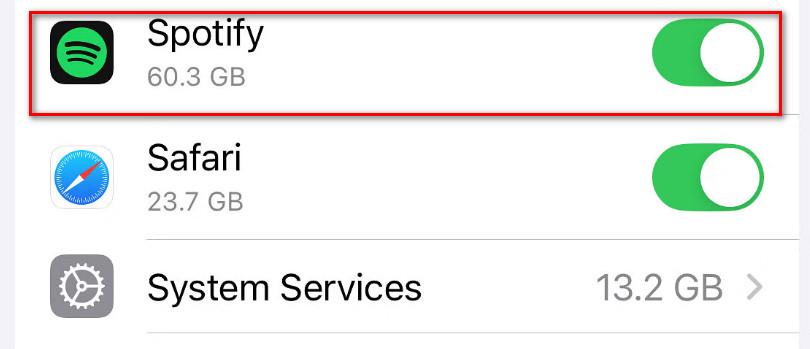
If you are using an iPhone, please refer to this section.
STEP 1. Open the Spotify app on your device.
STEP 2. Navigate to "Settings" and choose "Cellular" in the menu.
STEP 3. Then, scroll down and tap on "Spotify".
STEP 4. Under "Current Period", you’ll see the amount of mobile data used by the app.
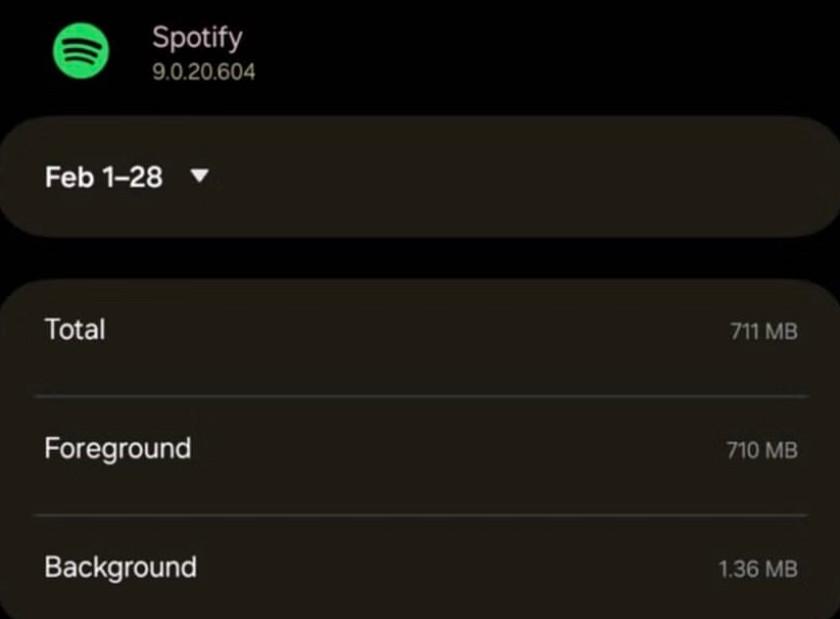
If you are an Android device user, please refer to this section.
STEP 1. Launch the Spotify app on your phone.
STEP 2. Choose the "Settings" option and tap on "Apps".
STEP 3. Find "Spotify" and select it.
STEP 4. View the data consumption under the "Usage" section.
How to Reduce Data Usage on Spotify
I have checked my data usage on Spotify. Is there anything I can do to reduce costs in the future?
Of course, in this section, you will find several useful tips.
Activate Spotify's Data Protection Program
Once the data protection program is activated, Spotify will reduce data usage by lowering audio quality and displaying smaller images.
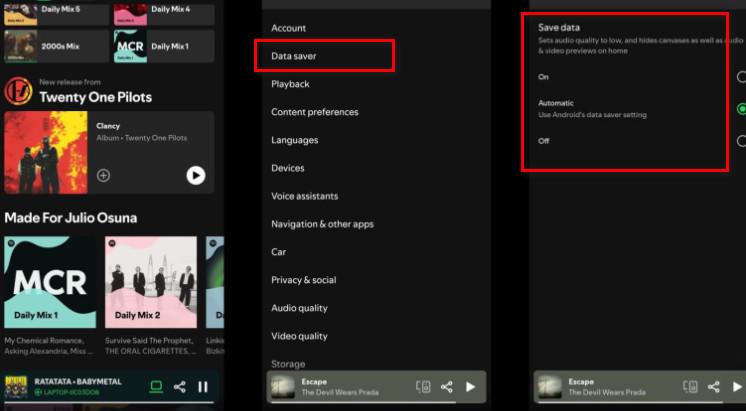
Here's how to turn on the data protection program.
STEP 1. Open the Spotify app.
STEP 2. Go to "Settings and Privacy".
STEP 3. Tap on "Data Saver".
STEP 4. You can choose to enable it just within Spotify or sync it with your device’s data saver settings.
Lower Spotify Audio Quality
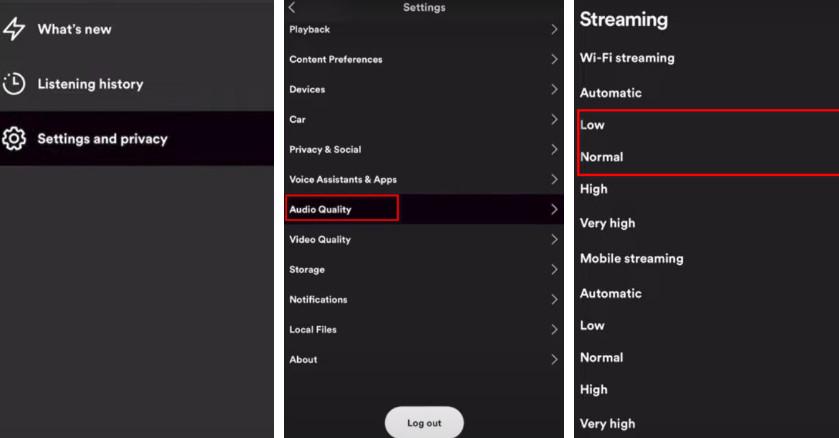
Spotify defaults to High audio quality, which provides a great music experience but will definitely consume more data.
STEP 1. You can open Spotify and go to "Settings" > "Audio Quality".
STEP 2. Then, select "Normal" or "Low". (This won't make a significant difference in audio quality.)
Use WiFi Whenever Possible
When there is a stable WiFi network in the surrounding environment, connect to it whenever possible. If you are in a store or other public place, you can ask the operator for the WiFi account and password. Minimize the use of cellular data.
Spotify may be a little unstable when switching networks. Read if you want to know how to fix Spotify saying offline.
Download Music for Offline Listening
You can download your favorite music, playlists, albums, or blogs in advance. After that, you can listen to them without connecting to the Internet. However, the download process will consume a lot of data. Therefore, you need to complete this operation in a WiFi environment.
Spotify officially provides an offline download feature. Just find the content you want to download and click the download button next to it.
However, please note that Spotify only allows Premium users to use the offline download feature.
Tips: When listening to Spotify music abroad, it is best to ensure that you are connected to a WiFi network. If you must use mobile data, please check your plan and understand the roaming charges beforehand.
Listen to Spotify Offline: Download Music as MP3 for Zero Data Streaming
However, Spotify does not allow you to save downloaded audio as MP3 or other common data formats. Furthermore, you can only listen to downloaded files within the app.
Is there any way to break through this restriction and truly own these songs?
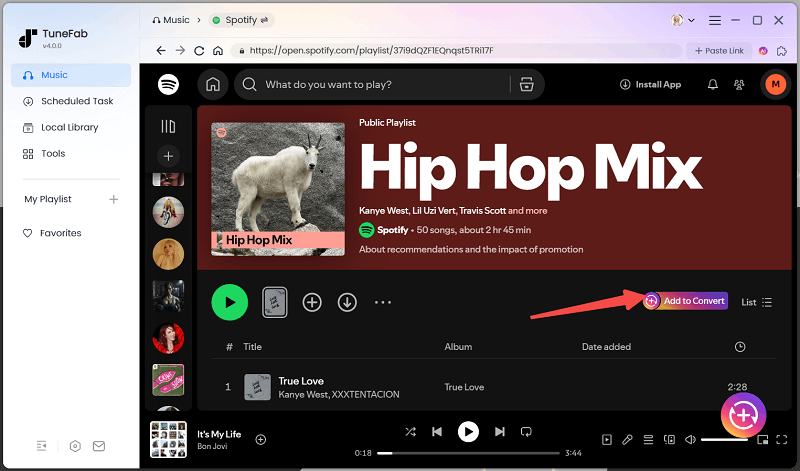
The solution is to use the most professional third-party software - TuneFab Spotify Music Converter. This tool allows users to convert Spotify songs to MP3. And it will guarantee 100% lossless audio quality. Whether you select songs, albums, playlists, or podcasts, TuneFab Spotify Music Converter can batch download music at 35X faster efficiency.
Most importantly, you don't need to be a Spotify Premium user to download audio with this software.
Features of TuneFab Spotify Music Converter
- Allow users to easily batch download Spotify songs, playlists, albums, podcasts, and more.
- Support downloading Spotify songs to MP3, M4A, FLAC, AIFF, AAC, and ALAC formats.
- Supports customizable music output quality, up to 320kbps and 48kHz.
- Utilizes advanced hardware acceleration technology to achieve 35X faster music download speeds.
- Retain music metadata, including title, artist, album cover, and track ID.
- Support users to preset download file titles for classification.
FAQs About Spotify Data Usage
How Much Data Does Spotify Use Per Hour?
There is a formula you can refer to to calculate the data usage per hour for playing songs at different audio qualities:
MB = kbps × time/second ÷ 8 ÷ 1024.
According to the calculation:
Low: 24 × 3600 ÷ 8 ÷ 1024 ≈ 10.5 MB
Normal: 96 × 3600 ÷ 8 ÷ 1024 ≈ 42.2 MB
High: 160 × 3600 ÷ 8 ÷ 1024 ≈ 70.3 MB
Very High: 320 × 3600 ÷ 8 ÷ 1024 ≈ 140.6 MB
Apple Music Data Usage V.S. Spotify: Are They the Same?
No. If you compare the two, you may find that Apple Music and Spotify both offer users several different audio playback quality options. Indeed, each option corresponds to different data consumption.
When the sound quality is relatively low, you may not notice any difference between the two software programs. However, once you adjust the quality to High or Very High, Apple Music consumes significantly more data than Spotify.
Conclusion
You can estimate how much data does Spotify use based on how long you listen and the audio quality settings. This guide outlines approximate usage for different quality levels. To check exact figures, refer to your device’s data records.
While downloading music is the most effective way to reduce data usage, Spotify’s built-in download feature comes with restrictions. A more flexible and affordable solution is to use TuneFab Spotify Music Converter. It offers efficient performance, supports various audio formats, and helps you enjoy your music at minimal cost.

