


Lately, a lot of people have been asking: Can Rekordbox actually work with Apple Music? To be honest, if you'd asked that a year ago, the answer would've been "no." But things are different now. Since March 2025, Apple Music and Rekordbox have officially teamed up. You just log into your Apple Music account right inside the software, and you've got access to its complete library. It's honestly something a lot of DJs have been waiting for.
However, as convenient as this official integration is, there are still some limitations. If you want to know exactly what those limits are, what features actually work, and how to connect and play Apple Music in Rekordbox, this article will walk you through everything. Just keep reading!
How to Use Apple Music in Rekordbox
Getting Apple Music working in rekordbox is fairly simple once you have the right version and subscription. Here is the quickest way to connect it and start streaming inside the software.
What you'll need
Before you start, make sure you have these basics ready:
- The latest compatible version of rekordbox or supported hardware firmware
- An active Apple Music subscription
- A stable internet connection
Quick tip: Apple Music security updates have affected compatibility before, so it is worth checking AlphaTheta’s latest official support page and updating to the newest supported version first.
How to Connect AM to Rekordbox
Once you've got those sorted, just follow the steps below to sign in and start using it.
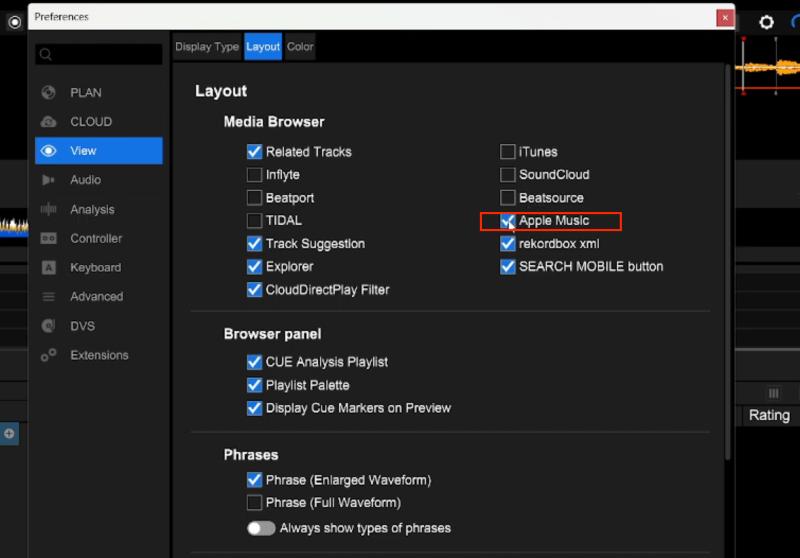
Step 1. Open Rekordbox and log in to your Rekordbox account. Then go to "Preferences" and then navigate to Layout > View to check Apple Music.
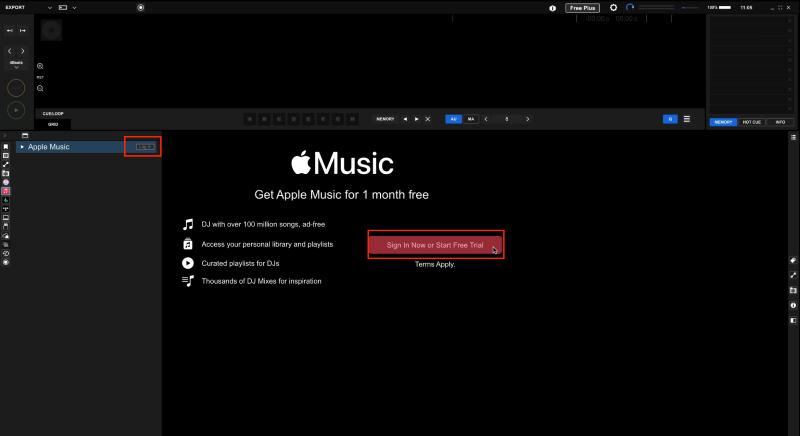
Step 2. Then find the "Apple Music" icon in the left sidebar. Click the "Sign In Now or Start Free Trial" button to log in to your Apple ID and authorize the connection.
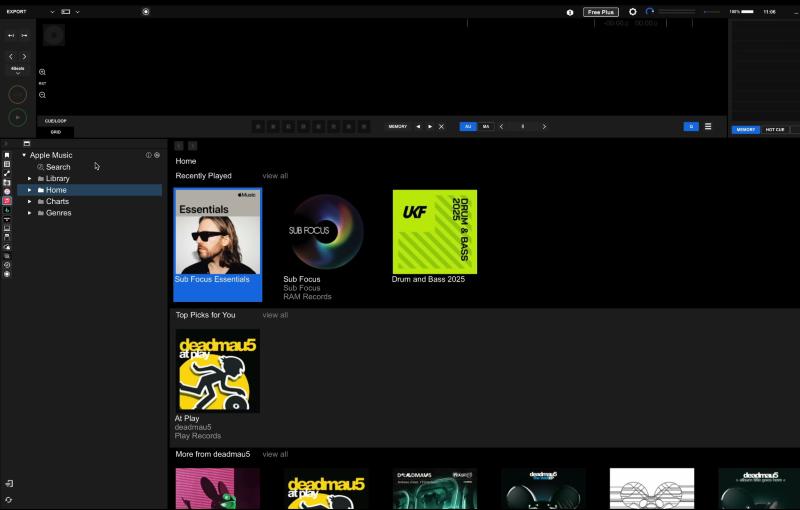
Step 3. After you finish the steps in the pop-up page, go back to Rekordbox. Your Apple Music library will load right away in the center panel of the program interface.
What You Can/Cannot Do with Apple Music in Rekordbox
Once Apple Music is connected, the main benefits are easy track access, streaming-based discovery, and quick mixing inside rekordbox. Here are the most useful things this integration gives you.
What You Can Do with Apple Music in Rekordbox
1. Browse and search the full Apple Music catalog
Once Apple Music is connected, you can browse and play over 100 million tracks right inside Rekordbox. That includes your saved songs, playlists, and albums. You can also use the search bar to find any track you're looking for.
Tips: The latest version of Rekordbox has improved browsing features for streaming services, so you can find tracks quickly using artist images and album artwork.
2. Streaming Radar
Streaming Radar looks at the track you're currently playing, its style, BPM, and key, and automatically suggests songs from your Apple Music library that fit well in terms of tempo and key. It's a handy way to find tracks that work together for mixing.
3. Collaboration Playlist
Any playlist you create in Rekordbox (including ones with Apple Music tracks) can be turned into a shareable link. Send it to someone else, and they can open it and add their own tracks. Changes show up in real time, so everyone sees the latest version. This is perfect for back-to-back sets or discovering new music together.
4. Basic mixing with Apple Music tracks
Once connected, you can load Apple Music tracks onto a deck and use most basic mixing controls, such as tempo adjustment, EQ, effects, and fader transitions. That is enough for a lot of practice and casual mixing, but it still does not mean the workflow is identical to using full local files in Rekordbox.
For beginners or anyone wanting to quickly explore new tracks without the hassle of importing local files, these features cover most of what you'd need. It's fast and convenient.
What You Can’t Do with Apple Music in Rekordbox
Apple Music support in Rekordbox is convenient, but it still comes with some important limits. Before you rely on it in a real DJ setup, here are the main restrictions to know.
No Offline Use or USB Export
Apple Music tracks in rekordbox are streaming-based, not normal local DJ files. That means you need an internet connection to use them, and you cannot export them to a USB drive or SD card through Rekordbox. If your workflow depends on offline playback, USB export, or CDJ use without streaming, Apple Music in rekordbox will feel limited.
Supported Hardware Is Still Limited
Direct Apple Music access on standalone hardware is currently centered on supported models such as the OMNIS-DUO, XDJ-AZ, and CDJ-3000X. If your setup depends on older players or a more traditional USB-based workflow, you should not assume Apple Music streaming will behave the same way.
Some Advanced Features Still Do Not Work
Apple Music tracks do not support Stems in rekordbox right now, so you cannot separate vocals, drums, or instruments for remixing. Rekordbox’s built-in recording function also cannot be used with Apple Music streaming tracks because of the streaming service's copyright restrictions.
Streaming Quality Is Not the Same as a Full Local-File Workflow
Apple Music streams at AAC 256kbps in Rekordbox. That is usually fine for casual practice and track discovery, but it is still different from working with high-bitrate or lossless local files in a more controlled DJ setup.
Is Apple Music in Rekordbox Enough for DJing?
Apple Music in Rekordbox is good enough for practice, track discovery, and casual mixing, but it is not a full replacement for a local-file DJ setup.
If you are just learning, mixing at home, or testing new transitions and track combinations, the feature is convenient. You can access a large music library quickly without building a full local collection first, and for everyday practice, basic mixing tasks are usually enough.
But for more serious DJ use, the answer is different. If you play gigs regularly, depend on USB export, or need a more stable live workflow, Apple Music streaming in rekordbox still has clear limits. Internet reliability, hardware compatibility, built-in recording limits, and missing export options matter much more in real performance settings.
So the short answer is this: Apple Music in Rekordbox is strong for practice and music exploration, but it is still not the safest choice for a full professional DJ workflow.
When Local Files Still Make More Sense
If you play on older gear, rely on USB export, need built-in recording, or want more dependable control in live settings, local files are still the safer fit. In that case, a dedicated local-file route may make more sense than relying on Apple Music streaming alone. For that kind of workflow, see [ Convert Apple Music to Local Files for Live Performance ].
Conclusion
Rekordbox does now officially support Apple Music, and for practice, music discovery, and casual mixing, that can be genuinely useful. But whether it is enough depends on your setup. If you rely on USB export, older hardware, built-in recording, or a more dependable live workflow, local files are still the safer route.

