


For the 100 million+ content creators worldwide, including bloggers, music producers, and video editors, having high-quality WAV files from SoundCloud is essential. WAV format preserves lossless audio quality, making it perfect for remixing, sampling, or professional editing.
However, downloading your favorite SoundCloud to WAV tracks for offline use remains a challenge, because SoundCloud doesn't officially support you downloading music to WAV, even if you are a subscriber to SoundCloud Go or Go+. Fortunately, there are many SoundCloud to WAV downloaders in the market that can help you enjoy music in WAV format. This post will cover all kinds of them, ranging from desktop, mobile, and web-based ones. Now, let's dive in.
You May Like:
4 Best Ways to Download SoundCloud to FLAC in 2025
How to Download SoundCloud to M4A: 3 Easy Ways
How to Download Music from SoundCloud to AIFF (100% Working)
- Best 4 SoundCloud to WAV Downloaders: Detailed Review
- Top 1. TuneFab SoundCloud Music Converter
- Top 2. Soundcloudrips
- Top 3. OKmusi
- Top 4. scdl SoundCloud Downloader
- Tip: Download SoundCloud to WAV Directly from the SoundCloud Website
- Discover the Benefits of Downloading WAV Files with the Right Tool
- Comparison of the 4 Soundcloud Downloaders to WAV
- FAQs About SoundCloud to WAV
Best 4 SoundCloud to WAV Downloaders: Detailed Review
Top 1. TuneFab SoundCloud Music Converter
Instead of downloading SoundCloud tracks one by one, TuneFab SoundCloud Music Converter is a SoundCloud Playlist to WAV downloader that enables you to download SoundCloud playlists in bulk. This delivers ultimate efficiency. That’s why we recommend this method to you at the very first.
Here we go with the TuneFab SoundCloud Music Converter, the best SoundCloud to WAV converter you can rely on. Benefiting from the powerful web player, it enables you to download music from SoundCloud to your computer effortlessly. No expertise is required. Simply drag & drop as instructed, you can get lossless tracks in WAV, FLAC, 320kbps MP3, and more high-quality formats in a few minutes. Below are more highlights that make it outstanding.
Key Features of TuneFab SoundCloud Music Converter
- Retain SoundCloud tracks to lossless WAV, FLAC, 320kbps MP3, and more compatible audio formats
- Download all audio content including singles/albums/playlists/podcasts/audiobooks, etc., without subscribing to SoundCloud Go or Go+
- Save entire playlists/albums/singer homepage songs in bulk, with a download speed of 35X or higher
- Keep ID3 tags and metadata info including artist name/album cover/album name/album ID, etc., for easy management anywhere
- Drag and drop to download tunes within the versatile web player
Below you will find easy steps to download SoundCloud to WAV with TuneFab SoundCloud Music Converter.
Step 1. Log into the SoundCloud Web Player
Download and install the TuneFab SoundCloud Music Converter to your computer. Then, launch it, select SoundCloud as the proceeding platform, and log into the built-in web player with your account.
Step 2. Add Tunes to Conversion List
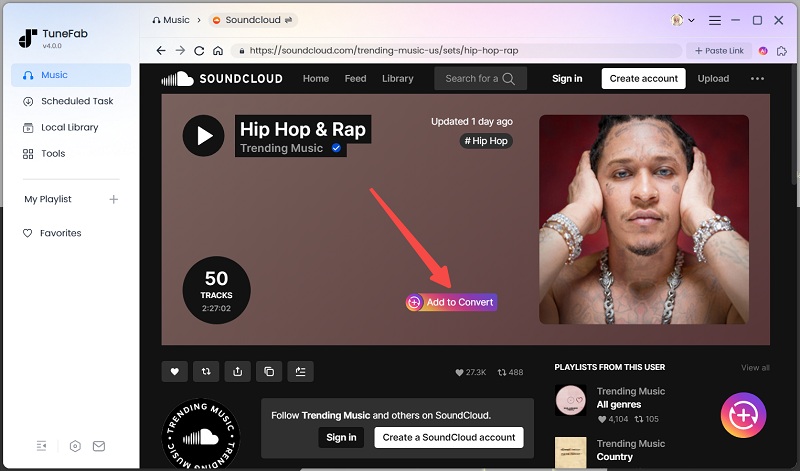
Search for the audio you want to save with keywords or URLs. On the result page, drag & drop the title to the red "+" button floating on the right screen. Besides adding multiple singles at once, it also supports playlists, albums, and podcasts.
Step 3. Set Output Format and Other Parameters
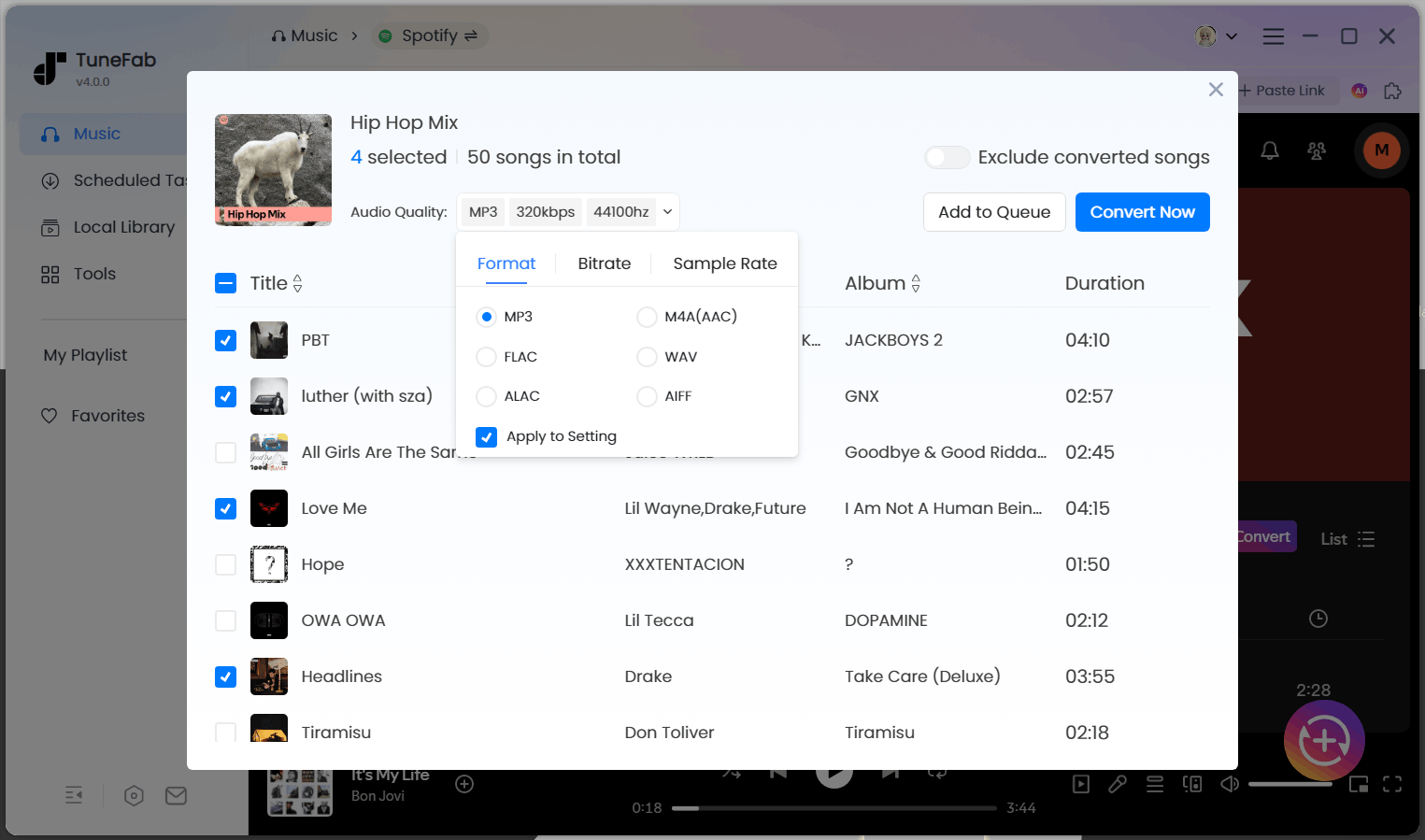
After the tool finishes parsing, you can set the output format and customize other parameters. Select "WAV" from the dropdown menu for any title and click "Apply to All", then all added tunes will be saved in WAV. For more settings such as output folder, bitrate, sample rate, etc., please click the "Setting" (three-line icon) button and go to "Preferences".
Step 4. Download and Check SoundCloud Music
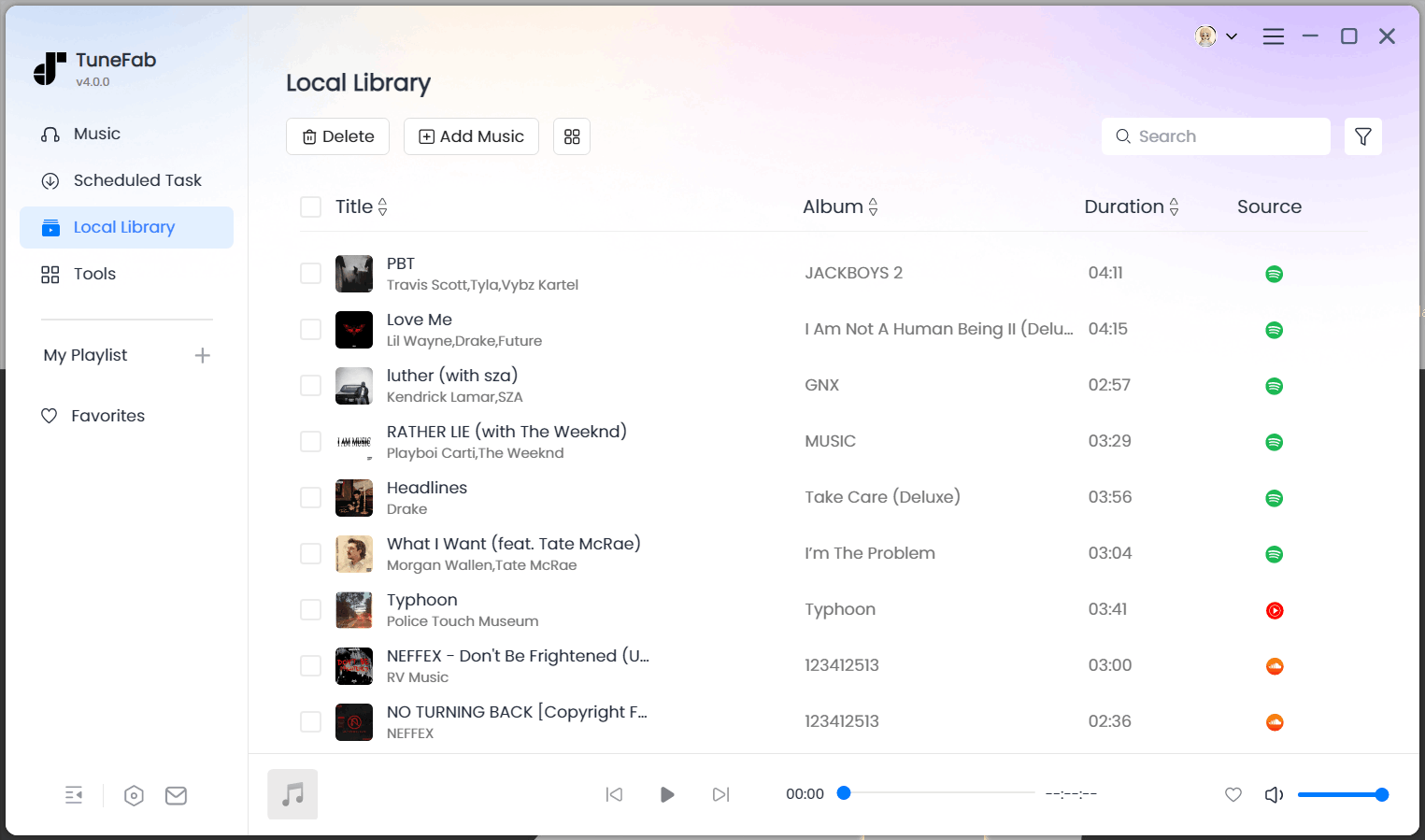
Switch back to the conversion list, click "Convert All", and TuneFab will start downloading added SoundCloud tracks. To check the files on your computer, please go to the "Finished" tab and click the folder icon next to each song.
Pros:
- 35X faster batch conversion for multiple tracks simultaneously.
- Works with 8+ streaming services, including SoundCloud, Spotify, and Apple Music.
- Save SoundCloud files to WAV, FLAC, MP3, AIFF, M4A, ALAC, AAC for flexibility.
- Save all SoundCloud music content forever, even without a subscription.
- Keeps artist, album, cover art, and track info intact for organization.
Cons:
- Requires upgrading to the full version to unlock full-length track downloads.
Top 2. Soundcloudrips
If you want to download music from SoundCloud for free without installing additional software, an online WAV downloader, like soundcloudrips.com, is an excellent option. Unlike dedicated software, online tools allow you to keep SoundCloud to WAV directly from your browser, with no registration required. It is particularly helpful for those who do not download SoundCloud frequently.
It's undeniable that Soundcloudrips.com stands as one of the most widely used online tools for converting SoundCloud tracks to WAV format, but it's also important to note that this tool only supports single-track downloads. For creators or listeners looking to download entire playlists in WAV format, you'd better switch to TuneFab SoundCloud Music Converter, which offers 35X faster batch conversion for SoundCloud playlists.
Below is a quick guide to using Soundcloudrips:
Step 1. Go to the SoundCloud webpage, find the track you want to download, and click the “Copy Link” button under the soundwave.
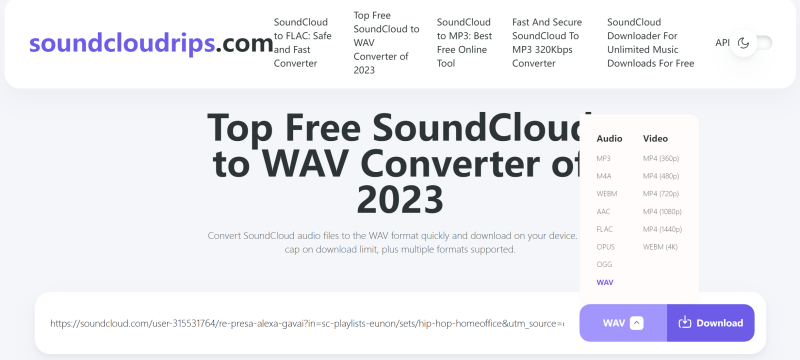
Step 2. Go to soundcloudrips.com, paste the copied URL to the search bar, and select “WAV” as the audio format from the drop-down menu.
Step 3. Click the “Download” button, and the file will be automatically saved to your device.
Pros:
- No hidden fees or account sign-up required.
- Works directly in your browser with no software installation.
- It can be used on smartphones and tablets.
Cons:
- Cannot download entire playlists or albums.
- Output varies from 128kbps to 256kbps, depending on the source, which is lower than TuneFab's 320kbps WAV output.
- The interface contains ads and pop-up redirects.
Top 3. OKmusi
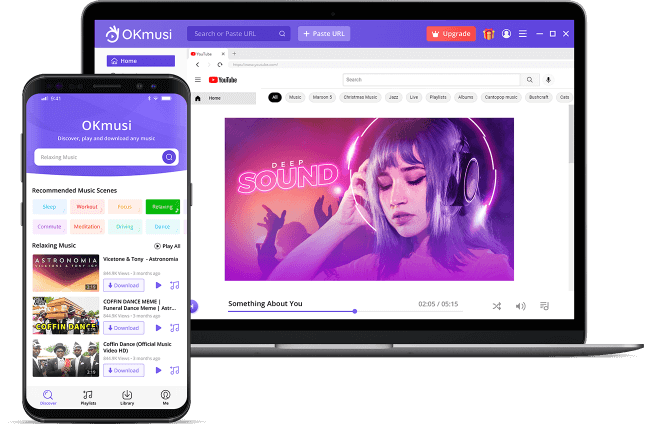
OKmusi offers a versatile SoundCloud to WAV downloader with both online and app versions. The platform supports Android, iOS, Windows, and Mac, making it accessible across devices. If you use its web-based version to download SoundCloud online, you can only get output MP3 at 128kbps. While if you use its pro version to convert SoundCloud by installing its app on desktop or mobile, you can easily convert SoundCloud to WAV for free with 5 downloads per day. Now, follow the guide below to use OKmusi.
Step 1: Navigate to SoundCloud's official website or app, browse to your desired track, and copy the URL from the address bar.
Step 2: Access OKmusi's SoundCloud to WAV Converter and paste the copied link into the designated input field. Click the "Download" button to proceed.
Step 3: Choose your preferred audio quality from the available WAV format options. Confirm your selection by clicking the final "Download" button to save the converted file to your device.
Pros:
- Seamless experience across all major operating systems.
- Desktop version offers lossless WAV up to 320kbps.
- No intrusive ads compared to similar web tools.
Cons
- Desktop version limits to 5 conversions/day.
- Require premium account to download SoundCloud to WAV.
- The web version only supports MP3 output with a max 128kbps quality.
Top 4. scdl SoundCloud Downloader
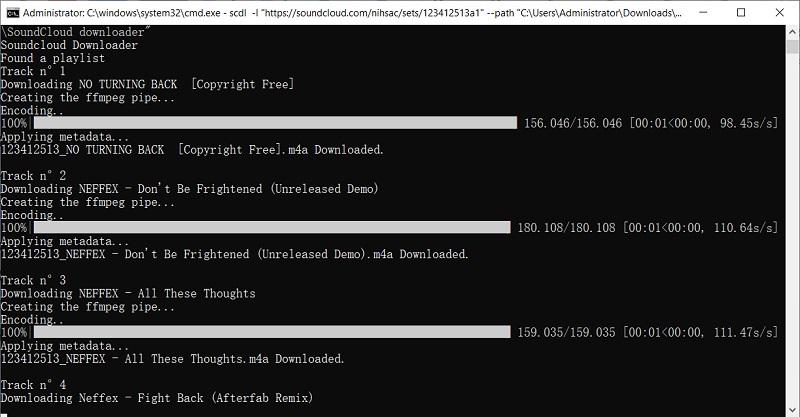
scdl SoundCloud Downloader is a powerful free and open-source SoundCloud downloader that operates via command line interface. This tool can download both individual tracks and full playlists from SoundCloud to WAV if available from the source, which means if the music source can't support WAV output, you need to use another converter to download the files to WAV with quality remaining limited to the original source.
How to install scdl to download SoundCloud to WAV:
Step 1: Install scdl to your computer with pipx:
brew install ffmpeg
pipxpipx install scdl
Step 2: Update this tool: pipx upgrade scdl. Then install it with PIP: pip3 install scdl.
Step 3: Update again: pip3 install scdl --upgrade. Then install it from the GitHub repo: pip3 install git+GitHub - scdl-org/scdl: Soundcloud Music Downloader
Step 4: Get the final update: pip3 install git+GitHub - scdl-org/scdl: Soundcloud Music Downloader --upgrade.
Step 5: Once you install successfully, you can now use it to convert SoundCloud to WAV for offline listening.
Pros
- Free open-source SoundCloud to WAV converter.
- Download music to WAV with original quality.
- Support full playlist download.
Cons
- Difficult to use.
- It depends on source file availability.
Tip: Download SoundCloud to WAV Directly from the SoundCloud Website
As mentioned, there are chances that you can download WAV on your computer from the SoundCloud website. This way, you do not need to install software, too.
However, it’s important to note that you can’t preview the audio details before getting the file. You can only know the format and quality after downloading the track. It is common to find that the downloaded audio is MP3 rather than WAV. In this case, you need to take further steps to convert MP3 to WAV.
Anyway, this method still works. Let’s dive into how you can make it.
Step 1. Log into your SoundCloud account.
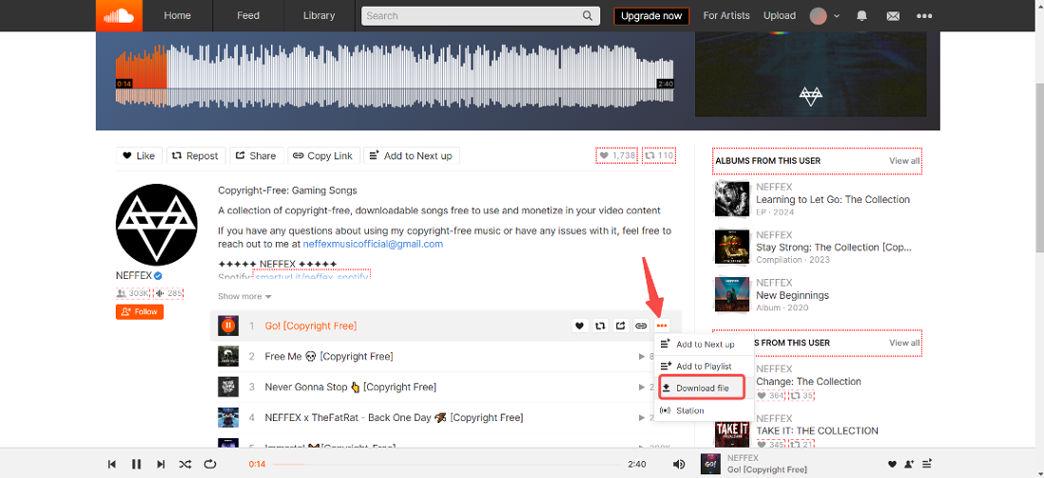
Step 2. Browse to find the track or playlist you want to download. Then, go to the detail page to check if there is a download button below the track's waveform.
Step 3. If the download button is available, click it, and the track will be downloaded.
Discover the Benefits of Downloading WAV Files with the Right Tool
For music producers, podcasters, and audiophiles, using a professional SoundCloud to WAV downloader unlocks critical pros over standard MP3 tools. Here’s why industry experts prioritize WAV:
-
Studio-Grade Audio Fidelity: Lossless uncompressed format preserves every nuance of the original recording, which is essential for audio engineers, musicians, and Hi-Fi enthusiasts.
-
Seamless Audio Editing: For Audacity, Adobe Audition, and Logic Pro workflows, zero quality degradation during remixing, mastering, or sampling.
-
Reliable Offline Archiving: WAV creates permanent local backups immune to streaming removals or platform changes.
- Universal Playback Compatibility: Popular WAV format directly compatible with DJ controllers, car audio systems, and pro gear, you can play natively on any device.
- Ad-Free Listening Experience: By converting SoundCloud to WAV, you can remove ads, pop-ups, and streaming interruptions.
Comparison of the 4 Soundcloud Downloaders to WAV
Choosing the right SoundCloud to WAV converter dramatically impacts your audio quality and workflow efficiency. Below we compare the top tools across critical dimensions:
| Feature | TuneFab | Soundcloudrips | OKmusi | scdl |
| Best For | Producers/DJs | Casual Listeners | Mobile Users | Developers/Tech Users |
| Max Quality | 320kbps (Lossless) | 128kbps-256kbps | 128kbps-320kbps (Premium needed for 320kbps) |
Depend on original source quality |
| OS Support | Win/Mac | Web Only | Win/Mac/Android/iOS/Web | Win/Linux/Mac |
| Ease of Use | Easy | Easy | Easy | Hard |
| Playlist Support | ✅ | ❌ | ✅ | ✅ |
| Overall Rating (10) | 9.5 | 6 | 7 | 8.5 |
FAQs About SoundCloud to WAV
Can I Download SoundCloud to WAV on Phone?
Yes, you can download SoundCloud to WAV on your phone. An online SoundCloud to WAV downloader like soundcloudrips.com is a good tool to get along with.
However, please always be cautious when using these free online tools. The operator makes profits by displaying ads on the homepage. They will also redirect you to other unfamiliar websites for each download. This can cause a high risk of privacy leakage.
For a safer experience, we highly recommend you try an ad-free desktop downloader like TuneFab SoundCloud Music Converter. It offers a safer and more stable downloading experience. You can first download music from SoundCloud to a Mac or Windows computer and then transfer the downloaded WAV files to your phone.
Why Choose WAV Instead of FLAC?
WAV and FLAC are both lossless audio formats that preserve the original sound quality and offer high-fidelity audio. However, WAV excels in compression rate. While the average compression rate for FLAC files is 60%, WAV files don't use any compression. Therefore, you can enjoy the audio in its purest form with WAV format. The only trade-off is that WAV files are much larger than FLAC files.
Due to its uncompressing feature, WAV is commonly used in industries that require top-notch audio quality. For example, music production, podcasting, filmmaking, and the like. It's also ideal for audio engineers and sound designers who need to work with raw, uncompressed audio without losing detail. It also remains the preferred choice for those who prioritize optimal sound quality and don't mind larger file sizes.
Conclusion
Downloading SoundCloud to WAV can be easy with this guide. It offers step-by-step guides with 4 powerful tools. If you expect the most efficient and lossless listening experience, never miss the TuneFab SoundCloud Music Converter. With it, you can download more than a single track, but all content including playlists, podcasts, audiobooks, etc. on SoundCloud in batches. Try it now to take your smooth SoundCloud to WAV downloading experience to a new level!

