


Summary:
To download music from SoundCloud to Mac, first check if the track has a “Download File” button. This option usually appears when the artist has enabled it.
If not, you can use third-party tools like TuneFab SoundCloud Music Converter to download SoundCloud music as lossless MP3 files, which can save and listen to your favorite tracks offline, even after your SoundCloud subscription ends.
100% Secure
100% Secure
SoundCloud is a fantastic platform for discovering and streaming music, hosting over 320 million tracks from emerging artists and established creators alike. SoundCloud allows its users of SoundCloud Go and Go+ to download music offline, but this feature is limited to the mobile apps on Android and iOS, not macOS.
On the SoundCloud website, downloading is only possible if the uploader has manually enabled the “Download File” option, which leaves a large number of tracks unavailable for direct download. If you want to download music from SoundCloud to Mac, including songs that don't have a download button, you'll need alternative solutions. This guide will show you 3 different ways to download SoundCloud music to your Mac, ensuring you can enjoy your favorite tunes anytime, anywhere.
1. How to Download Music from SoundCloud to Mac Losslessly (Any Track)
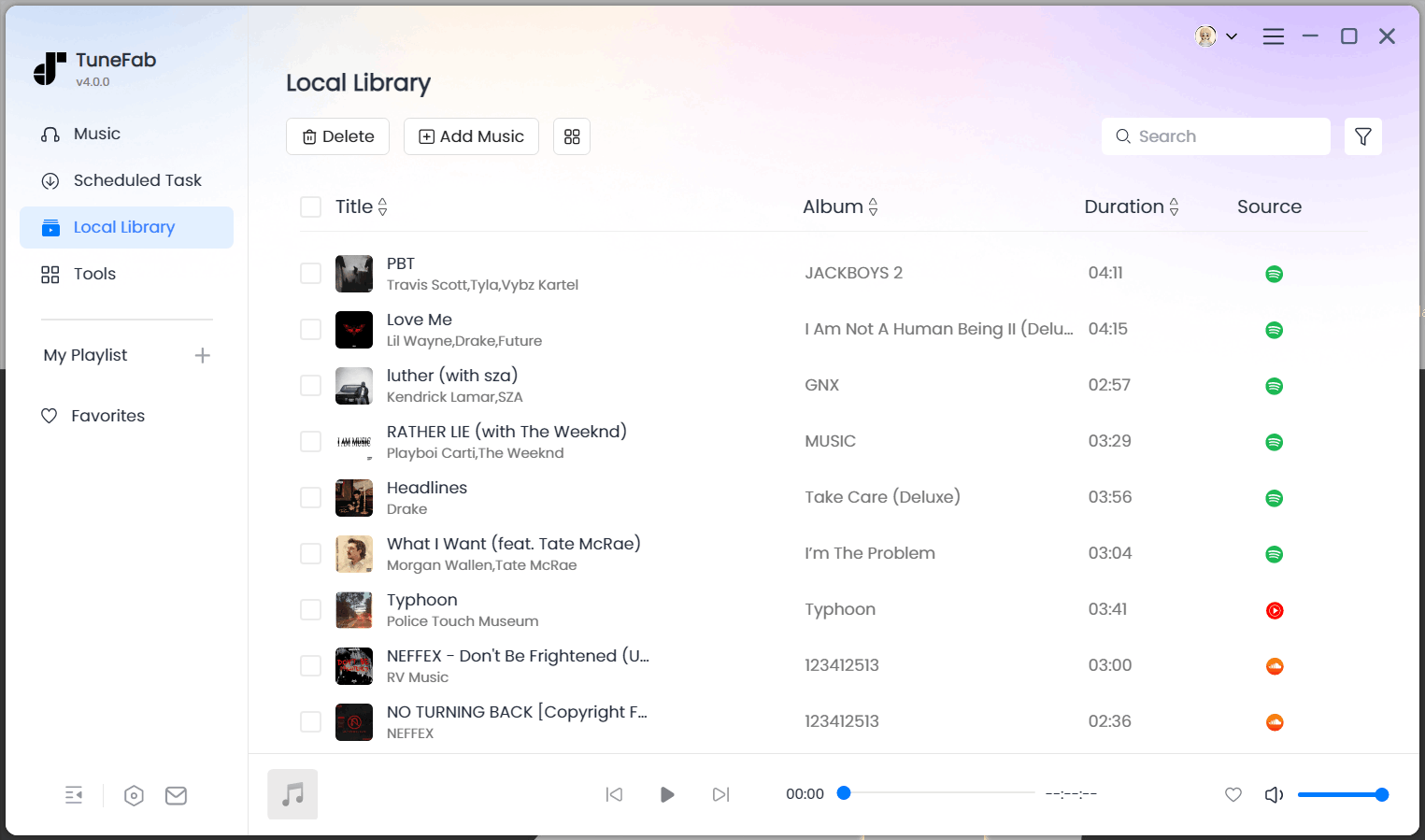
To download any track from SoundCloud to Mac without losing quality, the best way is to use TuneFab SoundCloud Music Converter. It is one of the best SoundCloud downloaders and offers an easy and efficient solution to bypass restrictions and download SoundCloud music in various formats, such as MP3, WAV, and FLAC, with lossless original sound quality.
The downloads are DRM-free, so you can transfer them to any device you want for offline streaming anytime, anywhere, whether you are on road trips or losing the internet connection.
Key Features of TuneFab SoundCloud Music Converter:
- Easily download SoundCloud for Mac via the built-in web player.
- Retain the original lossless audio quality of SoundCloud music.
- Batch convert SoundCloud songs, playlists, and albums at 35X faster speed on Mac.
- Support multiple output formats including MP3, WAV, FLAC, M4A, ALAC, AIFF, AAC, and more.
- Fully preserve all ID3 tags, including artist name, album title, and cover art, for a complete SoundCloud for Mac download experience.
No more waiting – let's get started with TuneFab SoundCloud Music Converter to download music from SoundCloud to Mac!
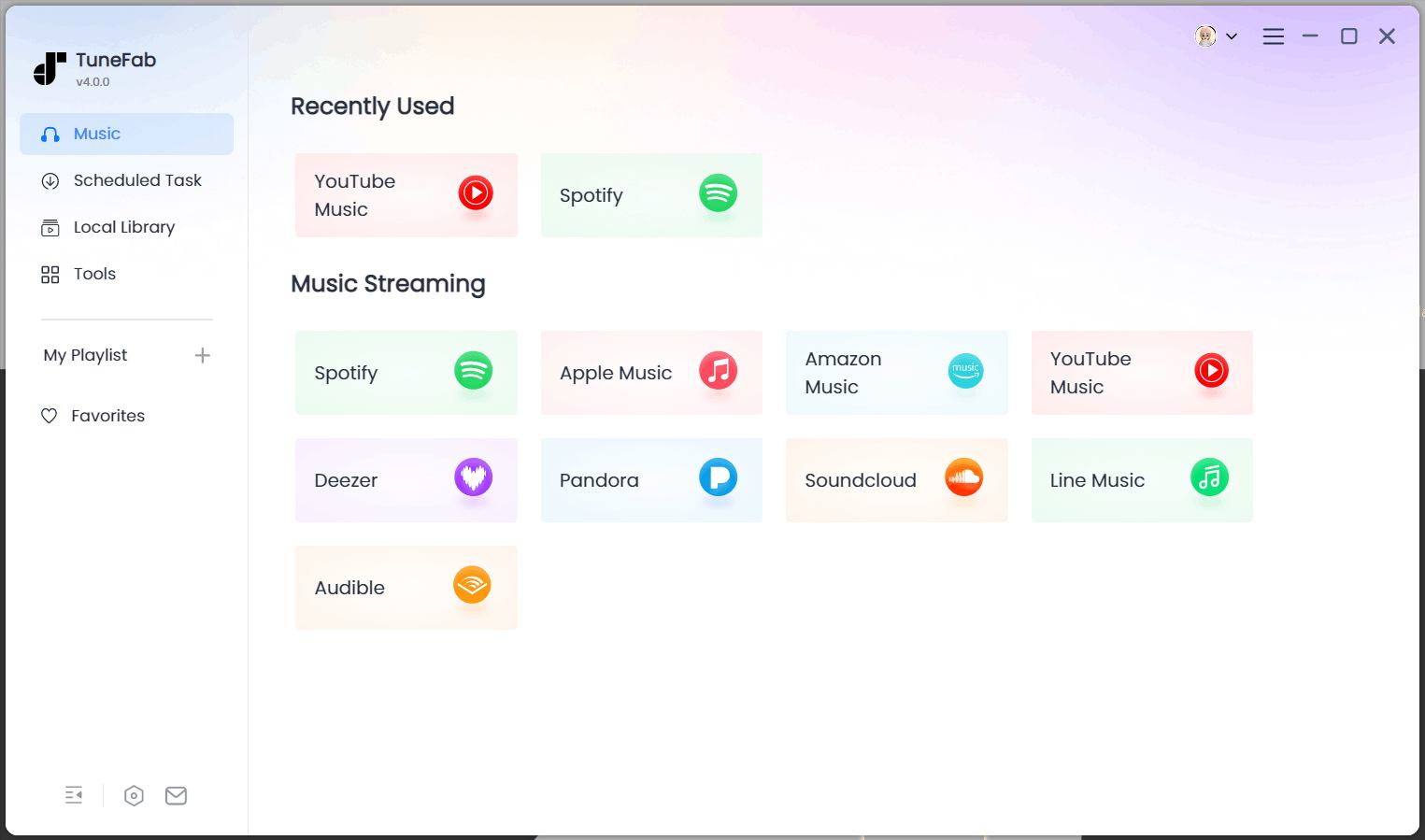
STEP 1. Download and install TuneFab SoundCloud Music Converter on your Mac. Select "SoundCloud" as the steaming platform and sign in to your account to access the web browser.
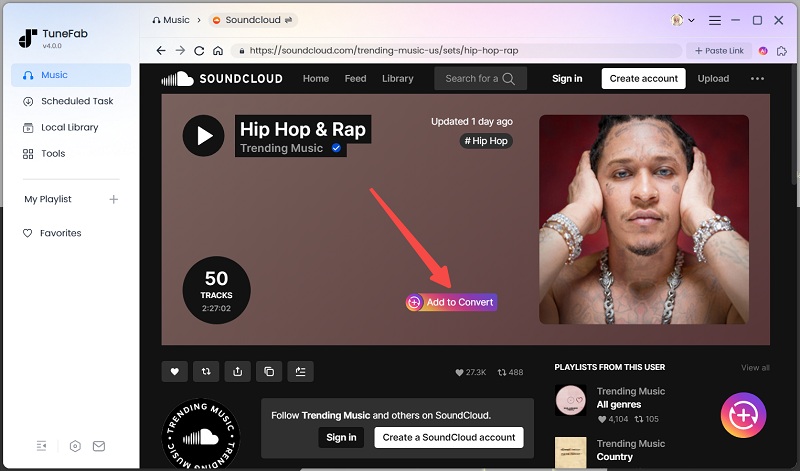
STEP 2. Browse the SoundCloud music library, find the tracks you want to download, and drag them to the converting list or the "+" icon.
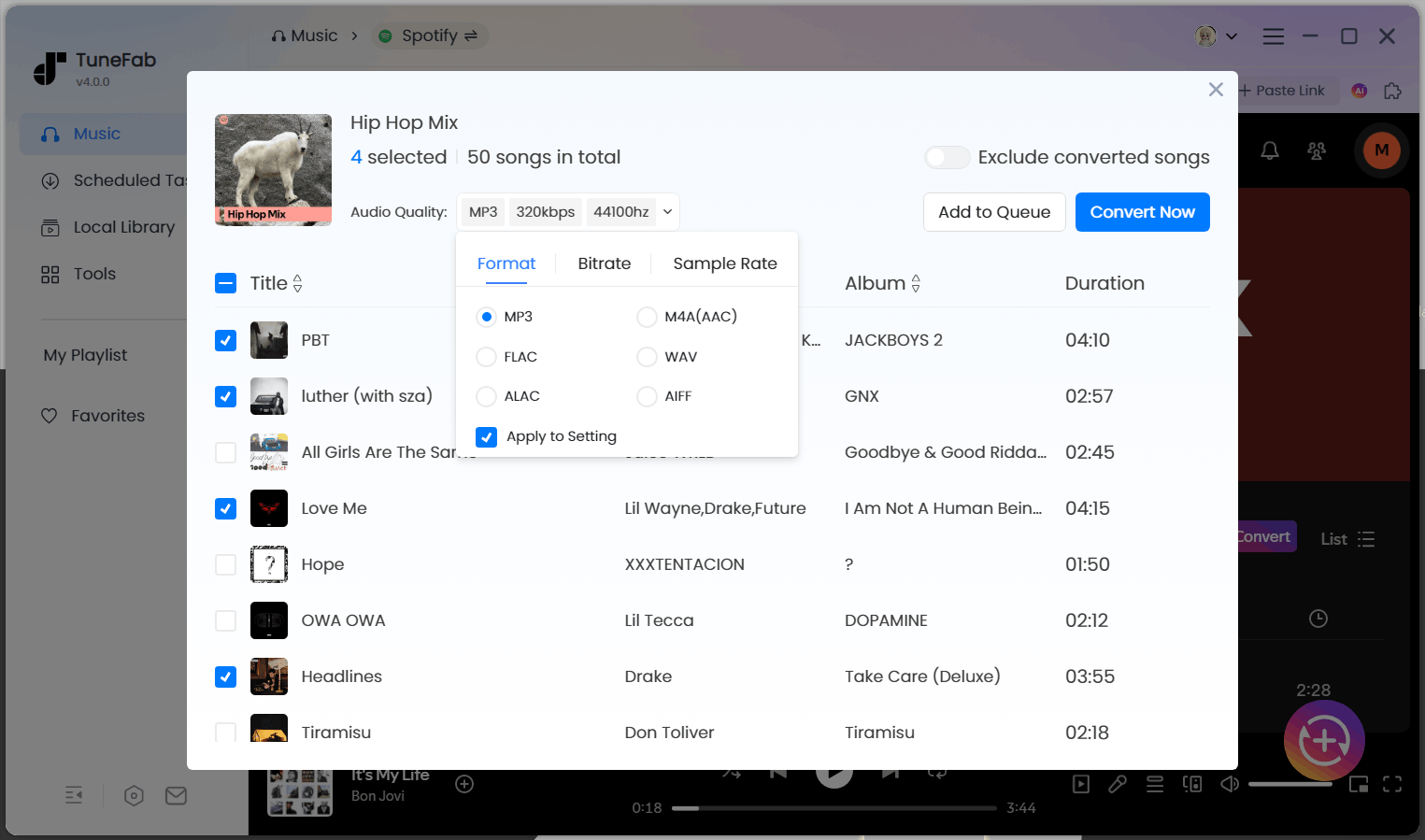
STEP 3. In the converting list, choose the output format and audio quality for the tracks according to your needs.
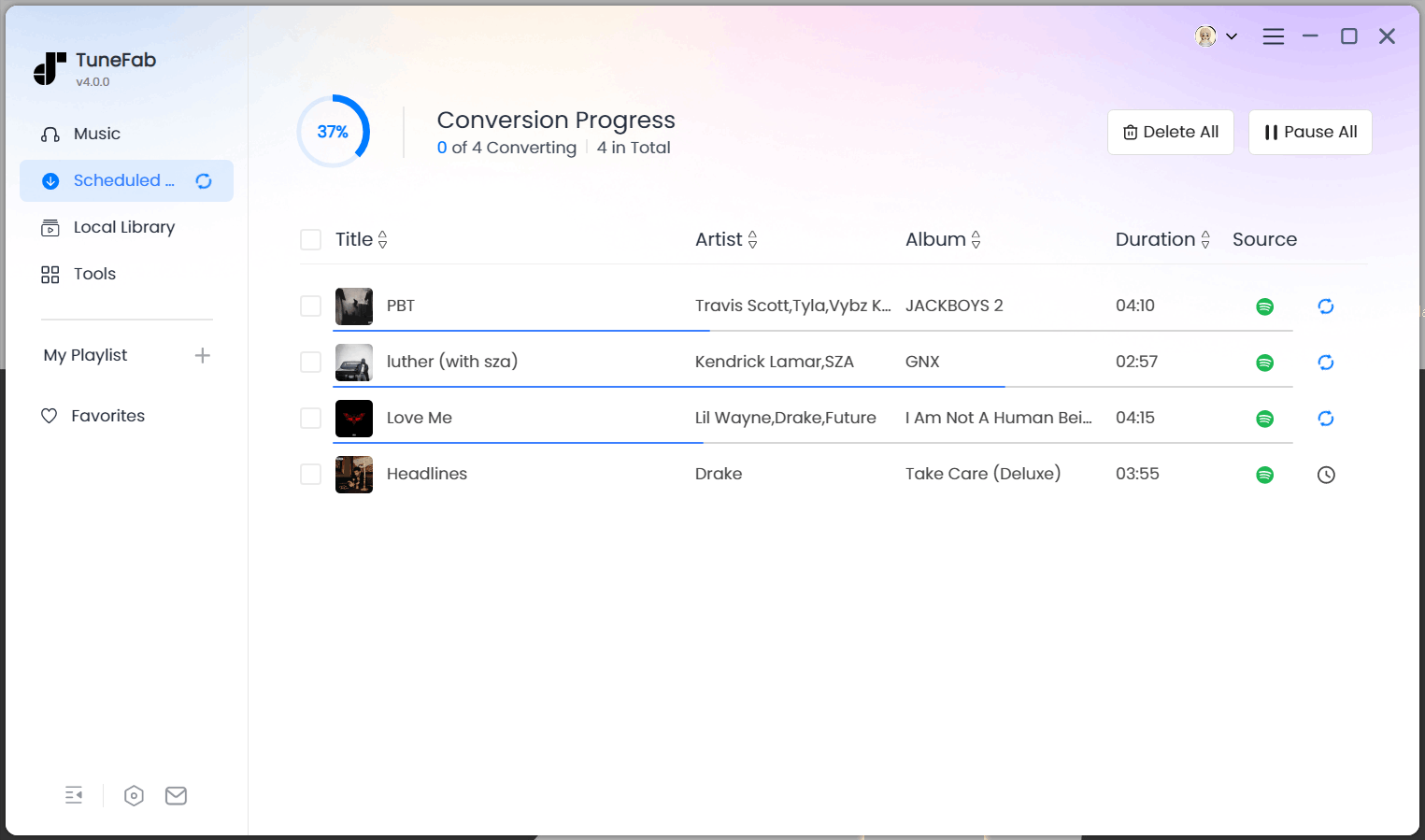
STEP 4. Click the "Convert All" button at the bottom right to start converting and downloading music from SoundCloud.
STEP 5. When the download is complete, go to the "Finished" section to find the downloads. You can click the file icon to get the local MP3, WAV, or FLAC files on your Mac.
2. How to Download SoundCloud Music on Mac from SoundCloud Site
SoundCloud provides an official way to download music, but it depends on whether the uploader has enabled the download option. Only songs with this setting can be downloaded. If the uploader has enabled the download button for a song, you can download it directly from SoundCloud after logging in to your account.
Note: For those that can't be downloaded, you can use TuneFab SoundCloud Music Converter as an alternative.
To download music to Mac from the SoundCloud website, follow the steps below.
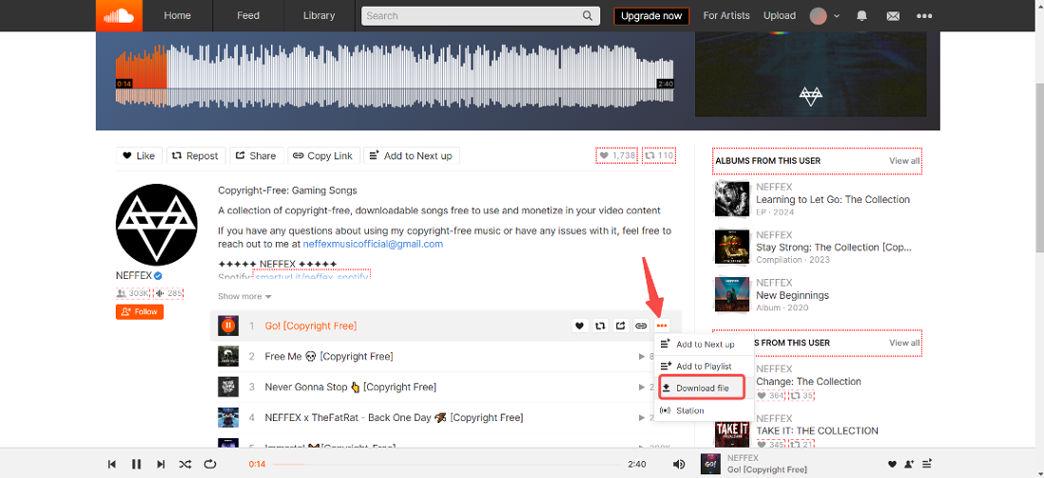
STEP 1. Sign in to your SoundCloud account and find a track with a download button beneath the waveform.
STEP 2. Click "Download file" and the track will be saved directly to your Mac in the format and quality set by the uploader.
Note: If you want to download SoundCloud songs to iPhone or Android, the official SoundCloud app lets you save content for offline playback with a SoundCloud Go or Go+ subscription.
3. How to Download SoundCloud Music to Mac Online
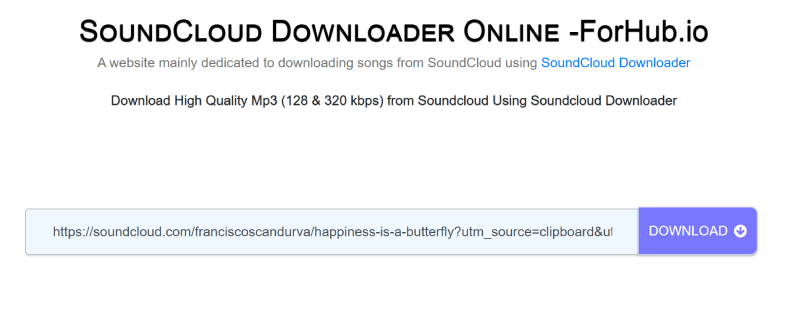
Another option for downloading SoundCloud music is to use an online downloader such as ForHub.io SoundCloud Downloader to download music to MP3. As a web-based tool, it requires no software installation and works directly in your browser. With just a simple copy-and-paste of the track URL, you can quickly start the download process.
However, remember that, while the site claims to support 320kbps audio quality, most downloads are actually limited to 128kbps, which may not meet your expectations. Additionally, the tool doesn’t support every track, some songs may be restricted and unavailable for download. If you want higher output quality and availability of all music downloads, you can turn to TuneFab SoundCloud Music Converter.
Here are the simple steps to download music from SoundCloud on Mac by using this online downloader.
STEP 1. Search for the SoundCloud songs or playlists on the SoundCloud website.
STEP 2. Copy the song or playlist link and paste it into the converter box.
STEP 3. Click the "DOWNLOAD" button.
STEP 4. The conversion will be done in a while, then click "DOWNLOAD THE SONG".
FAQs About Downloading Music from SoundCloud on Mac
How to download SoundCloud Music using SoundCloud Go and Go+
SoundCloud Go and SoundCloud Go+ allow you to download tracks for offline listening, but only within the SoundCloud mobile app on iOS or Android. Here are the steps to download using SoundCloud Go and Go+:
Step 1: Subscribe to SoundCloud Go or Go+ and open the SoundCloud app on your smartphone to log in to your account.
Step 2: Find the track or playlist you want to download, then hit the download button next to the like button. When it finishes downloading, you can easily listen to them offline.
Can you download songs from SoundCloud to Apple Music?
Yes, you can transfer songs from SoundCloud to Apple Music using third-party music transfer tools like Soundiiz or FreeYourMusic. These platforms allow you to link your SoundCloud and Apple Music accounts, making it easy to move playlists and favorite tracks between services.
While this method doesn’t download the audio files directly, it helps you sync and recreate your SoundCloud playlists within Apple Music, streamlining your listening experience across platforms.
Conclusion
Ultimately, that's pretty much about how to download music from SoundCloud to Mac. If the track has a download button, you can grab it directly from SoundCloud. An online downloader offering a free and quick solution can also help as long as you don't mind the lower quality.
However, for higher quality and the best listening experience, TuneFab SoundCloud Music Converter is the best and most reliable option for you. Try it right now and enjoy your favorite SoundCloud tracks offline freely!

