


- 1. There are many ways to download SoundCloud playlists to MP3. You can check the quick comparison table here.
-
- 2. TuneFab SoundCloud Music Converter is the best option for Windows and Mac users, as it downloads lists with simple clicks, outputs songs in 320kbps or WAV/FLAC at a 35X faster speed.
- 2. TuneFab SoundCloud Music Converter is the best option for Windows and Mac users, as it downloads lists with simple clicks, outputs songs in 320kbps or WAV/FLAC at a 35X faster speed.
100% Secure
100% Secure
-
-
- 3. Online downloader SoundCloudDownloader is the best option for mobile users.
-
Compared with popular mainstream music streaming platforms like Spotify and Apple Music, SoundCloud offers more niche songs released by individual musicians. However, if you want to keep SoundCloud songs as personal collections, you will need extra help to download whole playlist from SoundCloud to MP3, as the SoundCloud GO subscription only supports downloading songs within the SoundCloud app for playback offline.
If you also want to save your favorite music from SoundCloud to MP3, this tutorial is what you need. In the following, the 6 common ways will guide you on how to download SoundCloud playlists to MP3 offline with details. Now, check them and try!
- Way 1. Download Whole Playlist from SoundCloud to MP3/WAV/FLAC
- Way 2. Download SoundCloud Playlist with SoundCloud Go+ Subscription
- Way 3. Use Online Downloader to Download Whole Playlist from SoundCloud to MP3
- Way 4. Install Browser Extension to Download SoundCloud Playlist to MP3
- Way 5. Download SoundCloud Albums or Playlists with Github Tool
- Way 6. Record SoundCloud to MP3 with Screen Recorder
- FAQ
- In Conclusion
Way 1. Download Whole Playlist from SoundCloud to MP3/WAV/FLAC
For desktop users, the top 1 selection to download SoundCloud playlist to MP3 can be using the TuneFab SoundCloud Music Converter.
It is developed with a great music download function by embedding the official SoundCloud web player inside the software. Only by signing in to your music account can you access all your SoundCloud songs, playlists, or albums and download them to MP3 directly. If you don’t like logging in, you can simply search and find playlists you like to download directly.
The software can ensure lossless FLAC and WAV, 320Kbps MP3s to output SoundCloud music downloads, making sure that you can have the same high-quality streaming experience as the originals.
Except for the output quality, TuneFab SoundCloud Music Converter also pays attention to the downloading efficiency. It uses advanced acceleration technologies that can speed up music conversion to 35X faster in batches. Additionally, the enhanced stability also improves the conversion success rate, making this tool the best option, especially when you get batches of SoundCloud playlists to download at once.
Key Features:
- Lets you directly download songs and playlists within the familiar web player
- Provides common audio formats like MP3, M4A, WAV, FLAC, and AIFF to save SoundCloud playlists offline
- Ensures lossless music quality (at up to 320Kbps) to save SoundCloud downloads to ensure the best playback experience
- Keeps original ID3 tags and metadata information for easier music management offline
- Speeds up the batch music conversion performance to 35X faster
TuneFab SoundCloud Music Converter is also designed with a user-friendly interface, providing easy operations to download SoundCloud playlists on Windows/Mac. Now, also check the tutorial below and use the software to save your favorite playlists from SoundCloud to MP3 only by clicks.
Step 1. Download and install the updated version of TuneFab SoundCloud Music Converter on your Windows PC or Mac. Open the app and select the SoundCloud service to begin.
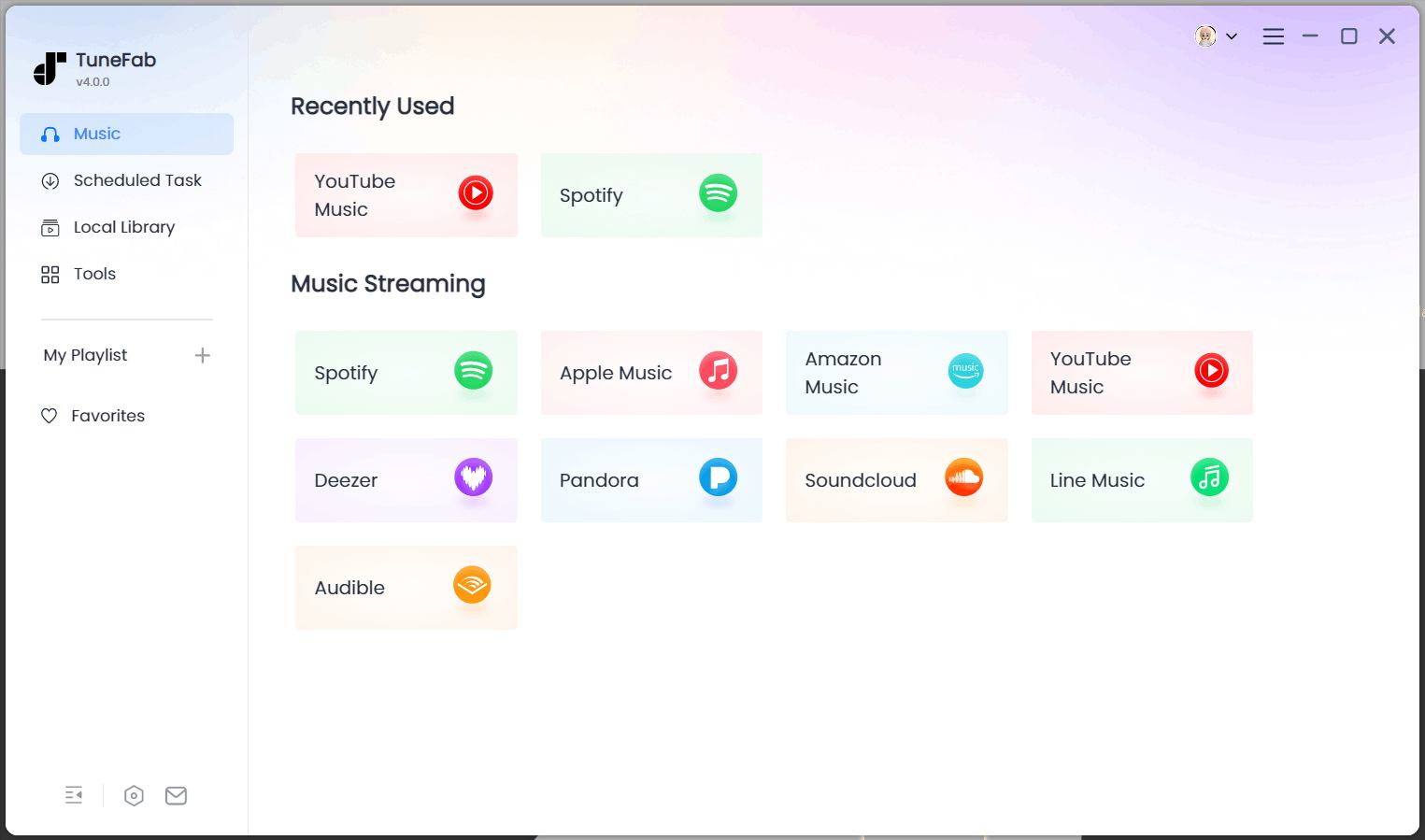
Logging in is optional. For a quick download, you can directly search for playlists from the built-in SoundCloud web player. However, if you want to download your own playlists, you can also sign in with your SoundCloud account.
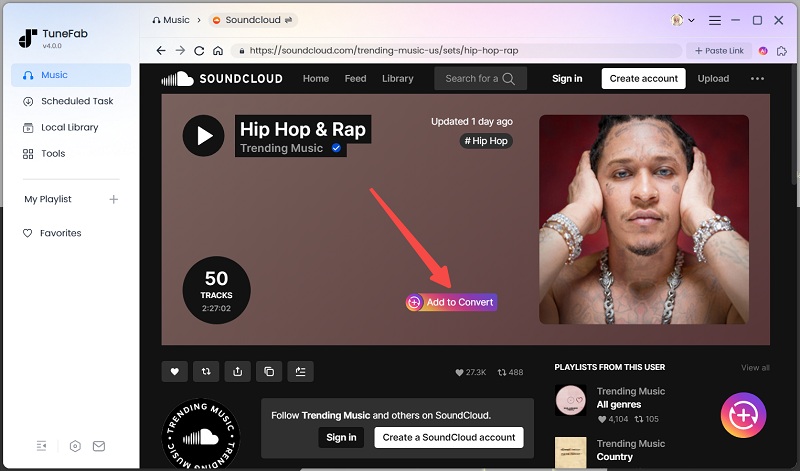
Step 2. Identify the playlists you want to download from SoundCloud. Then, click the "Convert to Convert" button over the cover image or inside the playlist to trigger the parsing process. A track list will then be returned for selection.
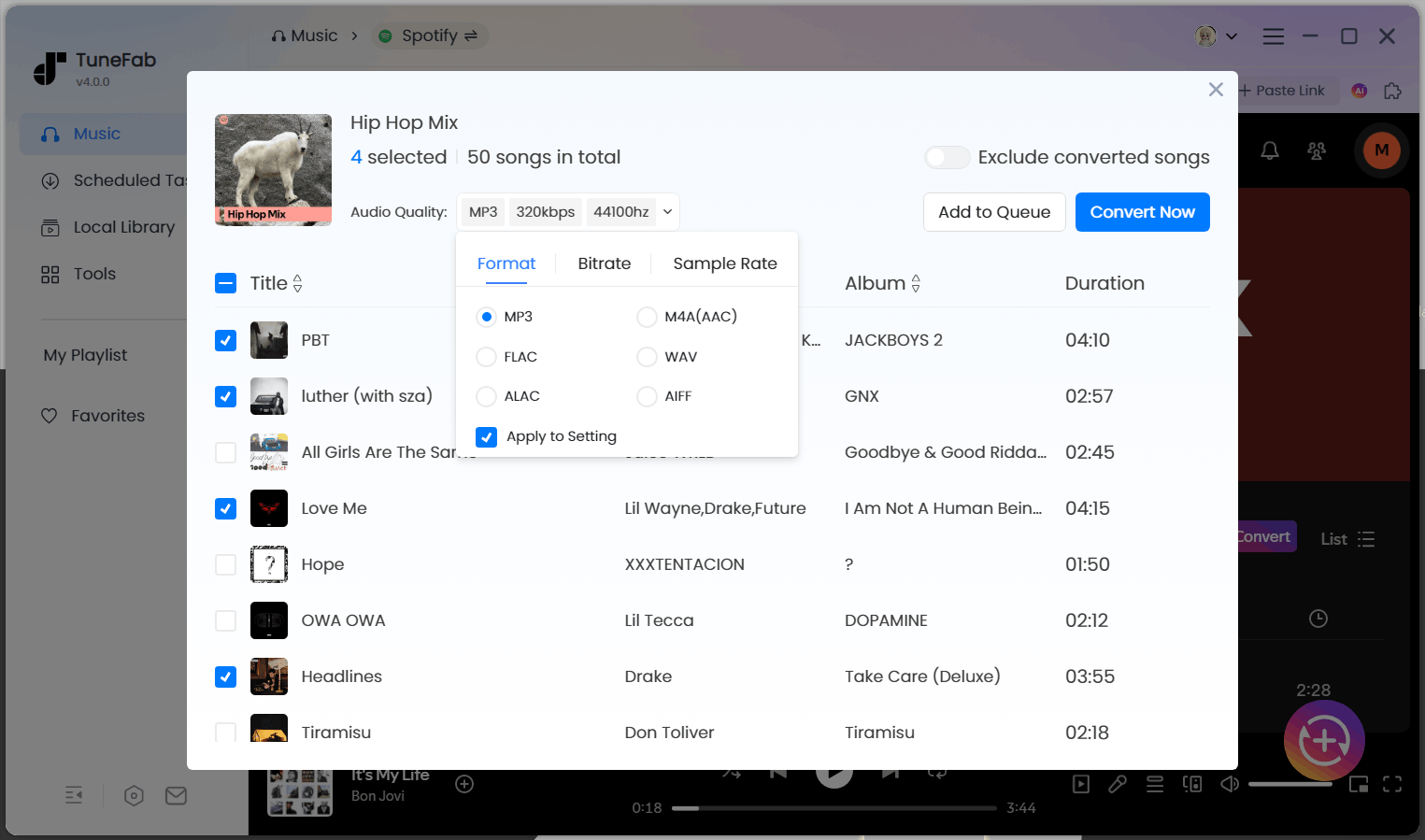
Step 3. Expand the conversion list and select the desired titles. Set the output format to MP3 or other formats. You can also adjust the bitrate and sample rate for a different audio quality. Then, hit "Apply to Setting" to apply the parameters to all tracks.
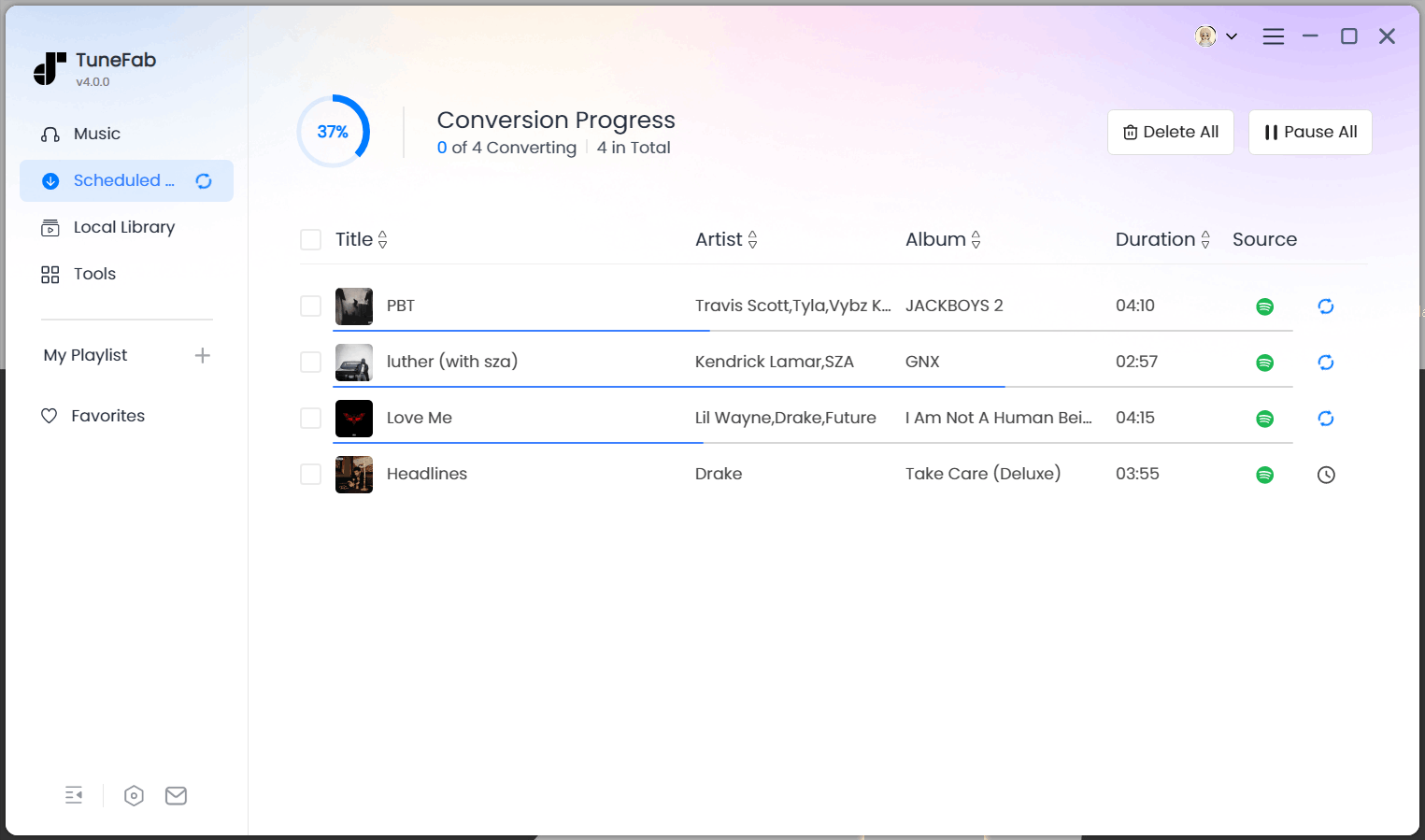
Step 4. When everything is set up, press the "Convert Now" button to batch download all the selected tracks to MP3 for free. Your SoundCloud playlists will be downloaded and saved to your computer 35 times faster. Once done, you can check the download history in the "Local Library" section or in the destination output folder.
Way 2. Download SoundCloud Playlist with SoundCloud Go+ Subscription
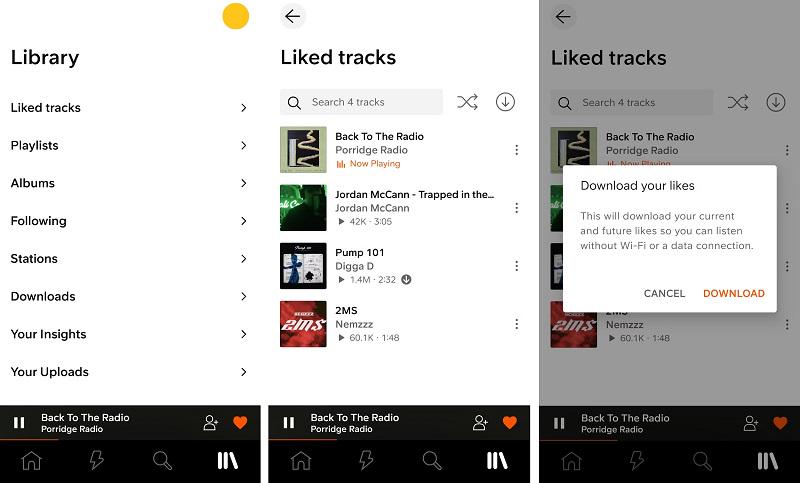
If you're looking for a legal and convenient way to download an entire SoundCloud playlist for offline listening, subscribing to SoundCloud Go or Go+ is a reliable solution. While it doesn't provide full exporting of songs to MP3 files, full playlists can be saved in the SoundCloud mobile app on your iPhone or Android.
SoundCloud Go and Go+ are premium subscriptions that unlock the ability to download tracks and playlists straight to your device. Then, you can listen to your music without an internet connection—ideal for commuting, traveling, or conserving mobile data.
- Output Format: DRM-protected file
- Output Quality: Original
- SoundCloud Go/Go+ Required: Yes
Note: That method works more like a local cache, as the audio is not genuinely downloaded into an MP3 and cannot be moved around to other devices; offline content also vanishes within SoundCloud when the subscription ends.
Step 1. Subscribe to SoundCloud Go or Go+.
Step 2. Search for the playlist you want to download either by using the search bar or your Library.
Step 3. Tap the download arrow icon next to the playlist title, and the entire playlist will start downloading.
Once the download is complete, you can listen to the playlist anytime from your Library, even when your device is offline.
Way 3. Use Online Downloader to Download Whole Playlist from SoundCloud to MP3
SoundCloud Go+ is priced at $59.88 per year, and then you will lose access to all your downloads if you cancel the subscription. So if you don't really like SoundCloud Download and don't want to install any kind of software to download playlists, try an online SoundCloud playlist downloader.
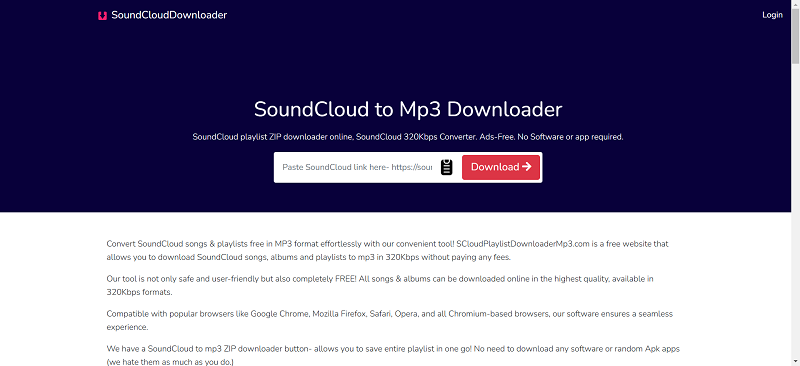
SoundCloud to MP3 Downloader is such a tool that can help you easily download whole playlist from SoundCloud, even without installing any software or extension at all. Only by going to the downloader in a web browser and then pasting the playlist URL to analyze, it will convert and let you download the songs as ZIP offline.
- Output Format: MP3, M4A
- Output Quality: Up to 256kbps M4A (SoundCloud Go+ required), 320kbps MP3
- SoundCloud Go/Go+ Required: No
Note: This online downloader contains many ads that may affect your download experience, and it only lets you download 50 tracks from a playlist at a time and requires an account login. If you want to download all songs from your SoundCloud playlist at once with an ad-free experience, TuneFab SoundCloud Music Converter is better recommended.
Here is the way to use it to download SoundCloud playlist online:
Step 1. In a web browser, go to SoundCloud to MP3 Downloader.
Step 2. Copy and paste the URL of the SoundCloud playlist you’d like to download offline to the downloading bar, and then click the "Download" to fetch the list.
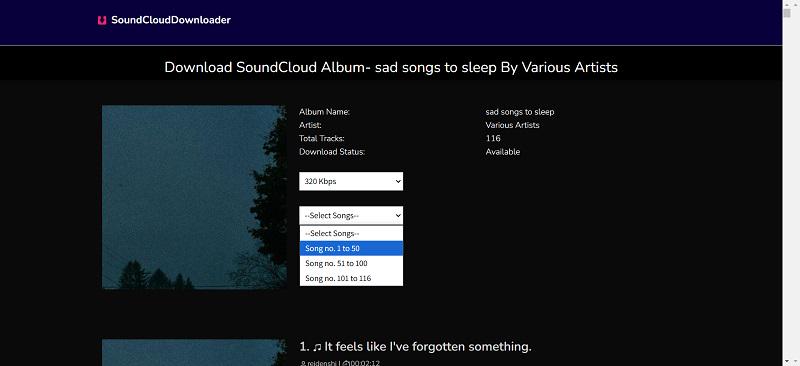
Step 3. When the files are ready, hit "Download Zip" and you can select the output audio quality from 64kbps to 320kbps. Then select the songs you want to download from the playlist and it will start downloading automatically.
Way 4. Install Browser Extension to Download SoundCloud Playlist to MP3
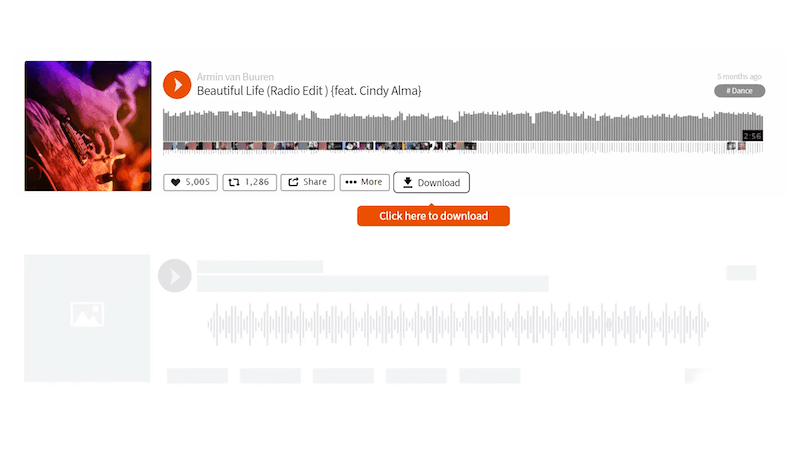
Other than online tools, if you are using Chrome browser on computers, installing the Addoncrop Soundcloud Music Downloader add-on to your browser can make the playlist download more convenient. The extension will directly add download buttons under all SoundCloud playlists to let you save all songs offline.
- Output Format: MP3
- Output Quality: 128kbps
- SoundCloud Go/Go+ Required: No
Also, check how to download playlist from SoundCloud with this tool:
Step 1. Firstly, add the Addoncrop Soundcloud Music Downloader extension to your Chrome browser.
Step 2. Then you can directly go to SoundCloud and open the playlist you want to download offline. You will see the "Download" button is provided.
Step 3. Simply press the "Download" button and the extension will detect all songs in the SoundCloud playlist and download them to MP3 offline for you.
Way 5. Download SoundCloud Albums or Playlists with Github Tool
The scdl tool is a popular open-source tool that lets you batch download whole playlist from SoundCloud with just one command. It could be considered lightweight, permitting the saving of SoundCloud tracks in MP3 format while working on Windows, macOS, or Linux.
It allows downloads in MP3/FLAC/WAV, depending on what the artist uploaded. This circumvents the high streaming sound quality of most free tools. Customization is also offered for file location paths, filename formats, or download folders to keep music more organized.
- Output Format: Matching the orginal format, such as WAV, and MP3
- Output Quality: Lossless
- SoundCloud Go/Go+ Required: No
Step 1. Install Python. Go to https://www.python.org/downloads/ and download the latest version for your operating system. During installation, make sure to check “Add Python to PATH".
Step 2. Open your command prompt or terminal, then install scdl by running: pip install scdl
Step 3. Obtain your SoundCloud client ID. Log into the SoundCloud website, open any track page, press F12 to open Developer Tools, go to the Network tab, and reload the page. Look for requests containing "client_id=" in the URL and copy the 32-character string after "client_id=".
Step 4. Set scdl to use your client ID by running: scdl --client-id YOUR_CLIENT_ID_HERE
Then replace "YOUR_CLIENT_ID_HERE" with the client ID you copied.
Step 5. Download the entire playlist by running: scdl -l "The playlist URL
Replace the URL with the playlist you want to download. Files will be saved to your current directory by default.
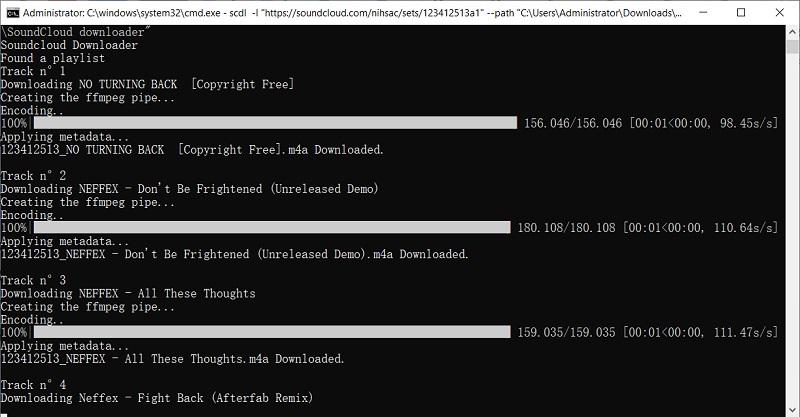
Step 6. You can customize the download by adding options like "--path" to specify the download folder, "--onlymp3" to download MP3 only, or"--addtofile" to add artist names to file names. For example: scdl -l "The Playlist URL" --path "~/Downloads/SoundCloud" --onlymp3 --addtofile
Way 6. Record SoundCloud to MP3 with Screen Recorder
To save SoundCloud playlists to MP3, recording is also a good choice for you to consider. FonePaw Screen Recorder provides a pretty convenient way to capture your favorite SoundCloud playlists one by one in audio-only mode, and then output the audio recordings in MP3 format with good quality. The recorder is equipped with advanced features like the scheduled recording mode, which doesn’t need you to keep waiting for the recording to finish continuously.
However, recording SoundCloud playlists can take much time as most screen recorders do not provide the speed-up feature at all. For saving time if you get lots of songs to save from SoundCloud playlists, using TuneFab SoundCloud Music Converter to batch download playlists at once is a better choice.
- Output Format: MP3, M4A, WAV, etc.
- Output Quality: Up to 329kbps
- SoundCloud Go/Go+ Required: No
You can also check the following guide to see how to use FonePaw Screen Recorder to record SoundCloud to MP3 easily.
Step 1. Open FonePaw Screen Recorder after installing it. Then select "Audio Recorder" on the home screen.
Step 2. Setting the audio recording settings like testing the volume in advance. You can turn off the microphone to avoid recording noise.
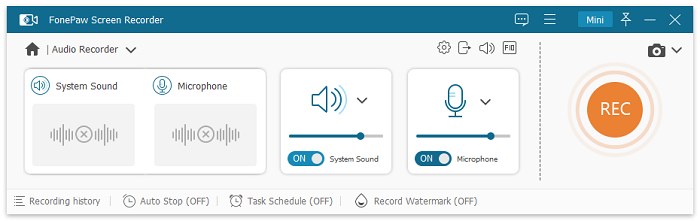
Step 3. Now, play the SoundCloud playlist and also tap the "REC" button to start the recording.
Step 4. When the recording is over, simply tap "Stop" and then save the recorded MP3 SoundCloud songs offline.
FAQs
Can I Download SoundCloud Playlist as WAV?
Yes. Both TuneFab SoundCloud Music Converter and scdl support downloading SoundCloud playlists in WAV format, allowing you to enjoy high-quality audio files.
How Do I Export a Playlist from SoundCloud to TEXT?
You can easily export your SoundCloud playlist to a text file using online tools like TuneMyMusic, which lets you transfer or save your playlist information as a text or CSV file.
In Conclusion
| Using | Pros | Cons |
| TuneFab's SoundCloud Music Converter | Add a playlist and download all songs in 2 clicks 320Kbps MP3, and FLAC, WAV supported 35 conversion speed ID3 preserved |
Only works on Windows/Mac |
| SoundCloud Go+ | Completely safe and legal | Only works on mobile devices Lose all songs when subscription ends |
| SoundCloudDownloader | Doesn't require app installation Works on computers and mobiles 320Kbps supported |
Not stable Can only download 100 songs at a time |
| Addoncrop | No software installation Download songs fast in batch |
The installation is a bit complicated Can only be used on a computer browser It only supports 128kbps audio quality |
| SCDL | Totally free and open-source Supports FLAC |
Not beginner-friendly for people who aren't tech-savvy Only works on computer |
| FonePaw Screen Recorder | Can record only the specific part of a song you want 320Kbps supported |
Recording an entire playlist takes too much time |
Downloading a whole playlist from SoundCloud to MP3 is not a difficult job as there are 6 easy methods available to help. Among all of them, TuneFab SoundCloud Music Converter ensures both high quality and also efficient process to batch download SoundCloud playlists at once with original music quality. Now, you can freely install the software and try it without any cost!

