


Summary:
To download music from SoundCloud to your computer, you have two main options: download directly from SoundCloud if the uploader has enabled the download feature, or use a third-party tool. For tracks that aren’t available for direct download, TuneFab SoundCloud Music Converter offers a simple and effective solution.
Here's how to download any music from SoundCloud to a laptop using TuneFab:
1. Launch TuneFab Music Converter and log in to your SoundCloud account.
2. Find the songs that you want to download to your computer and add them to the conversion list.
3. Reset output parameters, then click the "Convert" button to download the music to your computer.
100% Secure
100% Secure
SoundCloud is a renowned music finding and streaming platform. However, downloading SoundCloud tracks to the computer is not easy when you want to listen offline. While you can download SoundCloud songs to Android and iOS with a SoundCloud Go subscription, it is limited to the SoundCloud app. You can also download from SoundCloud web, but only those download options enabled songs are available. So, this confinement limits downloading SoundCloud music offline on PCs freely.
If you are searching for effective ways on how to download music from SoundCloud to a computer, there are several methods. Herein, this guide will introduce these methods to help you download SoundCloud music with detailed steps.
- 1. Download Music from SoundCloud to Computer with Professional Tool (Any Track)
- 2. Download SoundCloud Music to Computer from SoundCloud Website (Partial Tracks)
- 3. Download Music from SoundCloud to Computer with Firefox Add-on (Any Track)
- 4. Download Songs from SoundCloud to PC with Online Tool (Any Track)
- A Side-by-Side Comparison of the 4 Methods
- Conclusion
1. Download Music from SoundCloud to Computer with Professional Tool (Any Track)
If you want to download SoundCloud music to your computer without restriction, then a professional downloading tool for SoundCloud is recommended. TuneFab SoundCloud Music Converter is the first choice, which can help you download any SoundCloud music at the fastest speed and without quality loss.
As one of the best SoundCloud downloaders, TuneFab permits easy downloads of complete playlists, albums, and even podcasts from SoundCloud with ease. It also offers customizable audio settings that you can freely adjust the bitrate and sample rate, etc. Whether from 320kbps MP3s for seamless playback or FLACs for an uncompressed listen, this tool has it all.
Key Features of TuneFab SoundCloud Music Converter:
- No SoundCloud Go+ needed: No need to subscribe to SoundCloud to download its music.
- Lossless Quality: Preserve original sound quality while supporting customizable bitrate and sample rate.
- Multiple Output Format Support: Save SoundCloud tracks in MP3, WAV, FLAC, and more.
- Batch Download: Download playlists, albums, and multiple songs at one time.
- High-Speed Download: 35X faster download speed to save time.
- ID3 Tags Preservation: Keep the metadata like artist, album, cover art, etc. for better sorting.
TuneFab SoundCloud Music Converter has an intuitive interface that even if you are a first-time user, you can use without difficulties. Now, let's start using it by following the step-by-step guide below.
Step 1: Download and Install TuneFab
It is compatible with Windows and macOS. Go to the official home page and download the right version for your computer. After that, launch the software.
Step 2: Add SoundCloud Music to Download
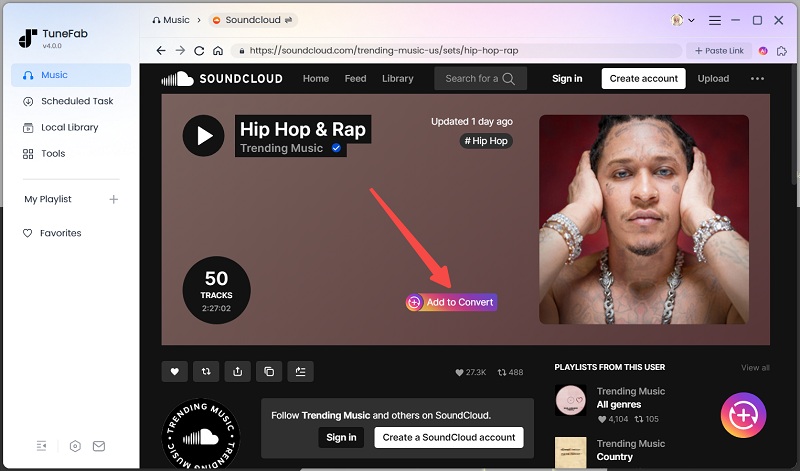
Log in to your SoundCloud account. From the built-in browser, search for the songs, albums, and playlists that you want to download. Just drag and drop them to the "+" icon to add them to the conversion list.
Step 3: Set the Output Format
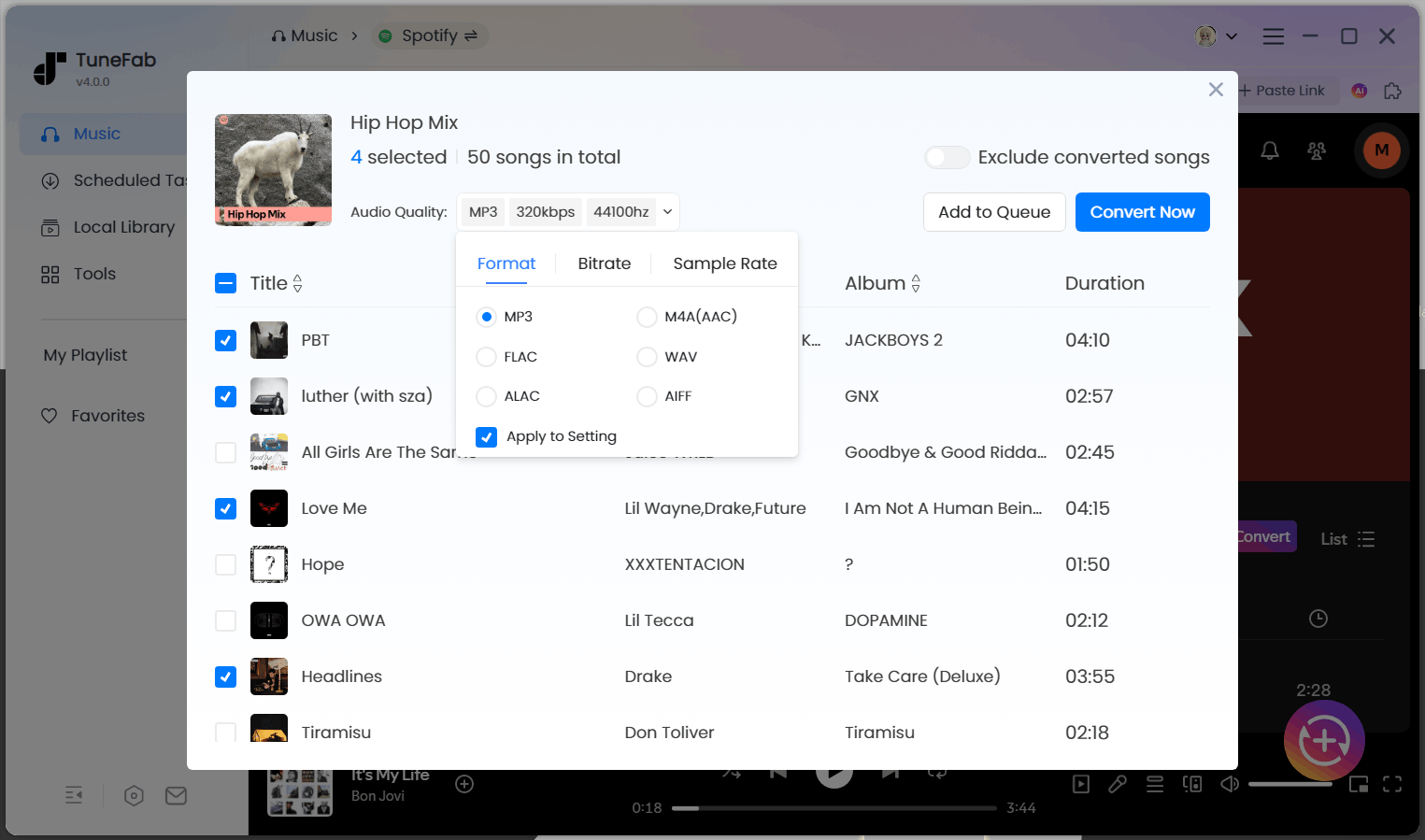
From the conversion list, you can set the output format as MP3, FLAC, etc. to your liking. You can also adjust the sample rate (up to 48000hz) and bitrate rate ( up to 320kbps) if you want.
Step 4: Start Downloading
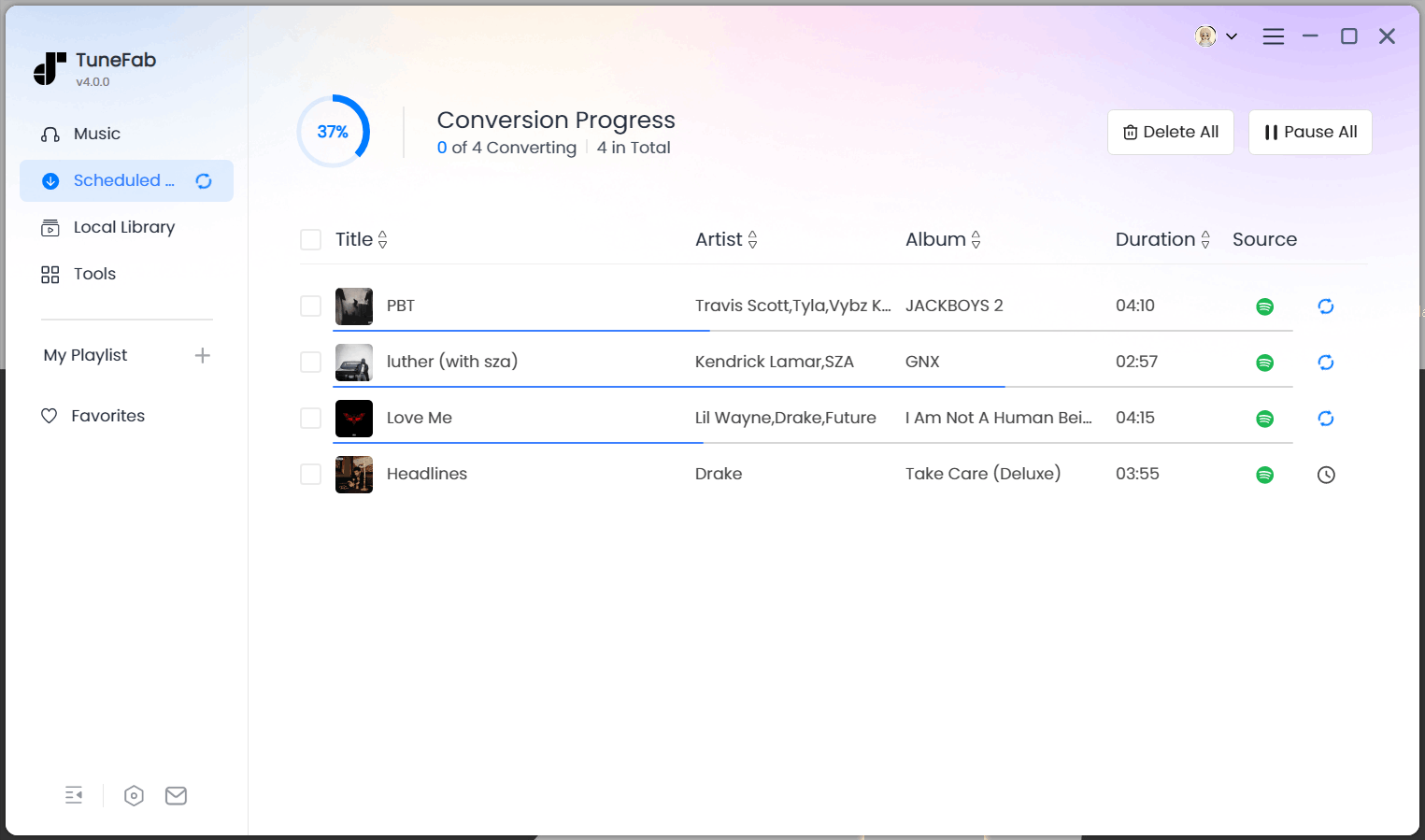
After settings, click on the Convert All button to begin the process. This software will download these songs at 35X faster speed. You can check the downloaded songs in the Finished section.
2. Download SoundCloud Music to Computer from SoundCloud Website (Partial Tracks)
Besides using professional SoundCloud downloaders for PC, you can also download SoundCloud tracks directly from the website. However, this method only works when the track uploader has enabled the download option, as mentioned earlier. Since all tracks on SoundCloud are uploaded by individual users, it's up to them to decide whether their content can be downloaded. As a result, only a limited number of tracks are available for direct download.
What's more, the format and quality of the downloaded song (such as MP3, WAV, etc.) depends on what the uploader has chosen, and cannot be customized. Another restriction is that this method only allows you to download individual tracks, not entire playlists or albums. If you're ready to try, you can follow the steps below to start.
Read Also: How to Download Whole Playlist from SoundCloud (6 Ways)
Step 1: Sign into your SoundCloud account.
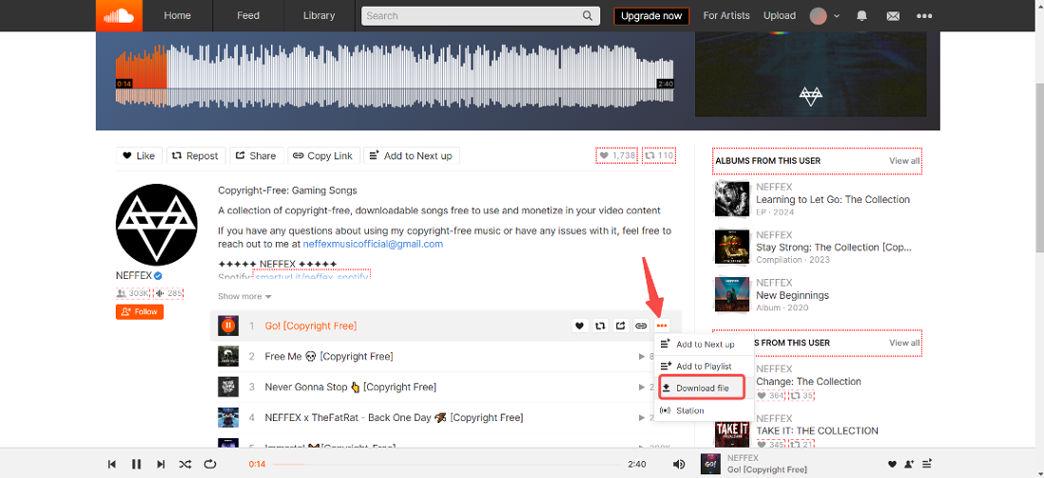
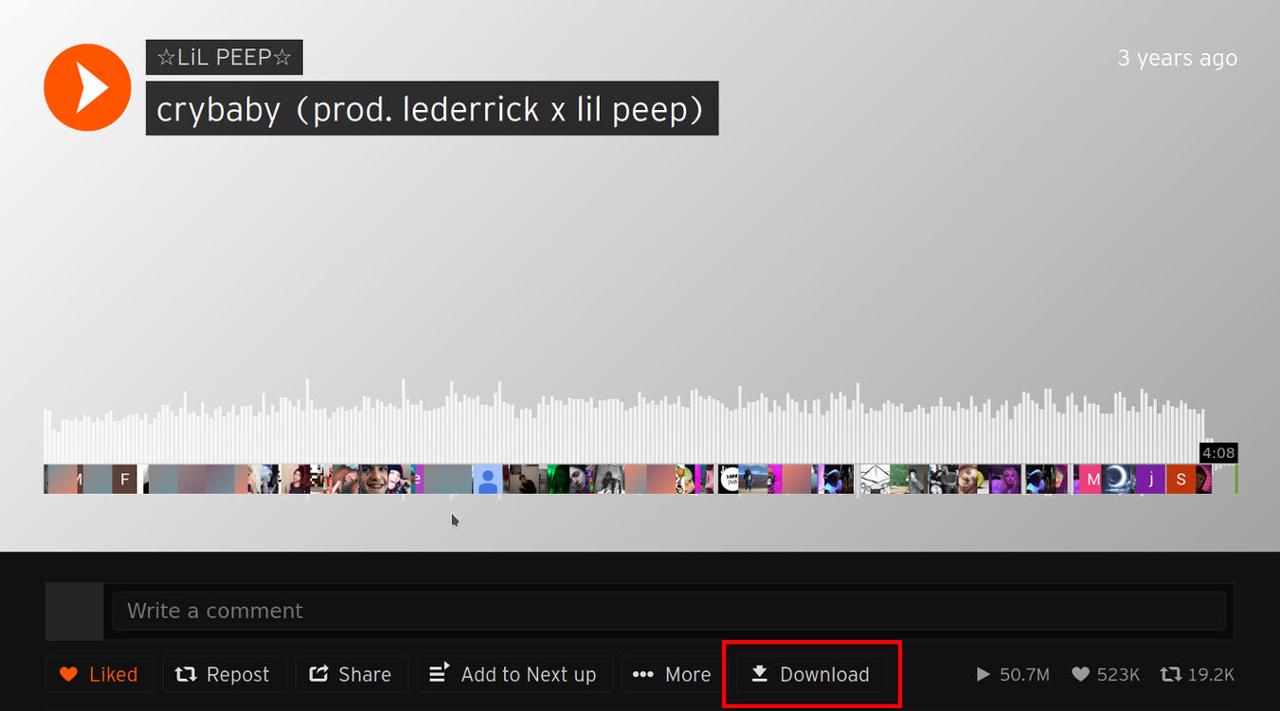
Step 2: Check below the track’s waveform for the Download button. If it’s available, the track is downloadable. If you don't find any Download buttons, then the song is not downloadable.
Step 3: Once you click the download button, the track will start downloading to your computer in the format chosen by the uploader.
Tip: How to Find Music You Can Download on SoundCloud?
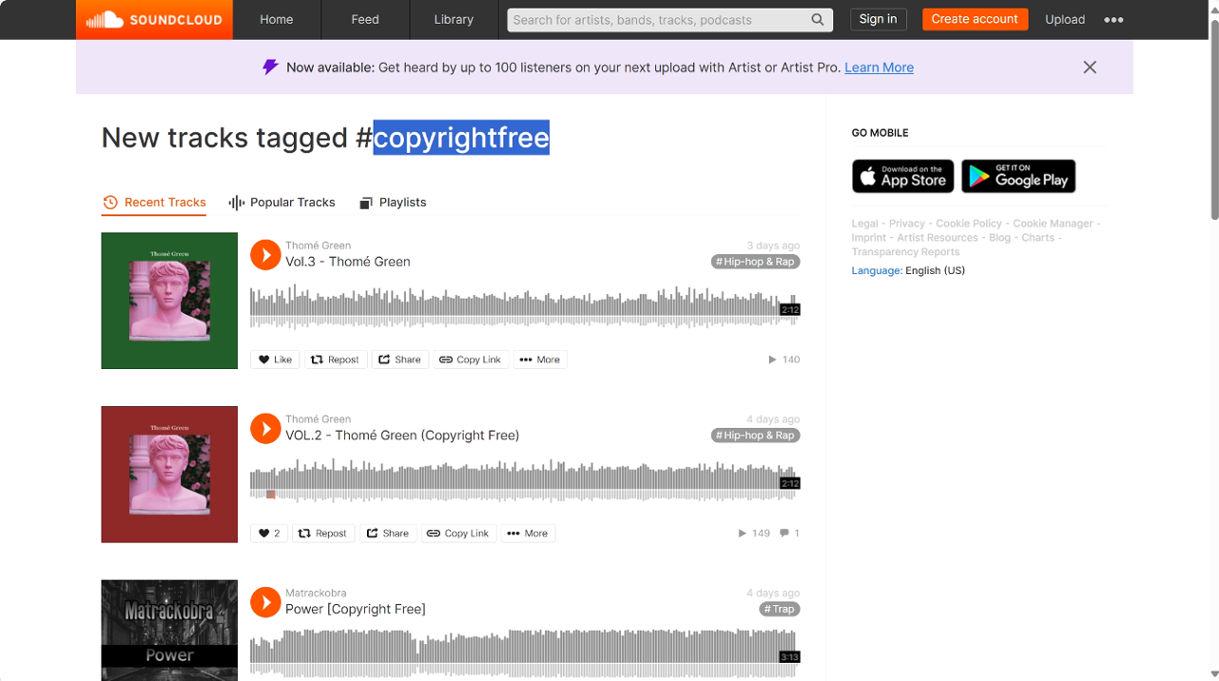
Most of the downloadable tracks are tagged with terms like "free download", "copyrightfree", "nocopyright", "royaltyfree" or "copyrightfreemusic". Using these terms to search on SoundCloud will find downloadable music. Just head on to the track details page to download after you find these resources.
3. Download Music from SoundCloud to Computer with Firefox Add-on (Any Track)
If you don't want to download any software or face all the limitations with the website method, then a Firefox add-on is another alternative. You can download SoundCloud tracks to Windows or Mac directly from the page but with some quality restrictions.
This SoundCloud DL add-on for Firefox helps you download the tracks. Keeping in mind that the downloads are in MP3 format at a 128 kbps bitrate, means you will hardly get any better sound quality. And remember it requires you to use the Firefox browser to install the add-on.
Step 1: Go to the SoundCloud DL GitHub page and install the add-on for the Firefox browser.
Step 2: Open the SoundCloud website using Firefox and find the track you want to download.
Step 3: The extension will provide the download option button on every track page that offers MP3 format in 128 kbps bitrate.
4. Download Songs from SoundCloud to PC with Online Tool (Any Track)
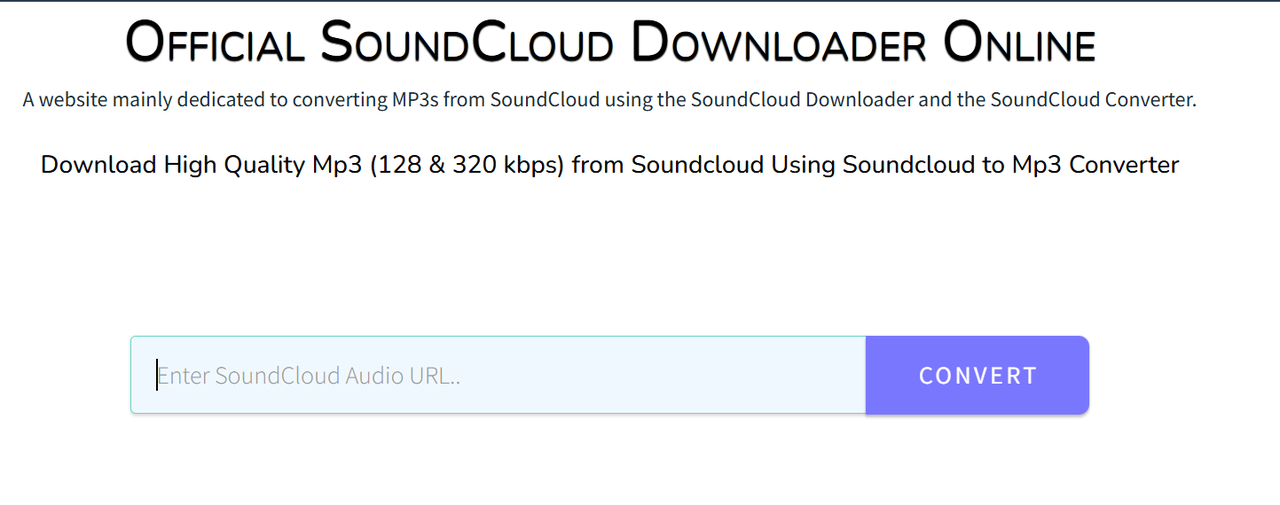
If you're wondering how to download music from SoundCloud to computer without installing any software, using a free online tool like KlickAud can be a suitable way. This web-based SoundCloud downloader for PC allows you to extract MP3 files from public tracks by simply pasting the track URL. It’s completely free and doesn’t require registration.
Remember that this tool only supports downloading individual songs, not playlists or albums, and the audio quality is fixed at 128kbps MP3, even though the site may claim to support 320kbps. Users also cannot choose the output format or quality, and downloaded files do not include ID3 tags such as song title or artist metadata.
For those who only need a fast and lightweight option to download SoundCloud songs to computer, KlickAud is a decent alternative, but with quality and feature trade-offs compared to desktop tools, like TuneFab SoundCloud Music Converter. Now, follow the steps to download music from SoundCloud to Windows using KclickAud:
Step 1: Open the SoundCloud website and find the track you want to download. Click the “Share” button under the track and copy the song’s URL.
Step 2: Visit KlickAud in your browser to paste the copied SoundCloud link into the search box on KlickAud’s homepage.
Step 3: Click the “Download” button. After a few seconds, a download link will appear, click it to save the MP3 file to your computer.
A Side-by-Side Comparison of the 4 Methods
To help you decide how to download music from SoundCloud to computer effectively, we’ve compared the four most popular methods side by side. Whether you want a professional SoundCloud downloader for PC like TuneFab, a direct download from the SoundCloud website, a Firefox add-on, or a free online tool such as KlickAud, each option has unique pros and cons. Use the table below to choose the best method that fits your needs for quality, speed, and features.
| Method | Supported Formats | Audio Quality | Speed | Playlist Support | Save ID3 | Stability | Ad-Free |
| TuneFab | MP3, WAV, FLAC, M4A, AAC, AIFF, ALAC | Up to 320kbps | 35X | ✅ | ✅ | ✅ | ✅ |
| SoundCloud Website | As uploaded | Varies | Fast | ❌ | ✅ | ✅ | ✅ |
| Firefox Add-on | MP3 | 128kbps | Medium | ❌ | ❌ | ❌ | ❌ |
| KlickAud | MP3 | 128kbps | Medium | ❌ | ❌ | ❌ | ❌ |
Conclusion
In this article, we have introduced four ways on how to download music from SoundCloud to the computer. Using a professional tool like TuneFab SoundCloud Music Converter, downloading from the website, or even utilizing an add-on in Firefox and a free online tool, you can save your favorite tracks on SoundCloud.
For best results, TuneFab SoundCloud Music Converter is a better choice, as it comes with a guarantee of high-speed and lossless downloads in multiple formats, which makes it increasingly flexible and qualitative for downloading SoundCloud music.

