


Quick Overview:
1. There are four ways to download SoundCloud to FLAC: from the official website, using TuneFab SoundCloud Music Converter, online SoundCloud downloaders, or recording the audio. You can make a quick comparison of them with the table below.
2. Among these options, TuneFab SoundCloud Music Converter is the best choice — it lets you batch-download entire playlists as FLAC files. But if you only need to download a few songs and prefer not to install software, online tools are a more convenient alternative.
100% Secure
100% Secure
With its vast library of music resources, SoundCloud is a top choice for many music lovers. However, you may have found its default compressed format delivers a frustrating streaming experience. Even SoundCloud Go and Go+ subscribers are limited to 256kbps AAC, even if the audio is uploaded in lossless FLAC/WAV format.
This makes losslessly ripping original SoundCloud audio to FLAC an increasingly popular need. If you are among those looking for a SoundCloud downloader for FLAC, this article is here to help! We will guide you through 4 effective ways that can easily get your hands on high-quality, lossless SoundCloud music. Let's explore the options and find the best solution for you!
Read Also:
How to Download SoundCloud to M4A: 3 Easy Ways
How to Download Music from SoundCloud to AIFF (100% Working)
- Way 1. Convert SoundCloud Playlist to FLAC Losslessly in One Go
- Way 2. Download SoundCloud to FLAC with Online Tool
- Way 3. Download FLAC from the SoundCloud Website Directly
- Way 4. Record SoundCloud Music to FLAC Manually
- Quick Comparison of the 4 Methods
- FAQs on SoundCloud to FLAC Downloads
- Conclusion
Way 1. Convert SoundCloud Playlist to FLAC Losslessly in One Go
Imagine being able to convert your playlists on SoundCloud to FLAC format with just one click, without having to process them one by one. Sounds amazing, right? TuneFab SoundCloud Music Converter can make this a reality!
Unlike many SoundCloud song to FLAC converters, TuneFab provides unlimited downloads. With it, you can effortlessly batch download singles, albums, playlists, podcasts, and more from SoundCloud without any hassle. Even better, this tool retains the original audio quality, so you can easily enjoy lossless music. Not only that, apart from FLAC, TuneFab also supports a wide range of audio formats. Whether you want to download songs from SoundCloud to MP3 or FLAC, TuneFab makes it quick and easy!
Discover More About TuneFab SoundCloud Music Converter:
- Download SoundCloud to FLAC without a SoundCloud subscription.
- Save SoundCloud music to FLAC, MP3, WAV, and more.
- Deliver a 35X faster speed for batch downloading SoundCloud music.
- Preserve the original ID3 tags like title, artist, album, cover art, etc.
- Easy to use with a built-in SoundCloud web player.
Get the detailed tutorial on how to download SoundCloud playlists to FLAC by using TuneFab SoundCloud Music Converter in the following.
Step 1. Get TuneFab SoundCloud Music Converter Ready
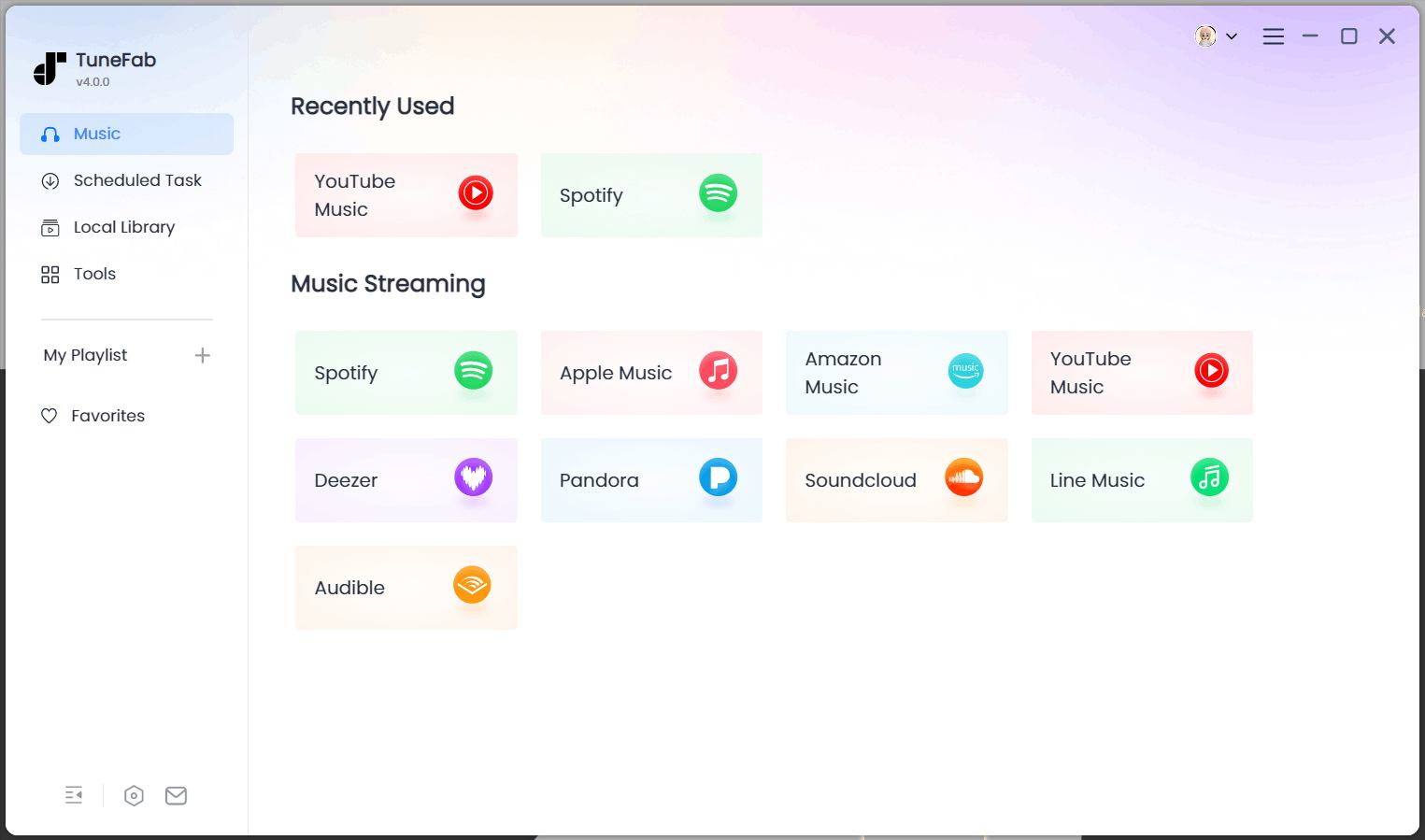
Start by downloading and installing the SoundCloud to FLAC converter software on your computer. Once installed, open TuneFab. On the main interface, choose the "SoundCloud" service and then log in using your SoundCloud account.
Step 2. Add SoundCloud Songs/Playlists/Albums
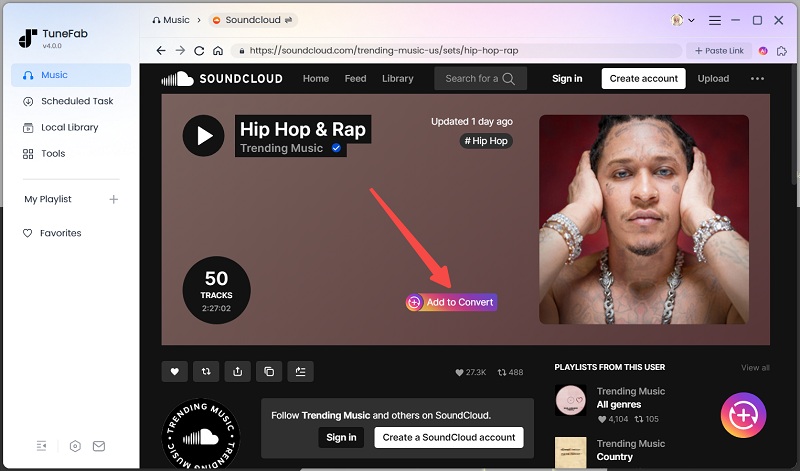
In the SoundCloud web player, you can easily explore and find the songs, playlists, and albums to download from SoundCloud to FLAC. Simply drag and drop them onto the conversion list on the right side. Alternatively, click the "Add to the conversion list" button that appears on the cover art to add them as well.
Step 3. Customize Output Settings
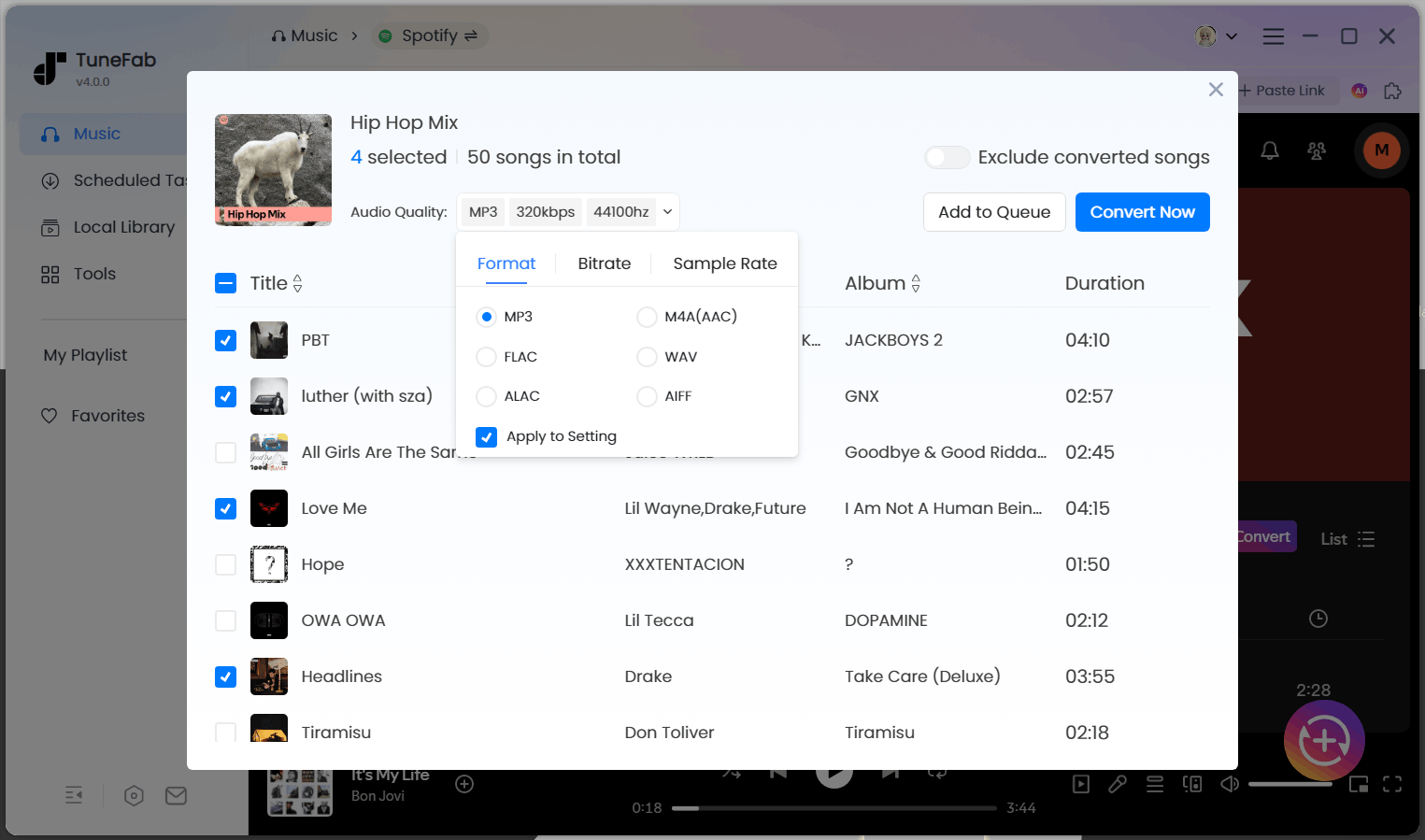
To convert SoundCloud music to 24-bit FLAC, expand the conversion list and choose FLAC as the output format. Also, you can further adjust the sample rate (up to 48kHz) and bitrate (up to 320kbps) as needed for higher output quality. This ensures the software exports the music in the highest quality, with FLAC and WAV formats not being limited to 320kbps.
Step 4. Download SoundCloud Songs to FLAC in Batches
Once all desired songs are added, click "Convert All" to begin the SoundCloud to FLAC conversion. With advanced decoding technology, TuneFab is able to handle the process in batches at a 35X faster speed. This can greatly save your valuable time and effort. After that, you can effortlessly locate your downloads on the "Finished" tab.
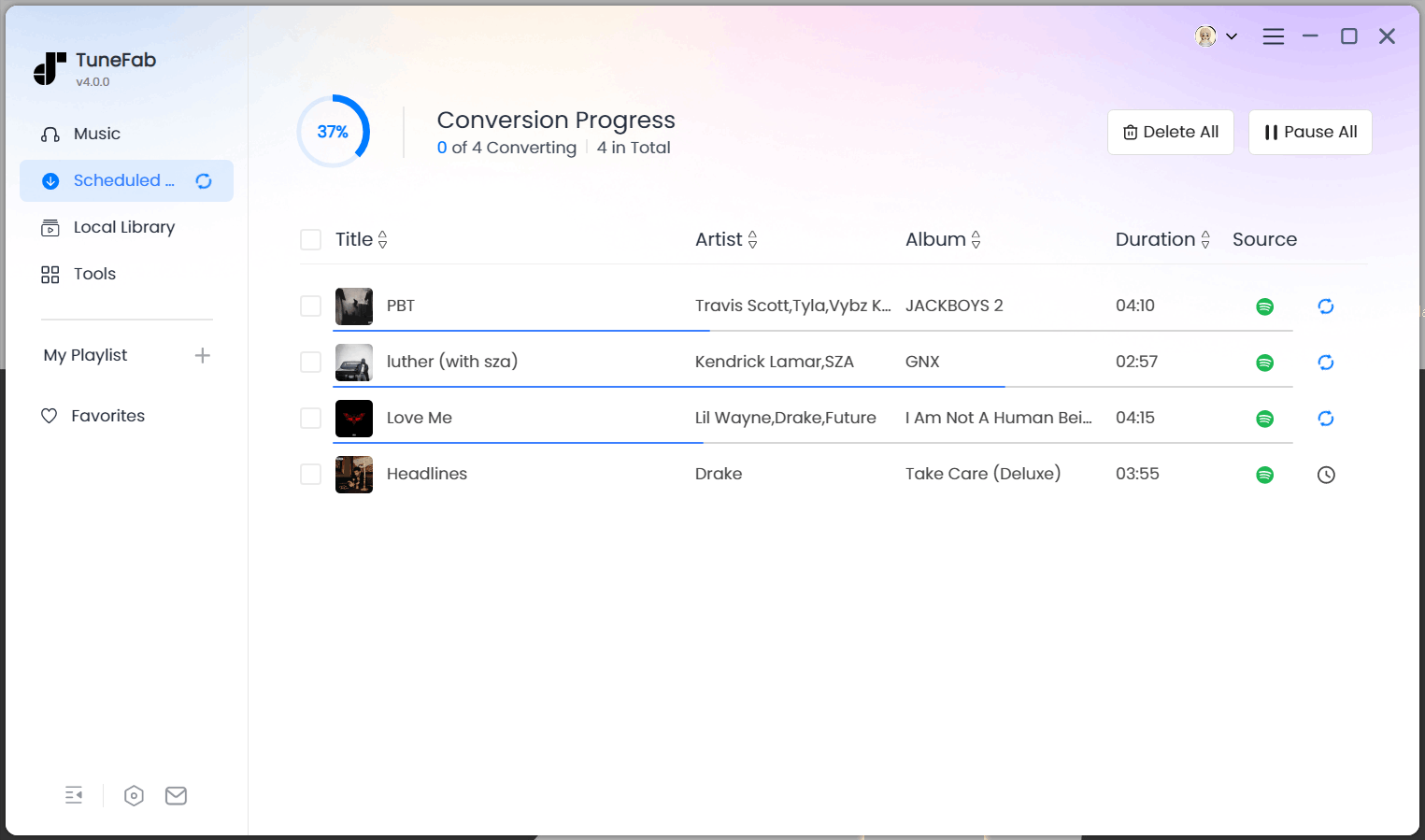
Overall, TuneFab SoundCloud Music Converter offers an effortless and efficient process for downloading SoundCloud to FLAC, especially if you intend to save a bunch of music tracks. If you are also looking for uncompressed audio files, TuneFab will also be your best option to download SoundCloud to WAV.
Way 2. Download SoundCloud to FLAC with Online Tools
For users who prefer not to install software, online tools offer a convenient solution to download music from SoundCloud. These tools typically work directly on your web browser, whether it's on a computer or a mobile device, but can only download singles. If you wish to download various playlists, TuneFab SoundCloud Music Converter is the better option.
With SCMP3 SoundCloud Go Free
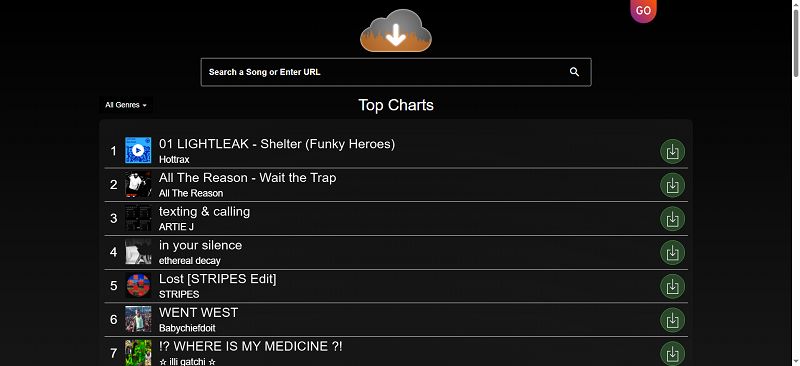
SCMP3 SoundCloud Go Free is a solid online tool that can recognize SoundCloud track links and lets you download songs/playlists in FLAC, WAV, or MP3 formats. When downloading as MP3 or FLAC, it retains the original ID3 tags, and MP3 downloads support up to 320kbps bitrate. The service is ad-free and easy to use.
Step 1. Copy the SoundCloud music link.
Step 2. Paste it to SCMP3 and hit the search icon on the right of the link box.
Step 3. Wait for the parsing, then click on the download button under the song. Select FLAC and it will download the song in FLAC to your browser download folder. If you are downloading a playlist, songs will be packed within a ZIP file.
With SoundCloudRips
SoundCloudRips is another online SoundCloud to FLAC converter that is a great option for those looking to download a few tracks without installing any software. It enables you to easily download SoundCloud songs in FLAC format with ID3 information. However, its frequent pop-up ads can be quite annoying. Plus, it lacks playlist download for larger music libraries.
Step 1. Go to SoundCloud and get the copied URL of the track you want.
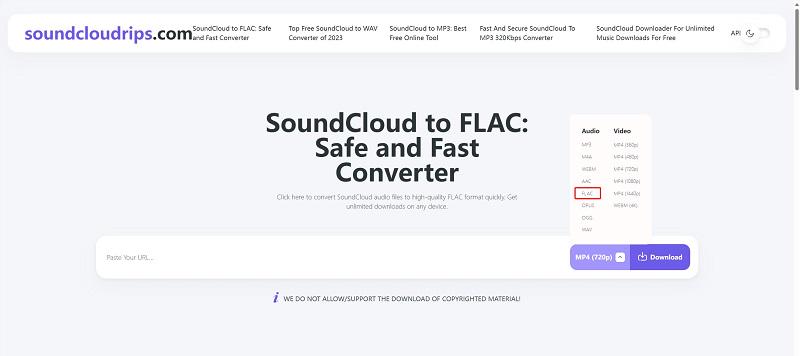
Step 2. Head to Soundcloudrips and paste the URL into the blank bar.
Step 3. Click on the output format menu, and then select "FLAC "from the list. After that, hit the "Download" button to initiate the online SoundCloud to FLAC conversion.
Step 4. Scroll down to get the download option. Hit "Download to Your Device" to save SoundCloud files in FLAC format.
Way 3. Download FLAC from the SoundCloud Website Directly
In fact, the most straightforward solution is to download FLAC files directly from the SoundCloud website. However, this is only possible if the uploader has enabled the download option and uploaded the music track in FLAC format in the first place.
You can check on SoundCloud’s website to see if the song you want has a download button. Try downloading it to see if it's in FLAC format. Most artists upload their tracks as WAV files, and if that’s the case, you can convert the WAV file to FLAC yourself.
If you are wondering how to find FLAC files on SoundCloud, it is actually quite simple. Just search for keywords like "FLAC", "FLAC songs", "FLAC downloadable" in its search bar, and you will get a wealth of relevant results. Then, you can follow these steps to download them.
Step 1. Sign in to your SoundCloud Free, Go, or Go+ account.
Step 2. Access the FLAC music file on SoundCloud that you want to download.
Step 3. Click on the "More" icon to check for the "Download file" button. If it is there, hit the button to download FLAC from SoundCloud to your computer. If not, the track is not downloadable.
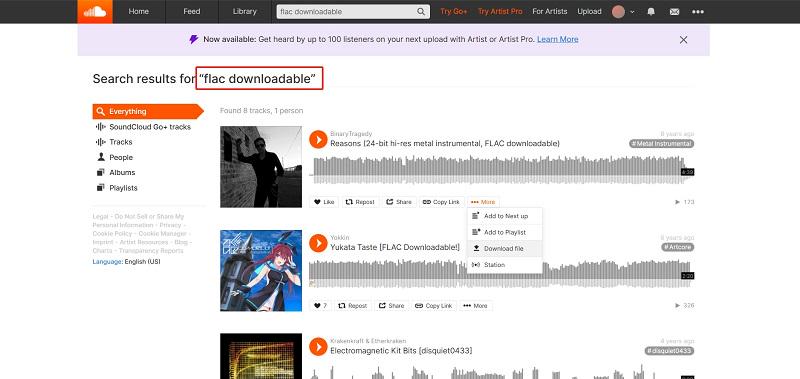
Directly downloading FLAC music from SoundCloud is indeed the most ideal way, but this method is limited by whether the uploader provides FLAC downloads. Moreover, it is not available on mobile devices and can not download entire playlists. If you wish to download music from SoundCloud to FLAC without restrictions, it is recommended to try other methods.
Way 4. Record SoundCloud Music to FLAC Manually
Instead of using a SoundCloud downloader for FLAC, an audio recorder like Audacity can serve as a viable solution to get high-quality music files on your computer. It can capture any SoundCloud music and save it in various formats, such as FLAC, MP3, AU, Ogg Vorbis, WAV, AIFF and so on. To get SoundCloud songs in FLAC format, follow the steps below.
Step 1. Run Audacity on your computer.
Step 2. Go to "Audio Setting" > "Host". Then, select "Windows WASAPI"/"Core Audio" to ensure a smooth SoundCloud to FLAC recording.
Step 3. Head to "Recording Device" to customize the input source. For better quality, make sure you have disabled the microphone source to avoid environmental noise.
Step 4. Click on the red "Record" button and play the target music on SoundCloud. Audacity will automatically capture the music track.
Step 5. When it ends, stop recording. Then, hit "File" > "Export Audio...". Here you can customize the file name, saving path, and audio options. Choose "FLAC Files" under the "Format" section. Finally, click "Export" to save SoundCloud music in FLAC format.
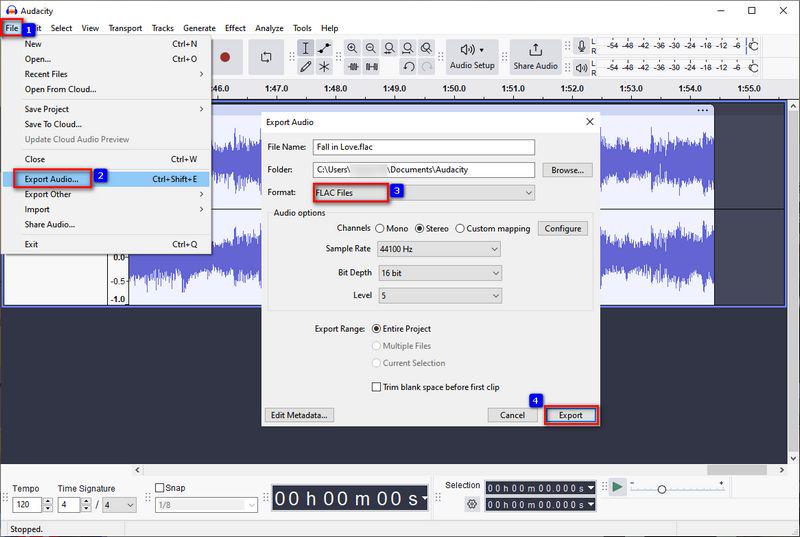
Audacity is an excellent option for recording specific portions of a music track from SoundCloud to FLAC, offering precise control and audio editing tools. But for downloading entire SoundCloud playlists in FLAC, you might need an alternative solution.
Quick Comparison of the 4 Methods
Each method has its pros and cons depending on your needs. To help you decide which one best fits your needs, here's a quick comparison table sketching out the key differences between four methods of downloading SoundCloud music to FLAC.
| Output Format | Batch Playlist Download | Ease of Use | Download Speed | ID3 Preservation Support | Ad-Free | Stability | Best For | |
| Way 1: Convert with TuneFab (Desktop) | FLAC, MP3, WAV, M4A, etc. | ✅ Yes | ⭐⭐⭐⭐⭐ | Fast (supports batch, 35x faster speed) | ✅ Yes | ✅ Yes | High | High-quality, stable and safe playlist downloading |
| Way 2: Use Online Tool 1 | FLAC, WAV, MP3 | ✅ Yes | ⭐⭐⭐⭐⭐ | Medium | ✅ Yes | ✅ Yes | Medium | People who don't want to install software and download a few songs |
| Way 2: Use Online Tool 2 | FLAC, MP3, WAV, M4A, etc. | ❌ No | ⭐⭐⭐ | Medium | ✅ Yes | ❌ No | Medium | People who want to download a few songs |
| Way 3: Download from SoundCloud Website | Original (if FLAC/WAV is provided by artist) | ❌ No | ⭐⭐ (Only works for tracks with download button) | Fast | ✅ If uploaded by artist | ✅ Yes | High | Downloading artist-approved tracks |
| Way 4: Record Music Manually | FLAC (depends on recording software settings) | ❌ No | ⭐⭐ (Manual setup required) | Slow (real-time recording) | ❌ No | ✅ Yes | Medium | Users needing downloading sound clips |
FAQs on SoundCloud to FLAC Downloads
Q1. Which Is Better, SoundCloud to MP3 or FLAC?
Both FLAC and MP3 are popular output formats when downloading songs from SoundCloud. Here is a quick comparison between them:
FLAC
MP3
Audio Quality
Lossless
Lossy Compression
File Size
Slower
Faster
Storage Requirement
Requires more storage space
Lower storage requirements
Compatibility
Supported by fewer devices and players, some may not support
Widely supported on almost all devices and players
For those who prioritize top-notch sound quality and have sufficient storage, FLAC is the way to go as it provides the closest listening experience to the original music track. On the other hand, if you focus more on saving space and ensuring compatibility across devices, or if pristine audio is not your top concern, MP3 is a solid option.
Q2. What Format Does SoundCloud Download?
SoundCloud supports a variety of audio formats, including FLAC, MP3, WAV, AIFF, and ALAC. The final output format of the files you download from the website will totally depend on the format in which they were uploaded. However, music streaming on the SoundCloud app is in AAC format, which is DRM-protected.
In Conclusion
In this article, we have introduced you to 4 effective ways to download SoundCloud to FLAC. Each option comes with its own set of advantages and limitations, so you can explore them to find the one that best suits your needs.
For a few downloads, online SoundCloud FLAC downloaders and screen recorders might suffice. However, if you are looking for a high-quality and convenient experience, using TuneFab SoundCloud Music Converter is undoubtedly the ideal choice. Not only does it support batch lossless downloads, but it is easy to use and guarantees perfect sound quality, making it the most trustworthy tool you can use. Download TuneFab and see what it can do.

