





 TuneFab Spotify Music Converter
 Free
Download
Free
Download Free
Download
Free
Download
 Free Download
 Free Download
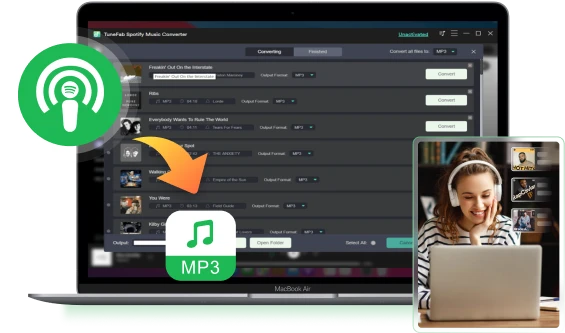
Best Spotify Podcast Downloader
- Download Spotify podcasts to MP3 for free
- Convert episodes all at once
- Obtain original sound quality
- No Spotify premium required


 38.1k views
 5 min read
How to Download Spotify Podcasts to MP3 for Free


With podcasts now spanning a wide range of interests, tuning in anytime, anywhere has become a daily ritual for many people. Spotify allows all its users to download podcasts without subscribing to the premium plans. However, these downloads are encrypted so that they can only be played on the Spotify app. The playback is somehow restricted if you want to put the podcasts to an MP3 player or burn the episodes to a CD. Worse, there are ads interrupting when you are losing yourself listening to the story if you are not a Premium user.
To help you out, this post will not only show you the guide on how to download Spotify podcasts on its official app, but also the way to download them as MP3 or MP4.
Key takeaway: The best Spotify podcast downloader - TuneFab Spotify Music Converter can help you download a one-hour episode in 2 minutes without quality loss. Try it free now!
Table of Contents
Why Do You Download Spotify Podcast to MP3?
Download Spotify Podcasts to MP3 via Best Spotify Podcast Downloader
Download Spotify Podcasts for Free on the Spotify App
How to Download Podcasts on Spotify on Phone?
How to Download Spotify Podcasts on Computer?
How to Download Spotify Video Podcasts on Spotify App [Mobile Only]
How to Download Podcasts from Spotify to MP3 or MP4 via Online Spotify Podcast Downloader
Why Do You Download Spotify Podcast to MP3?
You can easily download podcasts on the Spotify app and listen to them offline, but there are actually quite a few inconveniences with that. By downloading them as MP3s, you can enjoy numerous benefits, such as:
● Save Data Usage: Podcasts downloaded within the Spotify app may expire or be deleted upon logging out or uninstalling the software. In such cases, you'd need to re-download them if you want to replay them. Luckily, MP3 files are offline, allowing you to listen to downloaded episodes without consuming data, whether you're logged in to Spotify or not.
● Playback Freedom: Converting podcasts to MP3 format gives you the freedom to enjoy them ad-free, wherever and whenever you want, even offline. Plus, because they're in MP3 format, you can listen to them on any MP3-compatible player you prefer, not just on the Spotify app.
● Sharing Freedom: Because podcasts are downloaded as MP3s, you can easily share your favorite shows with friends and family via email, instant messaging, or social media, regardless of whether they have a Spotify account. Moreover, you have the flexibility to clip podcast lengths according to preference or import them into editing software when creating video content.
● Personal Collection: After downloading podcasts with a Spotify podcast downloader in the common MP3 format, you can freely store them on USB drives, cloud storage, external hard drives, or even burn them onto CDs for personal collection purposes.
How to Download Spotify Podcasts to MP3 via Best Spotify Podcast Downloader
Spotify has provided its official access to download Spotify podcasts. However, due to its DRM encryption, it won't be possible for you to take the podcast episodes to other devices without the Spotify app installed or play with other media players. Hence, if you desire a more limitation-free podcast playback offline, it is recommended to decrypt DRM from them and download Spotify podcasts to MP3. For such a purpose, TuneFab Spotify Music Converter is all you need.
TuneFab Spotify Music Converter empowers the powerful ability to rip music from Spotify, and also podcast content without hassle. It has enabled integration with the official Spotify web player, so that you are able to access all podcasts provided in Spotify's library and download Spotify to MP3, M4A, WAV, FLAC, AIFF, ALAC, AAC format in selectable audio quality. After that, you can transfer the DRM-free Spotify podcasts to all devices and play them offline without any limitations.
TuneFab Spotify Music Converter
- Convert Spotify podcasts to MP3, M4A, WAV, FLAC, AIFF, ALAC, AAC
- Download all episodes from a podcast at once
- Export any Spotify music, albums, or playlists for free
- Support output Spotify audio in original quality at 35X faster speed
- Preserve all ID3 tags and provide custom bitrate, sample rate
- Allows easy drag-and-drop download process via embedded Spotify web player
- Offer personal output presets for audio file title and folder archive
Now, let's check out how to download Spotify podcasts to MP3 with this tool. Below we will take the Windows version as an example. As the program interface and operation steps on Mac are very similar on Windows, you can also follow the tutorial below and process downloading Spotify episodes to MP3 without hassle:

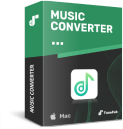
Step 1. Download TuneFab Spotify Music Converter and Run It
Download TuneFab Spotify Music Converter and then follow the instructions to get the whole converter fully installed on your computer or Mac. Launch the program when the installation process is over. From the welcome page, hit the "Open the Spotify web player" to access the official Spotify music library directly.
Step 2. Add Spotify Podcast to the Download List
When you log in to your Spotify on the podcast downloader, search and pick the podcast or episode that you want to download. Now, you can either drag the items to the "Add" button or directly click on the "Add" icon on the podcast's page. Then TuneFab Spotify Music Converter will automatically import all detected episodes from the podcast playlist to the conversion queue.
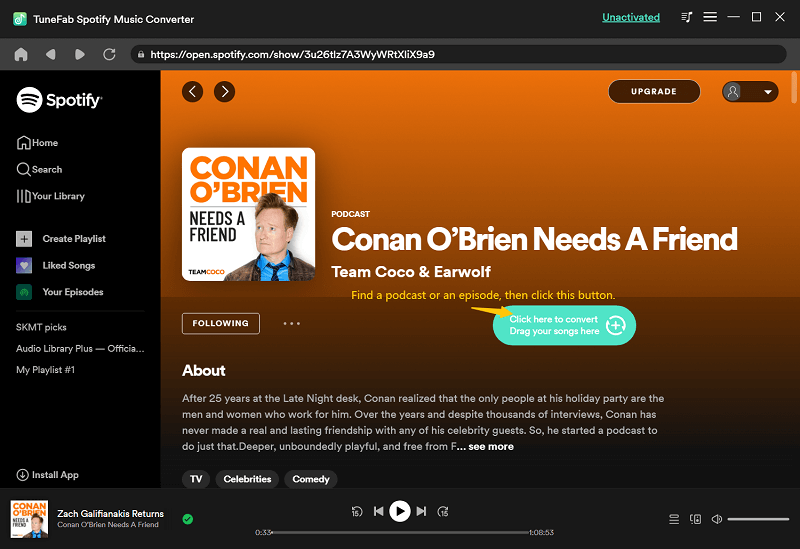
Step 3. Choose the Output File Format
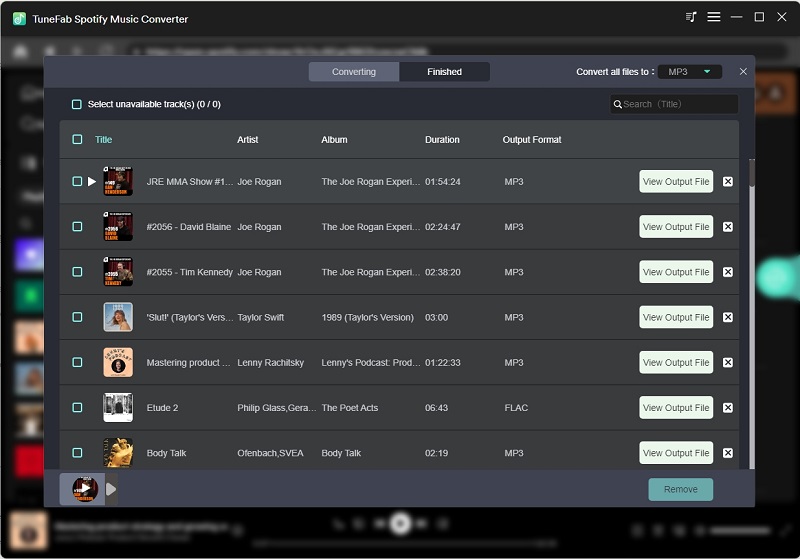
After adding podcasts, TuneFab will quickly analyze and provide the download and convert option for each episode of the podcast. Then you can choose a suitable output file format (MP3, WAV, M4A, FLAC, AIFF, ALAC). Here we recommend converting Spotify podcasts to MP3 because MP3 is fully compatible with many devices.
From the "Output" column on the bottom, you can change the output location for your converted podcasts if you don't want these podcast files to consume much space on your C drive.
Step 4. Download Spotify Podcast to MP3
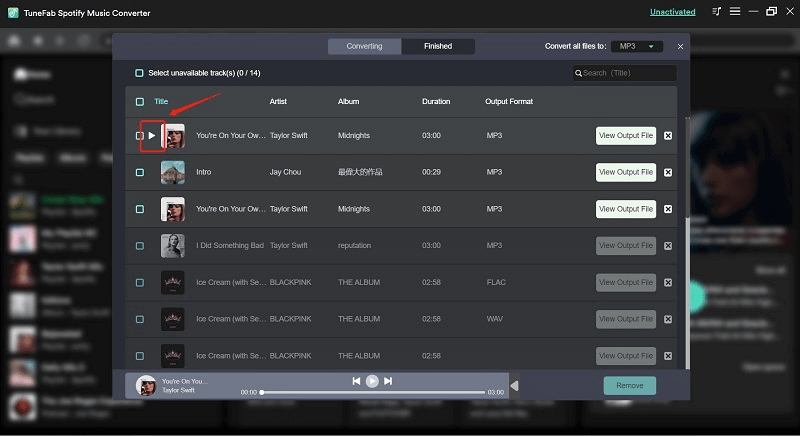
Just click to "Convert" and then you can download Spotify podcast to MP3 or other supported audio formats. When the whole conversion is over, you can enjoy podcasts on devices like your MP3 player and even burn a CD for these podcasts to have flexible offline playback.
Note: TuneFab recently launched TuneFab All-in-One Music Converter that can not only convert Spotify podcasts to MP3, but also performing music conversion for other platforms like Apple Music. If you are using multiple music services, don't miss it!
How to Download Spotify Podcasts for Free on the Spotify App
Downloading Spotify podcasts to MP3 or MP4 with a Spotify podcast downloader does help you enjoy Spotify podcasts flexibly. But it can be easy and convenient to download them directly on its official app. Luckily, Spotify has enabled the free podcast download feature for all users. Now, go through the guide below and grasp how to download Spotify podcasts officially within the Spotify app on your phone or computer.
How to Download Podcasts on Spotify on Phone?
Before getting started with the Spotify podcast download on your phone, make sure that you have installed the latest Spotify app. Then simply follow the steps below to start downloading podcasts in the Spotify app to enjoy offline.
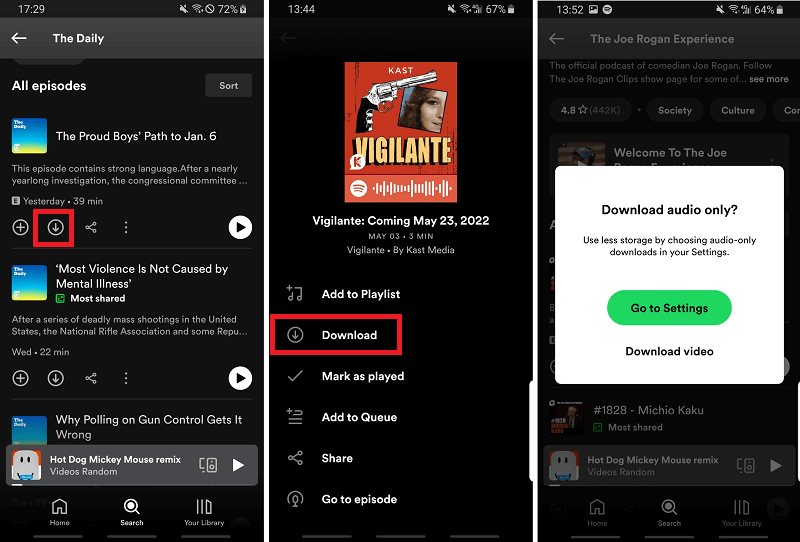
Step 1. On Spotify, find the podcast and click on "See All Episodes"
Step 2. Click on the "Download" button and it's done.
If you want to download a podcast with a video, Spotify will ask if you want to download video or download audio only. To download audio only for video podcasts, you need to turn on the feature via "Settings > Video Podcasts > Download audio only".
How to Download Spotify Podcasts on Computer?
Actually, downloading Spotify podcasts on the computer is quite similar to the steps on phone. There will be a download button for each episode. However, you can only download the audio of the podcast. Video downloading is currently not supported on the desktop app.
Note: The downloaded podcasts will be packaged in several .file folders on the Spotify app and they are still encrypted with protected DRM, so you can't copy or transfer them to other unauthorized devices or players, which means you can only enjoy them within the Spotify app. If you want to listen to them on other media players, you can use TuneFab Spotify Music Converter to convert podcasts from Spotify to MP3, then move them to the platforms you like.
Step 1.
Launch the Spotify app and log in to your account.
Step 2.
Navigate to the podcast you wish to download.
Step 3.
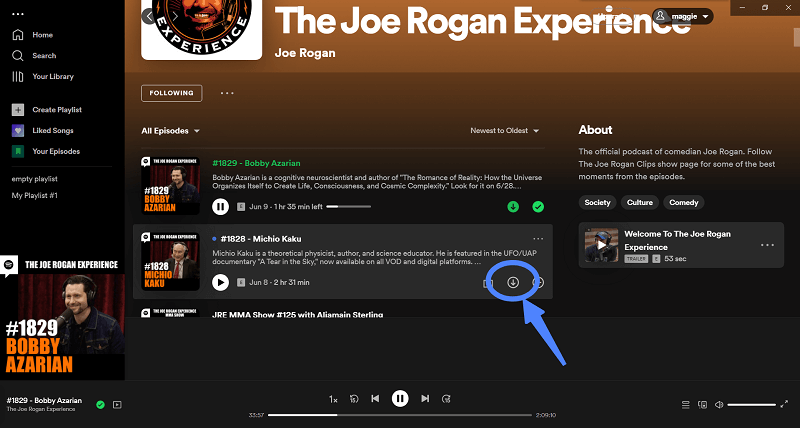
Move your mouse cursor over the episodes, and you will see the "Download" button for each. Click on it and you can download Spotify podcast episodes to PC right away.
How to Download Spotify Video Podcasts on Spotify App [Mobile Only]
Spotify has enabled the podcast video download feature for every user to process and enjoy them smoothly offline. However, you should note that this can only be processed within the Spotify mobile app. Now, grasp how it works:
Step 1.
Firstly, you need to open the Spotify app and then navigate to "Settings".
Step 2.
Scroll to "Video Podcasts" > "Download audio only" from the menu and disable it.
Step 3.
Now browse any video podcast you desire to enjoy offline. The download icon will automatically be provided and enable you to download Spotify podcast episodes as videos offline.
How to Download Podcasts from Spotify to MP3 or MP4 via Online Spotify Podcast Downloader
PasteDownload Spotify Podcast to MP3 Converter is an online video downloader that works to download videos and audio from Spotify podcasts. It supports multiple video sites, including Dailymotion, Vimeo, YouTube, Facebook, etc. in one place. With this podcast downloader, you can download Spotify podcasts to MP3, MP4 and so on. For details on how to download videos from Spotify podcasts, please follow these steps:
Step 1.
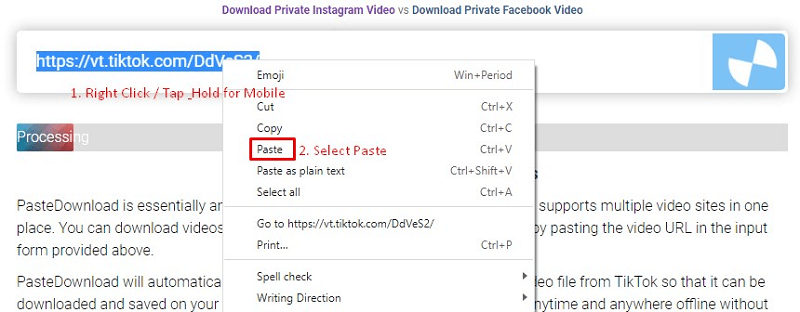
Copy the URL of the Spotify podcast video and paste it into the download form input.
Step 2.
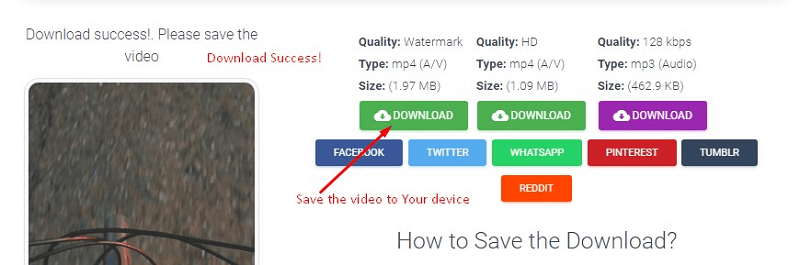
Click the download button, then PasteDownload will automatically extract video, audio, and photo files of your podcast.
Step 3.
Once it's done, the download button will be available along with full information about the size, quality, and resolution of the MP3 or MP4 file.
FAQs About Spotify Podcast Download
Where Are My Spotify Podcast Downloads?
On both your phone and your computer, you can find your podcast downloads via "Your Library > Your Episodes" on the Spotify app. If you download them on TuneFab Spotify Music Converter, they will be on the output folder you set on the app.
Will Podcasts Downloaded on the Spotify App Be MP3 Files?
No. They are in Ogg Vorbis format and are just available offline on the Spotify app. Actually, all downloads on the Spotify app are not and can not be converted to MP3 files directly because of DRM encryption. Instead, you will need software like TuneFab Spotify Music Converter to remove DRM and download Spotify podcast episodes to MP3 for you.
Conclusion
The best way to download Spotify Podcasts is by using the powerful TuneFab Spotify Music Converter. It can losslessly download Spotify podcasts to unprotected MP3 files at a 35X faster speed. This makes podcast burning or editing flexible and you can play the MP3 podcasts on many popular players for free. To download Spotify podcasts to MP4, you can use the online tool PasteDownload or the Chrome extension Video DownloadHelper. Try them and start your offline podcast journey now.
Was this information helpful?
Best Spotify Podcast Downloader
Convert, download any or all episodes of a Spotify podcast to MP3 for free.

 Free Download
 Free Download
Products
Popular
Newsletter Subscription


Copyright © 2022 TuneFab Software Inc. All rights reserved.


We use cookies to ensure that you get the best experience on our website. Clicking "Accept Cookies" means you agree with our Privacy Policy.