


"Can I remove copyright from MP3? When I go to properties, there is a copyright claim."
You may run into trouble when dealing with MP3 files carrying copyright information in their metadata. However, seeing a Copyright field in an MP3's properties does not necessarily mean the file has DRM or other technical protection. These files may fail to play on certain devices, trigger errors when uploading, or limit how you use and manage your music for personal listening.
That is where this guide comes in. We will walk you through how to remove or edit Copyright metadata from MP3 files using 6 tested methods and also explain what removing metadata can and cannot do. If your actual goal is to get local MP3 files for personal offline listening, we’ll also introduce an alternative for downloading music from supported streaming services. Scroll down to start exploring!
Important Note: Removing a Copyright tag does not remove copyright ownership, make a recording copyright-free, or grant permission to reuse or redistribute the music. All methods shared here are for personal use only. Please make sure you stay compliant with local copyright laws when handling media files.
- Can You Really Remove Copyright from an MP3?
- Which Method Should You Use?
- Method 1. Remove Copyright Tag from MP3 Using Windows File Properties
- Method 2. Strip Copyright from MP3 Songs Using VLC Media Player
- Method 3. Remove Copyright from MP3 Online
- Method 4. Remove Copyright Metadata from MP3 Files with Mp3tag
- Method 5. Remove All Metadata from an MP3 with FFmpeg
- Method 6. Remove Copyright from Audio Using Audacity
- How We Tested These MP3 Copyright Removal Methods
- What Removing Copyright Metadata Does and Doesn't Do
- What If You Need a Local MP3 for Offline Listening?
- FAQs About MP3 Copyright Removal
Can You Really Remove Copyright from an MP3?
Yes, but only if you mean removing copyright information from the MP3's metadata. An MP3 can contain ID3 tags such as the title, artist, album, publisher, comments, and Copyright field. These are file metadata, not the copyright protection of the music itself.
Copyright Metadata vs. Copyright Protection
Deleting the Copyright tag only removes that information from the file. It does not remove copyright ownership, make the song copyright-free, or remove DRM. You can have an MP3 with no Copyright field that is still copyrighted.
This is also why YouTube can still detect copyrighted music after you remove the Copyright tag: its audio recognition can analyze the actual audio content rather than relying on the metadata.
So, the methods below are useful for editing or cleaning MP3 metadata, not for changing the copyright status of the underlying music.
Which Method Should You Use?
The best method depends on whether you want to remove only the Copyright tag or clean up all MP3 metadata. Use the quick guide below to choose the option that fits your needs:
| What you want to do | Recommended method |
| Remove the Copyright field directly in Windows | Windows File Properties |
| Edit metadata without installing a dedicated tag editor | VLC Media Player |
| Remove only specific tags while keeping other metadata | Mp3tag |
| Remove all metadata without re-encoding the audio | FFmpeg |
| Edit metadata while editing and exporting audio | Audacity |
| Remove metadata without installing desktop software | Online Metadata Remover |
For most users who only want to remove the Copyright field, Windows File Properties, VLC, or Mp3tag should be enough. If you want to remove all embedded metadata while keeping the original audio stream unchanged, FFmpeg is the better choice.
Method 1. Remove Copyright Tag from MP3 Using Windows File Properties
If you are looking for the quickest way to remove the Copyright tag from an MP3, using the built-in Windows File Explorer is one of your go-to options. You can try to access and edit available audio metadata directly from the file's Properties window, without installing additional software.
Note. This method is only for removing the Copyright information stored in the MP3's metadata. It does not remove DRM or change the copyright status of the music..
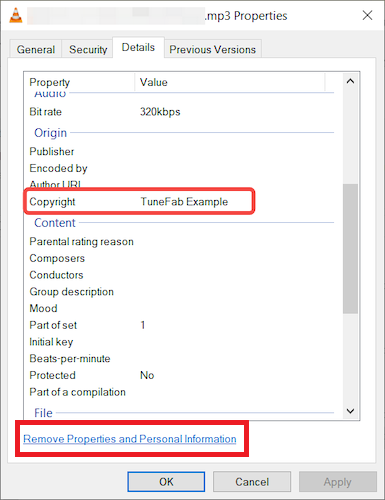
STEP 1. Right-click the MP3 file and select Properties from the list.
STEP 2. Move to the "Details" tab. Here you will see a list of metadata, including Title, Tags, Genre, Album, Copyright, and more.
STEP 3. Click the link at the bottom that says "Remove Properties and Personal Information".
STEP 4. When a pop-up appears, choose "Remove the following properties from this file" > "Copyright".
STEP 5. Click "OK" to save your changes. Then, reopen the MP3's Properties > Details tab and check whether the Copyright field has been cleared.
You May Like:
Chill Music for Studying, Relaxing & Everyday Listening
Relaxing Music:Playlists, Songs & Calming Sounds for Every Moment
Method 2. Strip Copyright from MP3 Songs Using VLC Media Player
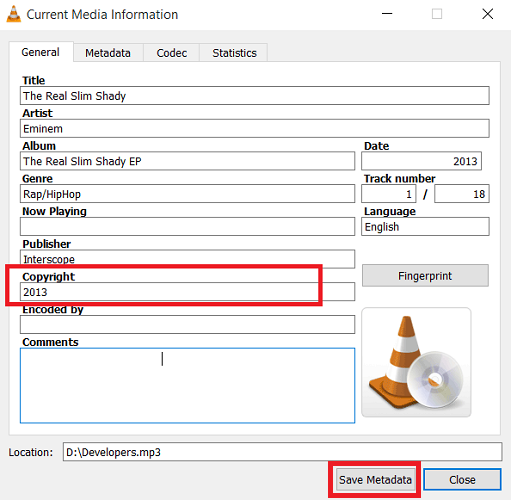
VLC is more than just a media player. It also lets you view and edit available MP3 metadata, including the title, artist, album, and Copyright information. By clearing the Copyright field and saving the metadata, you can remove the Copyright metadata from an MP3 file. Here is how to remove the Copyright tag from an MP3 using VLC:
STEP 1. Open VLC Media Player on your computer.
STEP 2. Drag and drop the MP3 file into VLC and start playing.
STEP 3. Go to "Tools" > "Media Information" to show all ID3 tags of your audio file.
STEP 4. Locate the Copyright field and clear its value. Then, click "Save Metadata" to save the changes to the MP3 file.
Method 3. Remove Copyright from MP3 Online
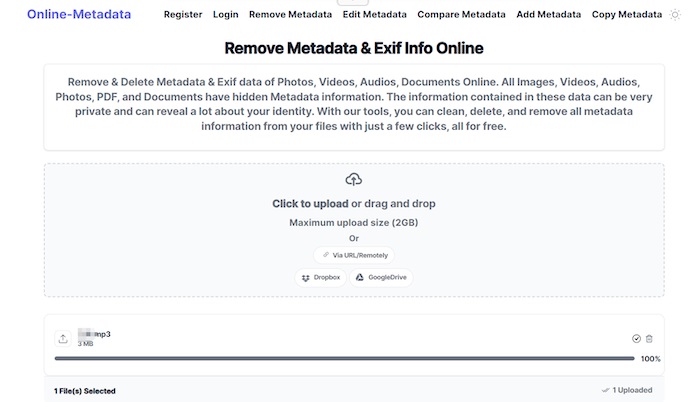
There are also many web-based tools that can help you remove copyright from MP3s online, without using extra extensions or desktop software. One reliable option is Online Metadata Remover. It supports uploading files up to 2GB and allows batch processing of up to 5 MP3 files at a time.
However, this online tool will delete all ID3 tags at once, so you will need to manually rename files or re-add ID3 information later. Below is a simple tutorial showing how to delete copyright information from MP3 files using this online tool.
STEP 1. Open a new tab in your browser and go directly to Online Metadata Remover. On the main interface of the tool, directly drop MP3 files to upload to the platform.
STEP 2. Once the MP3 files are uploaded, Online Metadata Remover will automatically process the files and remove all MP3 copyright metadata.
STEP 3. When the file processing performance ends, tap "Download" to save the copyright-free MP3 file offline.
Method 4. Remove Copyright Metadata from MP3 Files with Mp3tag
To remove copyright information from MP3 files, Mp3tag is a useful option when you want to edit a specific tag without wiping the rest of the file's metadata. This free, lightweight tag editor works on Windows and Mac, allowing you to locate and clear the Copyright field while keeping other metadata intact.
Unlike online metadata removers that may delete all embedded tags, Mp3tag lets you target the Copyright field specifically. This makes it a better choice when you want to preserve information such as the title, artist, album, and artwork.
Keep in mind that Mp3tag only edits copyright metadata stored in the file. It does not remove DRM, copyright ownership, or other restrictions on the underlying music. Now, follow the steps below to remove the Copyright tag from an MP3 file:
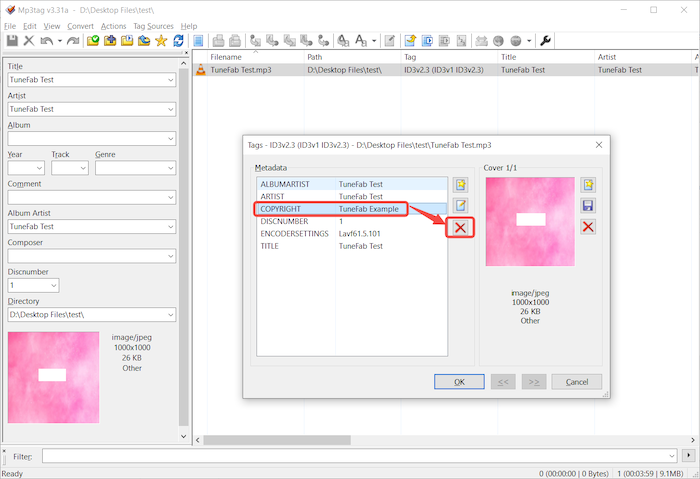
STEP 1. Firstly, install the software and launch it on your desktop. Simply drag the MP3 file you need to remove its copyright tags to the software's interface.
STEP 2. Use the quick shortcut "Alt + T" to open the tag editor. Then you are able to look for the "Copyright" metadata to locate the tag.
STEP 3. Select this "Copyright" field and tap the "Delete" icon, then confirm with OK. This will remove the copyright metadata from your MP3 file while keeping other metadata intact.
Method 5. Delete MP3 Copyright with FFmpeg
For advanced users, FFmpeg offers an efficient way to remove copyright from MP3 files via the command line. FFmpeg is a powerful open-source multimedia framework that can handle audio and video conversion and metadata management. By using the right command, you can strip copyright tags or remove all metadata from MP3 files.
While this method might hold a learning curve, you can still follow this step-by-step guide to delete copyright information from MP3 hassle-free.
STEP 1. Install FFmpeg and open Command Prompt (on Windows) or Terminal (on Mac/Linux) on your desktop.
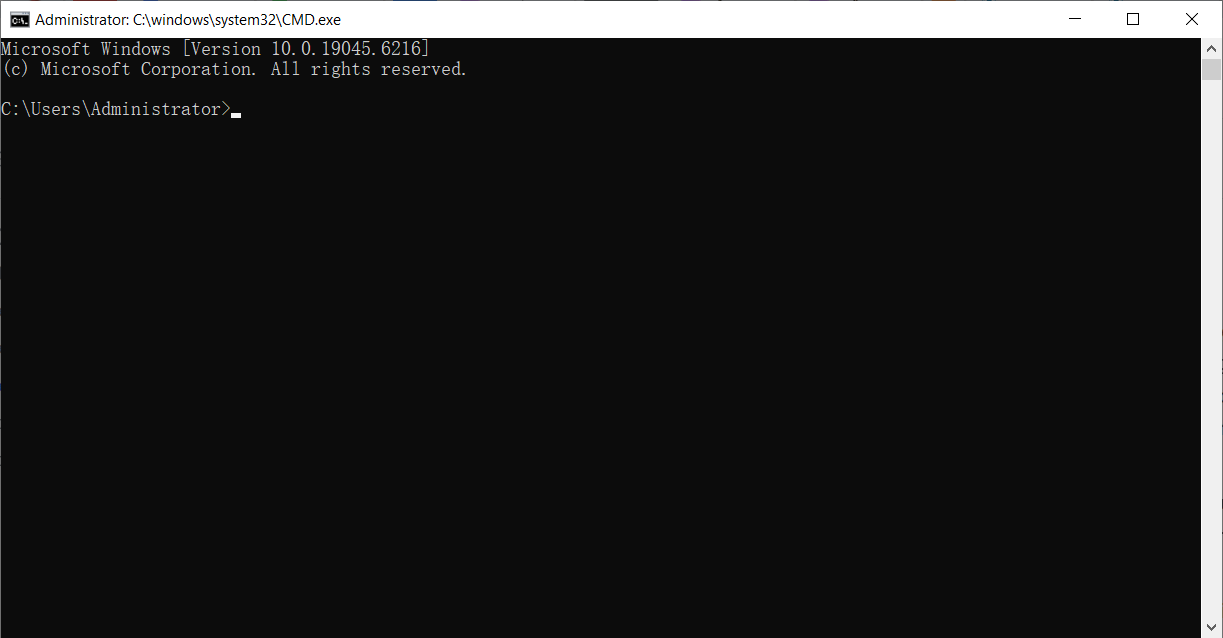
STEP 2. Navigate to the folder with the MP3 files you’d like to remove copyright protection from.
STEP 3. Run one of the following commands and replace input.mp3 with your actual MP3 file name:
- To remove only the copyright tag: ffmpeg -i input.mp3 -c copy -metadata copyright="" output.mp3
- To strip all metadata: ffmpeg -i input.mp3 -map_metadata -1 -c copy output.mp3
STEP 4. Press "Enter" on the keyboard to run the command. Just a moment, you can get the copyright-free MP3 file!
Method 6. Remove Copyright from Audio Using Audacity
If you need a free tool to remove copyright from MP3s while making basic audio adjustments in one go, Audacity is an ideal choice. It lets you edit metadata through its built-in Metadata Tags Editor when exporting audio. However, it is better suited to users who already need to edit and re-export an audio file, rather than those who only want to remove a Copyright tag.
Keep in mind that exporting an MP3 in Audacity may involve re-encoding, so it is not the ideal choice when you only want to remove metadata without changing the audio. Detailed steps are as follows.
STEP 1. Open Audacity on your Windows, Mac, or Linux, then drag and drop your MP3 file into the workspace.
STEP 2. (Optional) Edit your audio file, like trimming or noise reduction.
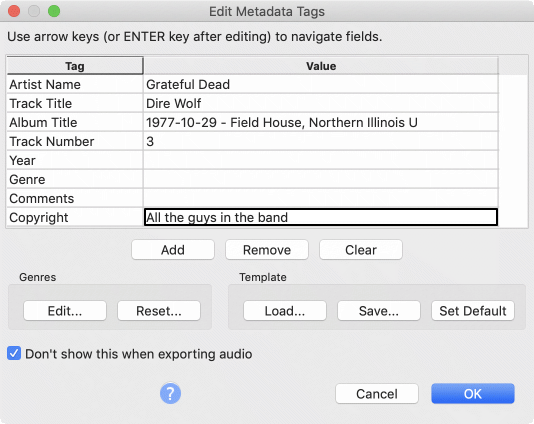
STEP 3. Go to "File" > "Export" > "Export as MP3" to open its built-in Metadata Tags Editor.
STEP 4. In the Metadata Tags Editor, clear the Copyright information or other metadata fields you want to remove, then click OK to continue exporting.
STEP 5. After exporting, check the MP3 file's metadata in Windows, Mac, or a tag editor to confirm that the Copyright field has been removed.
How We Tested These MP3 Copyright Removal Methods
To make the comparison more practical, we tested each method with the same MP3 sample and compared its metadata before and after processing. We focused on whether the Copyright field could be removed, whether other metadata was preserved, and whether the audio properties changed.
Test Content
We used the same MP3 sample for each method and recorded its metadata before and after processing. The checks included:
| Check | Before | After |
| Copyright tag | Present | Removed / unchanged |
| Artist | Present | Preserved / removed |
| Album | Present | Preserved / removed |
| Artwork | Present | Preserved / removed |
| Codec | MP3 | MP3 |
| Bitrate | Measured value | Measured value |
| Sample rate | Measured value | Measured value |
| File size | Measured value | Measured value |
| Audio duration | Measured value | Unchanged / changed |
What We Found
Rather than simply marking every method as successful, we compared what each method actually removed and what it preserved:
- Windows File Properties: Copyright field removable when exposed by Windows.
- VLC: Copyright field editable and saved through Media Information.
- Online Metadata Remover: Removes the Copyright field along with other embedded metadata.
- Mp3tag: Removes the specific Copyright tag while preserving other metadata.
- FFmpeg: Removes all metadata while copying the original audio stream without re-encoding.
- Audacity: Removes metadata during MP3 export, but the export workflow may re-encode the audio.
What Removing Copyright Metadata Does—and Doesn't Do
Removing the Copyright field from an MP3 can help clean up the information embedded in the file, but it does not change the copyright status of the underlying audio. Understanding this distinction is important before using any of the methods above.
What It Can Do
Removing or editing MP3 metadata can:
- Remove the visible Copyright metadata field from the file.
- Clean up ID3 tags and other embedded metadata.
- Remove unwanted metadata before sharing or organizing an audio file.
- Help keep personal audio files organized by controlling which metadata is stored in them.
The exact result depends on the tool you use. Some methods remove only the Copyright field, while others can remove all embedded metadata.
What It Cannot Do
Removing copyright metadata does not:
- Remove copyright ownership from the music.
- Turn copyrighted music into public-domain music.
- Make a copyrighted song royalty-free or grant you a license to use it.
- Remove DRM or other technical restrictions.
- Bypass YouTube Content ID or similar audio-recognition systems.
In short, removing a Copyright tag changes the file's metadata, not the legal status or underlying content of the recording.
What If You Need a Local MP3 for Offline Listening?
If your goal is simply to obtain local MP3 files for personal offline listening, tools such as TuneFab All-in-One Music Converter may be relevant for supported music services. However, converting a track to MP3 does not change its copyright status or grant additional rights to reuse or redistribute the recording.
TuneFab All-in-One Music Converter supports several popular music services and provides options for exporting music as local audio files. Its features include:
- Support for multiple music streaming services
- MP3 and other audio format export
- Adjustable bitrate and sample rate options
- Built-in ID3 tag editing
- Batch conversion for multiple songs or playlist
Below is how to use TuneFab to save supported music as local MP3 files for offline listening.
STEP 1. Launch TuneFab All-in-One Music Converter on your PC or Mac. From the main interface, select a supported music service, such as Spotify, to get started.
STEP 2. Log in to the built-in Spotify web player. Browse the music library as usual to access the songs, playlists, albums, or artists you want to download as copyright-free local files. Click the "Add to Convert" button to move on.
STEP 3. In the pop-up window, set the output format to MP3. You can also adjust the bitrate and sample rate for an optimal offline listening experience.
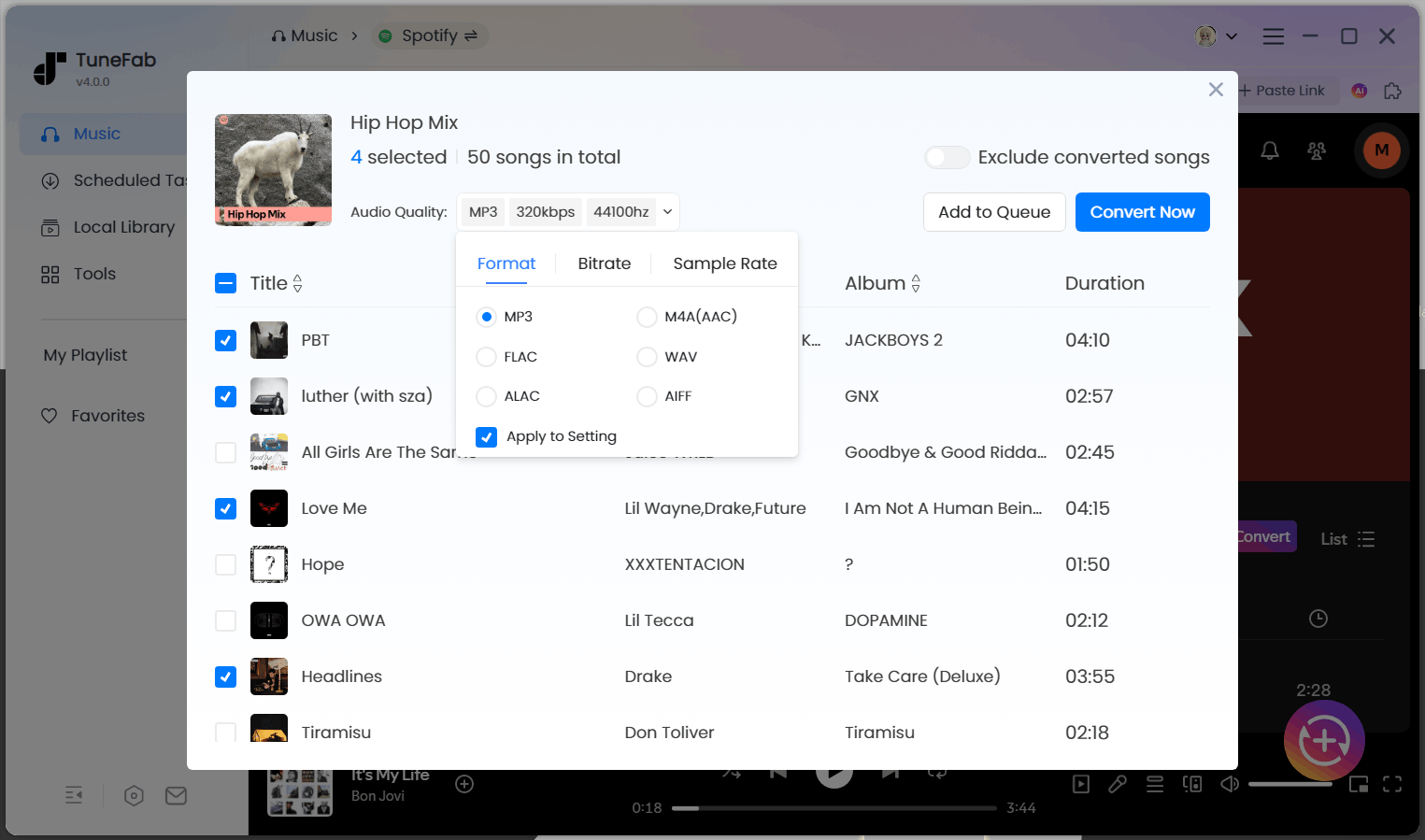
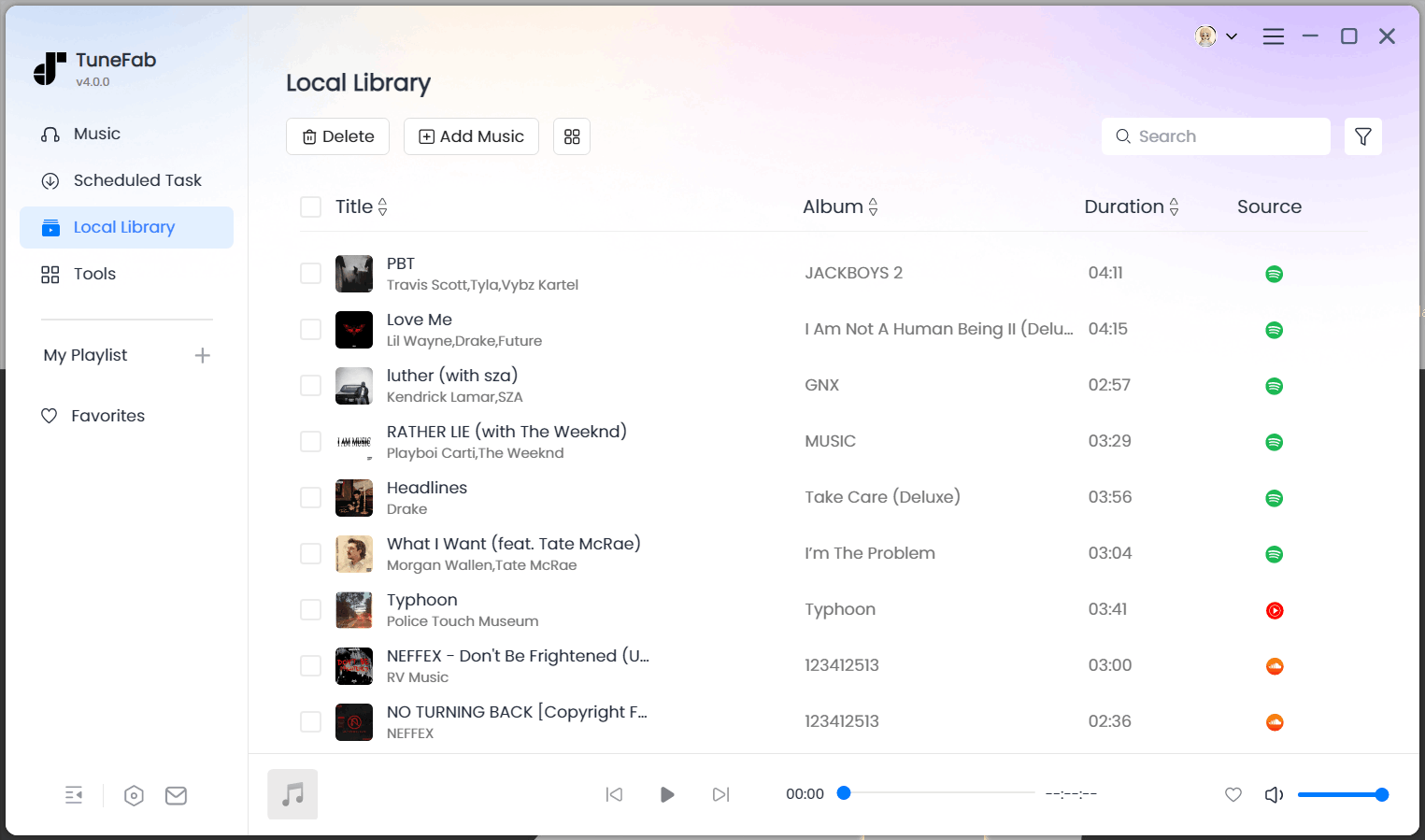
STEP 4. Click "Convert Now" to start the conversion. Once finished, the selected tracks will be saved as local MP3 files for supported offline playback and personal file management. You can also edit their metadata using TuneFab's built-in ID3 tag editor if needed.
Important: The resulting MP3 file is still subject to the copyright and licensing terms that apply to the original recording. Saving a local copy does not make the music copyright-free or grant permission to use or redistribute it in other projects.
Further Readings:
FAQs About MP3 Copyright Removal
Does removing copyright metadata mean removing DRM protection?
No. An audio copyright remover only deletes text-based ID3 tags from file properties, meaning it will not convert copyrighted music to non-copyright local files.
If you need fully playable, unprotected MP3 files for offline use, TuneFab All-in-one Music Converter might be the one you need.
Can I Check Whether an MP3 Contains Copyright Metadata?
Yes. You can inspect its metadata using Windows File Properties, VLC, Mp3tag, or a metadata inspection tool. However, seeing no Copyright tag does not prove that the underlying recording is free of copyright restrictions.
Where Can I Get an MP3 I Can Legally Use in a Project?
If you need an MP3 for a YouTube video, podcast, presentation, game, or commercial project, removing the Copyright tag is not enough. What matters is whether you have the appropriate rights or license to use the recording.
You can look for music that is:
- Properly licensed for your intended use
- Royalty-free under terms that cover your specific use
- Public-domain
- Available from licensed music libraries such as YouTube Audio Library, Pixabay Music, or Free Music Archive
- Purchased with a license that permits your intended use
Keep in mind that "royalty-free" does not mean "copyright-free." Always check the license terms for requirements such as attribution, commercial use, and modification.
Conclusion
If you see a Copyright field in your MP3's properties, you are most likely dealing with metadata rather than a technical copyright lock.
Windows File Properties, VLC, and Mp3tag are suitable when you only need to edit a specific tag. FFmpeg is better when you want to strip all metadata without re-encoding, while Audacity makes more sense when you are already editing and exporting audio.
Most importantly, removing metadata does not change the copyright status of the underlying recording. If you need music for a project, use audio that you have permission or an appropriate license to use.
For personal offline listening, a local music conversion workflow via TuneFab All-in-One Music Converter may be useful, but converting music to MP3 does not grant additional usage rights.

