


TL;DR:
1. To listen to SoundCloud offline officially, you need a SoundCloud Go/Go+ subscription. This feature is only available on Android/iOS.
2. To listen to SoundCloud songs offline without SoundCloud Go or on other devices, you'll need to use a 3rd-party tool like TuneFab SoundCloud Music Converter to download songs to a common audio format first.
100% Secure
100% Secure
Providing over 320 million tracks, including some self-created ones by individuals, SoundCloud is rising as one of the best music streaming platforms to discover more resources to enjoy. However, good internet connections aren’t always available, so downloading songs in advance for offline listening is something many people need.
This article will walk you through the official way to listen offline, as well as how to use third-party tools to download songs for more flexible offline listening on SoundCloud. Now, scroll down to find out how!
1. Subscribe to SoundCloud GO+ to Listen to SoundCloud Offline
To download music from SoundCloud, a direct method to do it is by subscribing to SoundCloud’s official service, SoundCloud Go/Go+ to access the official download function on the SoundCloud app. Currently, the app is compatible with:
- iOS 16.4 or later (does not support beta operating systems)
- Android 8 (Oreo) or later
If your device meets the installation requirements, you can download songs for offline listening through the SoundCloud app once you’ve subscribed, directly from your phone’s app store.
Note: It is noted that you can also download SoundCloud songs on the official website on a PC if the uploader enables the download feature. This doesn't require SoundCloud Go+ subscription, but not all songs are downloadable.
Download and Listen to Playlist Offline
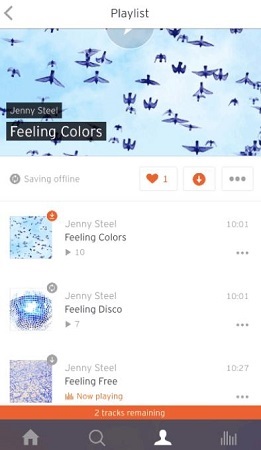
Step 1. Find the playlist you want to listen to and open it.
Step 2. You’ll see a download icon, a downward arrow, next to the Like button. Tap it to start downloading.
Step 3. SoundCloud will save all the songs in that playlist to your device, and you can listen to them without an internet connection.
Download and Listen to Liked Tracks Offline
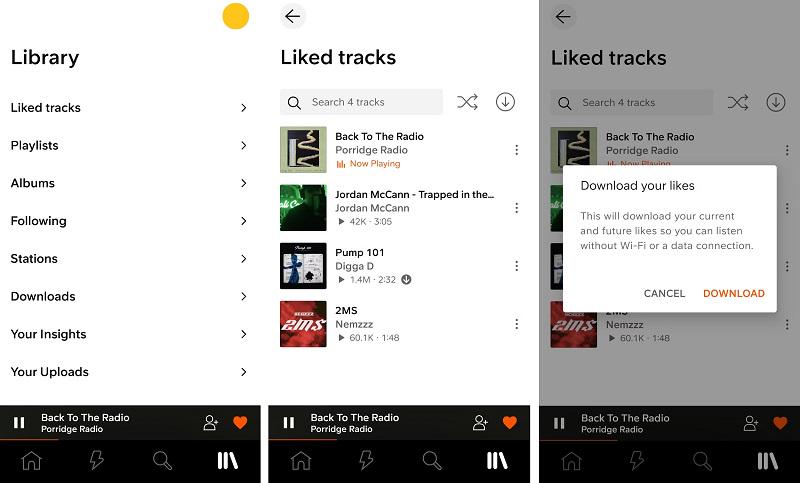
Step 1. Go to SoundCloud and sign in to your account with the SoundCloud GO+ service activated.
Step 2. Then directly open the "Liked tracks" section.
Step 3. Tap on the download button next to the shuffle button. When the download is done, you can listen to them offline easily.
Tips for SoundCloud Offline Listening
SoundCloud Auto-Download
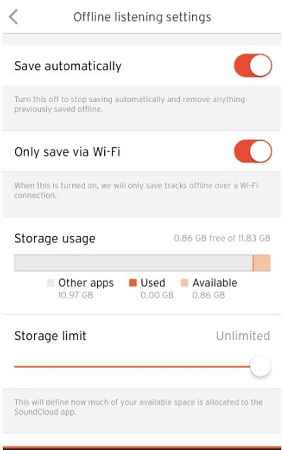
In the Offline Listening settings, there’s an option called Save automatically. If you have lots of playlists and liked tracks, turn this on to have SoundCloud automatically download all the songs in your library.
Remove Downloaded Songs
If you want to delete downloaded tracks: Go to your Liked tracks or Playlists section > Tap the download arrow next to a playlist or song. When the download icon turns gray, the track or playlist has been successfully removed.
If you’re worried about auto-downloading taking up too much space, you can also set a storage limit in Offline Listening settings to control how much memory SoundCloud uses for automatic downloads.
Only Save via Wi-Fi
To avoid using mobile data when downloading: Offline Listening settings > enable Download on Wi-Fi Only.
2. Download SoundCloud to MP3 for Offline Listening Effortlessly
Instead of subscribing to SoundCloud GO+, another more flexible method to let you listen to SoundCloud offline everywhere can be downloading SoundCloud to MP3 with a professional SoundCloud downloader, TuneFab SoundCloud Music Converter.
It is equipped with a built-in SoundCloud web player to let you search for your favorite songs, artists, playlists, and albums to download directly, keeping the lossless SoundCloud effect to save the music downloads as common audio files of popular formats such as WAV, FLAC, MP3, M4A, and so on.
The downloaded SoundCloud music can be transferred to any device, and then streamed with all media players without worrying about format incompatibility. With the help of TuneFab SoundCloud Music Converter, you can listen to SoundCloud offline more flexibly without any limitations!
Key Features:
- Provides embedded SoundCloud web player to find all resources to download easily
- Doesn’t require a SoundCloud Go or GO+ subscription and downloads songs on Windows/Mac
- Saves SoundCloud downloads in common formats such as WAV, FLAC, and MP3 up to the best quality at 320Kbps
- Keeps ID3 information to make your offline music management convenient and easy enough
- Supports downloading SoundCloud playlists in batches more efficiently
TuneFab SoundCloud Music Converter also ensures the simplest operations to download SoundCloud songs for listening offline efficiently. Now, you can check the tutorial below and follow it to save your favorite songs from SoundCloud with very easy clicks:
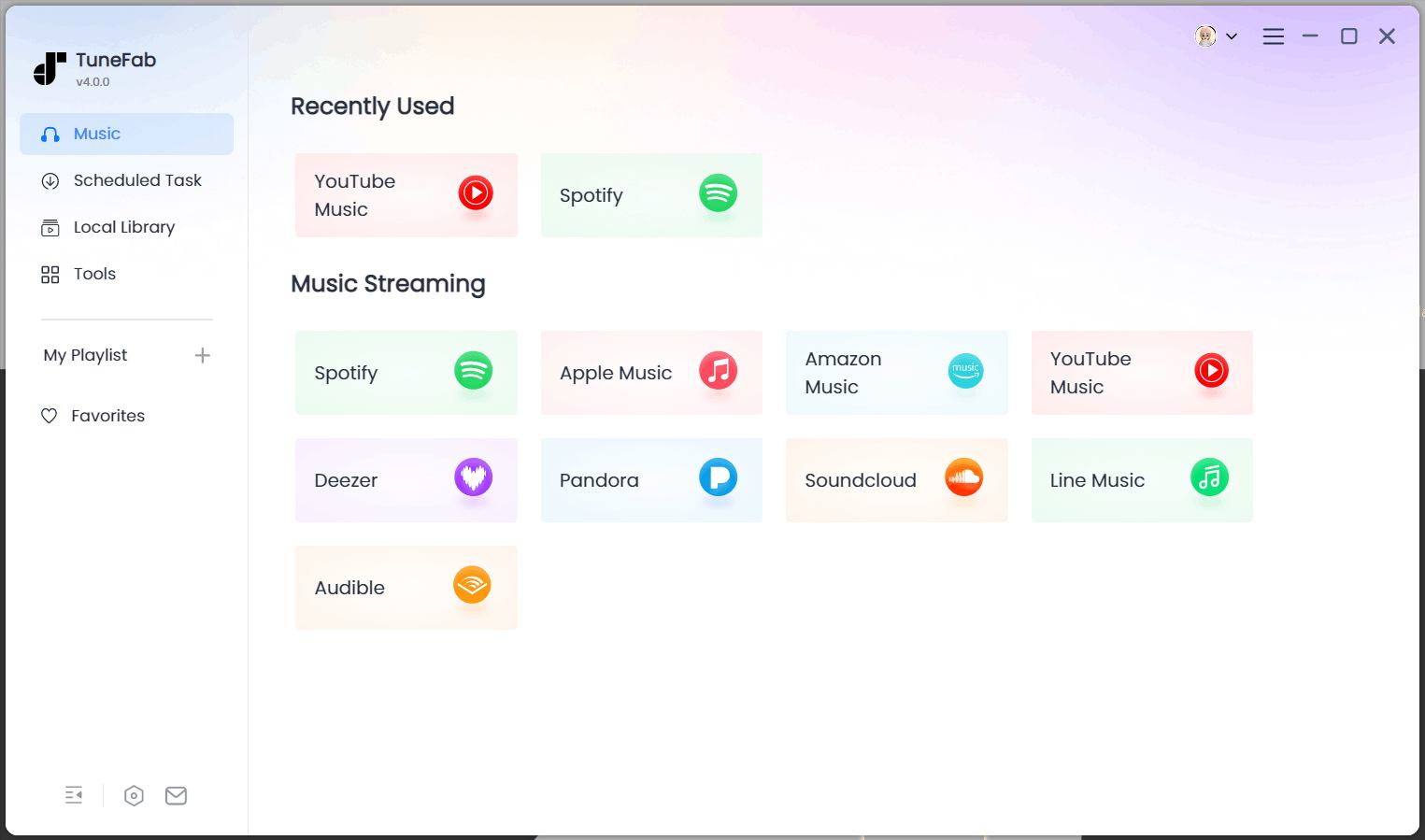
Step 1. Open TuneFab SoundCloud Music Converter on your computer. On the Home Screen, choose "SoundCloud" to sign in to your account first.
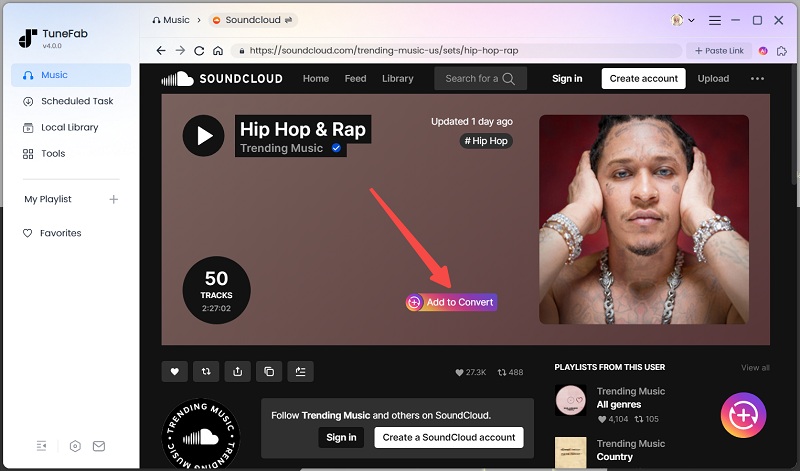
Step 2. Then in the web player, directly search for the songs, playlists, or artists you want to download. Tap the "Add to the conversion list" buttons on their covers or directly drag them to the converting window on the right side.
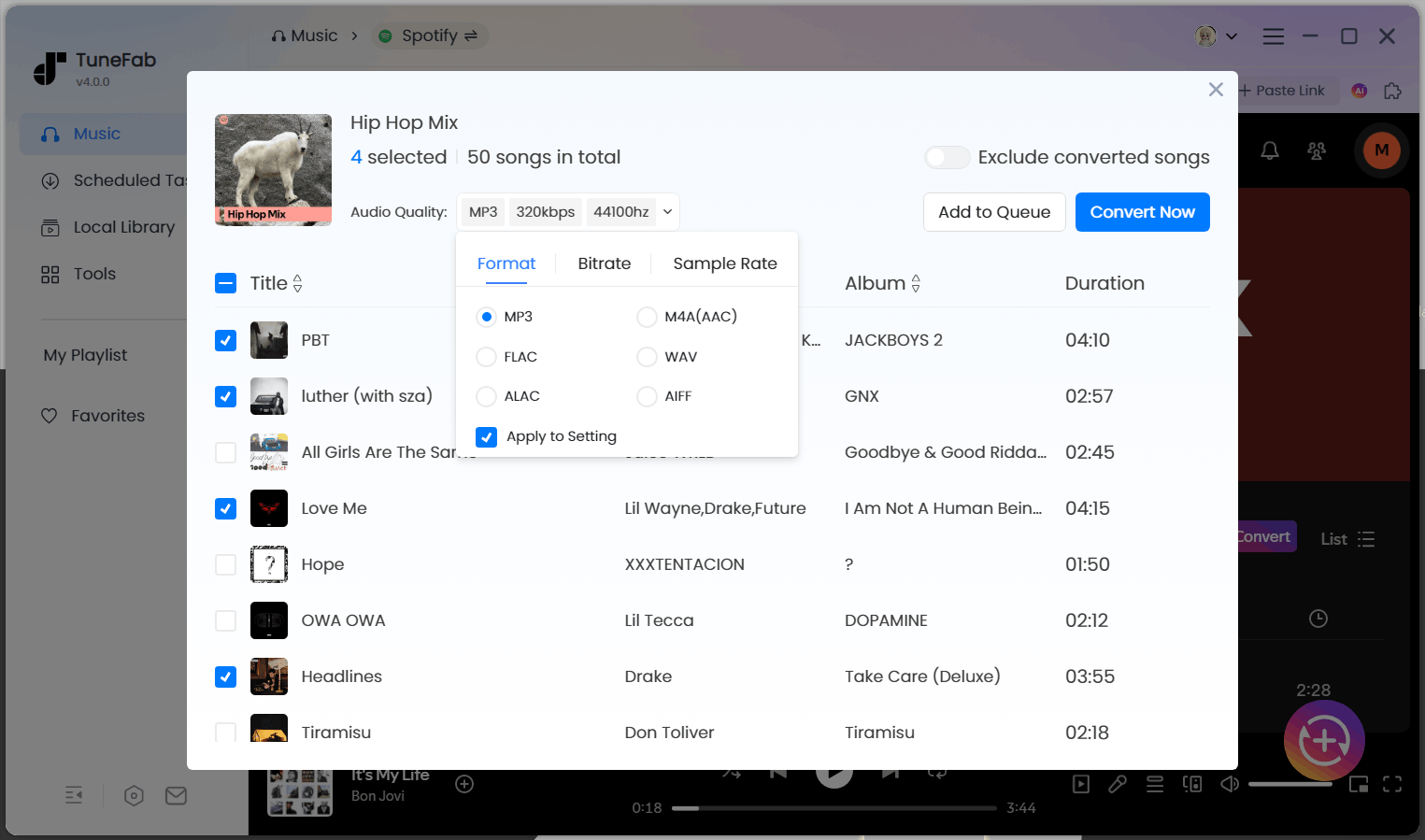
Step 3. Now, move to the "Converting" window to further adjust the output format and quality. You can choose MP3 as it is the most widely supported one on almost all devices and media players.
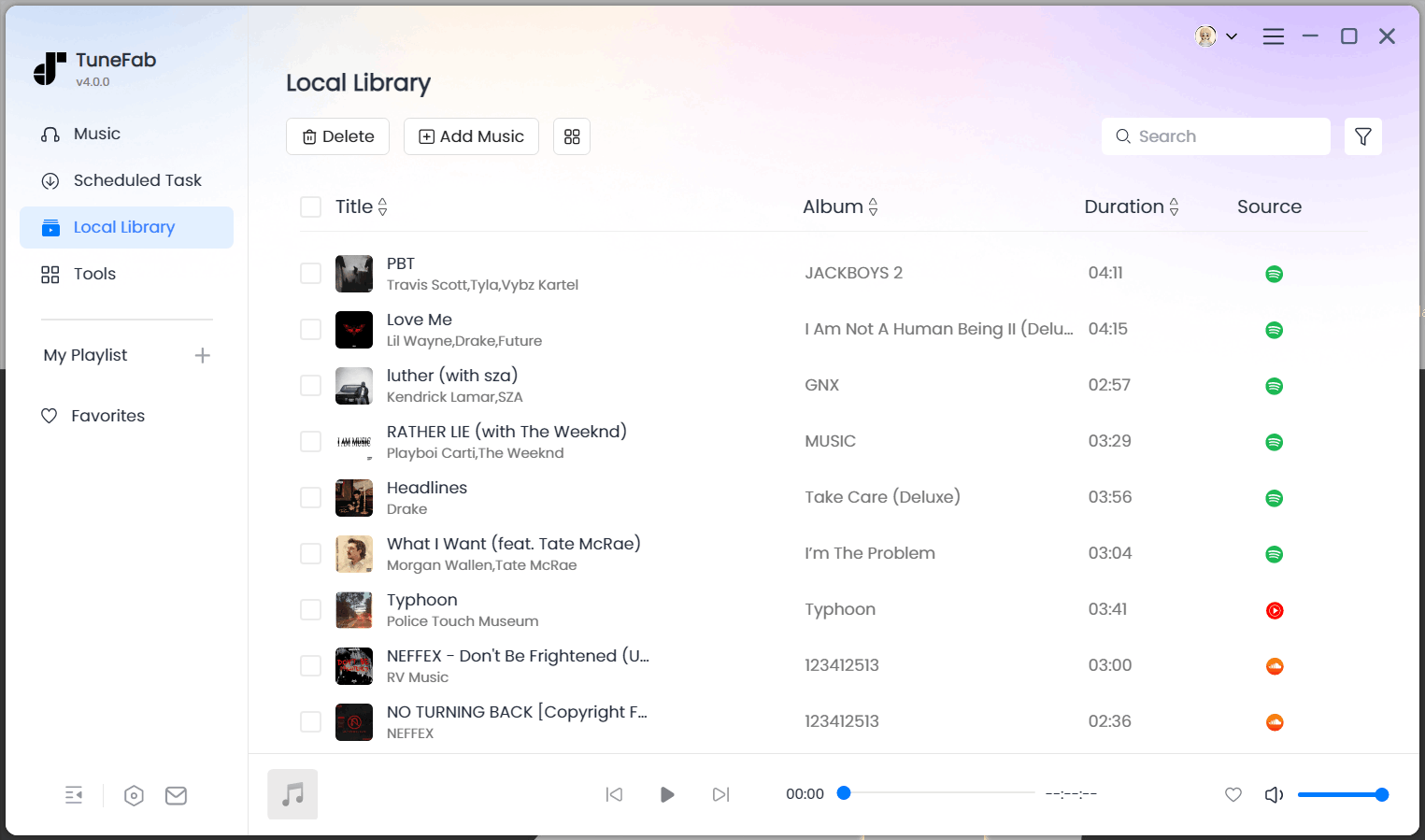
Step 4. Finally, just press the "Convert All" button and the software will start saving the SoundCloud playlist offline. Once finish, you can listen to SoundCloud offline without opening the SoundCloud platform at all!
3. Use Online Tool to Download and Listen to SoundCloud Offline
Besides installing the software, there are also many helpful online tools providing quick help to download SoundCloud songs for listening offline on all devices more conveniently, and Scloud Downloader is one of the options you can trust.
This online service is well compatible with all web browsers. No matter you are using a mobile phone or a computer, only by using a web browser to open Scloud Downloader, you can process the SoundCloud music download directly. It will help download SoundCloud to MP3 with just one click. However, keep in mind that it only supports downloading individual songs at 128kbps in MP3 format.
In the following, see the operating steps to try downloading songs from SoundCloud immediately:
Step 1. Firstly, go to SoundCloud and copy the link of the song you want to download offline.

Step 2. Open the web browser and directly go to Scloud Downloader. Then, paste the link of the song into the search bar and tap the "Download MP3 Track" to convert it immediately.
Step 3. When the conversion finishes, you will get the converted MP3 file. Simply tap the "Download" button and you can download and listen to SoundCloud offline with any installed media player!
FAQs About SoundCloud Offline Listening
Q1: Can I listen to SoundCloud on a plane?
Yes, you can. If you've downloaded the tracks beforehand using SoundCloud's offline listening feature (available with a paid subscription). Once your music is saved offline, you can enjoy it without needing Wi-Fi or mobile data, even while flying.
Q2: How to listen to SoundCloud offline for free?
Free users can't officially use the offline download feature within the SoundCloud app. However, some artists allow individual tracks to be downloaded directly, you can download them on the SoundCloud website. Alternatively, there are third-party tools that let you download songs as MP3s, but be sure to check local laws and SoundCloud’s terms of use before using them.
Q3: Why is my SoundCloud offline listening not working?
You can refer to the steps below based on your specific situation.
1. Recently Added Tracks Aren’t Showing Offline
If newly added likes or playlists aren’t appearing offline, check your Offline Listening settings.
- Make sure “Only save via Wi‑Fi” is turned off if you're not on a Wi-Fi connection. Otherwise, downloads won’t start over cellular data.
- Toggle the setting or switch to Wi-Fi, then retry.
2. Downloads Disappeared or Offline Content Lost
Offline files are stored in-app. If you sign out or reinstall the app, you'll likely lose previously downloaded songs.
- Simply sign back in or redownload your library after reinstalling the app.
- If a subscription has expired, offline content may be removed automatically.
3. Playlists or Tracks Won’t Download or Play
- Some tracks are disabled for offline listening by the artist, even with a SoundCloud Go subscription.
- Disable/delete the downloads for this playlist, restart the app, and try again.
- Enable “Download automatically” in settings.
4. General App Issues
- Restarting the app can fix glitches or stuck downloads—close the app completely, then re-open it.
- Refresh your library or playlist view by pulling down to update content.
In Conclusion
Whether you're wondering how to listen to SoundCloud offline or searching for a way to enjoy your playlists without relying on Wi-Fi or mobile data, this guide has you covered. If you're an Android or iPhone user with a SoundCloud Go+ subscription, the official offline listening feature is the easiest way to stream music on the go, even on a plane.
For those looking for additional perks or are unsubbed, something like TuneFab SoundCloud Music Converter serves best. Download songs, playlists, or albums in MP3 and other formats and keep them offline forever.
Whatever method you employ, the moment you go offline because of internet failure, you'll never face the problem of stuck music again. Give one a try! Enjoy your own SoundCloud offline.

